 By
Quick answer: What should I do after my Product Hunt launch?
- Days 1–3: keep replying; people find launches for days.
- Week 1: email every sign-up and commenter personally; thank supporters publicly.
- Week 1: measure against the goals you set before launch.
- Week 2: ship the top feedback and tell the people who asked.
- Weeks 2–4: reviews, a second launch site, a permanent page.
- Later: relaunch on Product Hunt with your next major update.
Key takeaways
- Product Hunt says people keep finding launches for days; keep replying like it's launch day.
- Personal follow-up turns curious visitors into users and some users into customers.
- Judge the launch by your own goals, not rank; Product Hunt calls '#1 or nothing' a myth.
- Shipping feedback quickly, and saying so, builds goodwill for the next launch.
- A permanent page and a second launch keep the momentum after the spike fades.
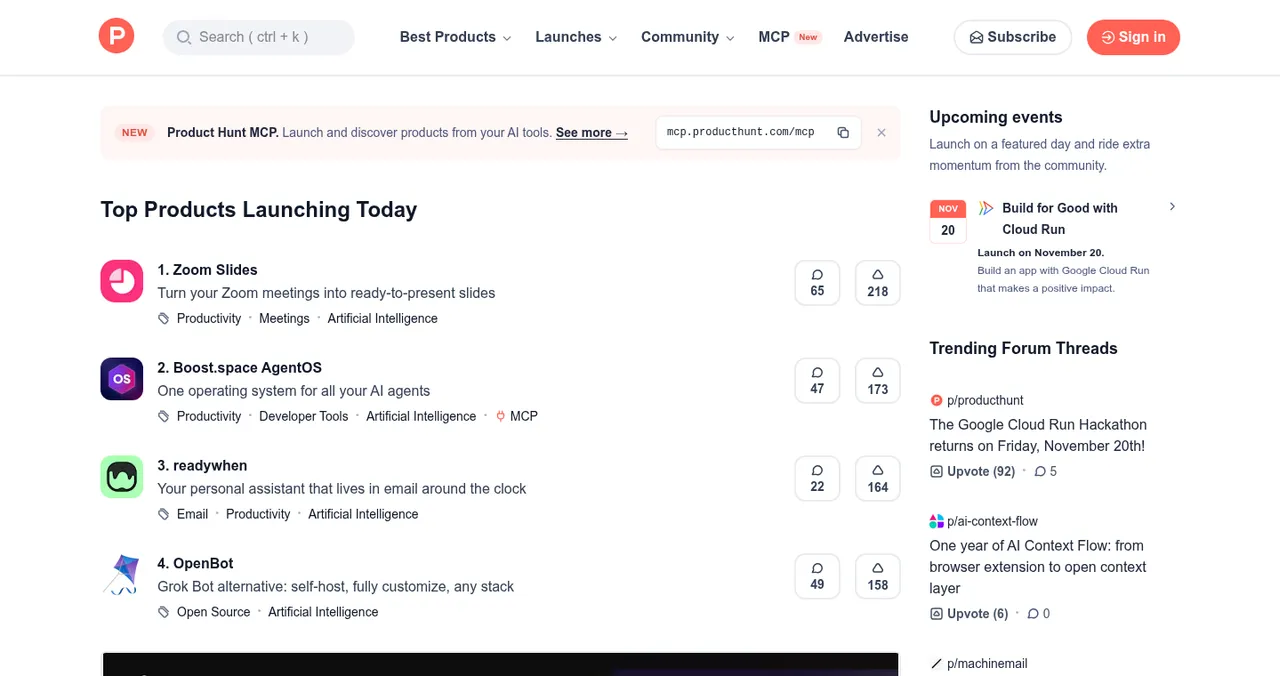
Midnight Pacific comes, the leaderboard resets, and the launch that consumed your week is yesterday's news. What you do in the next 30 days decides whether it was a spike or a start. Product Hunt's own guide spends as much time on "after" as on "during", and for good reason: people keep finding launches for days, and the follow-up is where users become customers. This plan follows that guide, read on 17 November 2026. Jump to the first three days, week one or the rest of the month.
A 30-day plan after Product Hunt
- Days 1–3
Keep the conversation going
Reply to new comments as fast as on launch day; people keep finding launches for days.
- Week 1
Follow up and thank
Email every new user, prospect and partner who engaged; thank supporters publicly; remind them of your offer.
- Week 1
Measure
Compare results with the goals you set: sign-ups, feedback, traffic, conversations. Write down what worked.
- Week 2
Ship feedback
Pull the best ideas from comments, ship the top one, and tell the people who suggested it.
- Weeks 2–4
Build what lasts
Reviews on your Product Page, a permanent profile, a second launch site, a Forums update.
- Later
Relaunch
Every major update is a reason to launch again; under two months needs a relaunch request.
Days 1–3: keep replying
Product Hunt is explicit: "People keep finding your launch for days afterward. Keep replying to comments the same way you did on launch day." Late commenters are often the most considered ones.
Week 1: follow up, thank, measure

- Email every sign-up personally — ask what they hoped to do and where they got stuck
- Message every thoughtful commenter — continue the conversation
- Follow up with prospects and partners — the business conversations launch day started
- Thank supporters publicly — share results honestly
- Add your badge — if you won an award, Product Hunt emails one for your site
- Measure against your goals — not rank
Week 2: turn feedback into updates

- Read every comment and tag each as bug, confusion, feature request or praise.
- Look for patterns — three people stuck on the same step is your next fix.
- Ship the top fix within a week.
- Close the loop — reply to the people who raised it.
Weeks 2–4: build what lasts
| Action | Why |
|---|---|
| Collect reviews on your Product Page | Product Hunt says reviews help future visitors decide; add the 'Leave a review' badge |
| Publish a permanent profile | A page that keeps ranking after the spike |
| Launch on a second site | Peerlist (Monday launches), Uneed, or Show HN and DevHunt for developer tools |
| List in directories | SaaSHub and AlternativeTo for software; AI directories for AI tools |
| Post a Forums update | Reach new users between launches |
Table: Post-launch actions that keep working

If your launch didn't go well

- Was the tagline clear? — "say what it does" beats clever
- Did strangers get value fast? — check sign-up and onboarding in a clean browser
- Did your audience know the date? — the best launches start weeks earlier
- Was it featured? — featuring is editorial; unfeatured launches get far less attention
- Next step — fix, launch elsewhere, and relaunch with a major update
Ready for what's next?
How we know
The after-launch steps follow Product Hunt's help centre (What to do during and after your launch; Launch FAQ and myths), read on 17 November 2026; second-launch options from Peerlist's and Uneed's own pages. Science of Apps runs the Launchpad mentioned above.
Key terms, defined
- Product Page: the permanent home for a product's Product Hunt launches, reviews and awards.
- Relaunch: launching again after a major update.
- Close the loop: telling people who gave feedback what you changed.
- Second launch: a launch on a different site to reach a new audience.
- Launch retro: a written review of what worked and what didn't.
Frequently asked questions
What should I do after my Product Hunt launch?
Keep replying to comments for days, email every new user and commenter personally, measure results against your goals, ship the best feedback within a week, collect reviews on your Product Page, launch on a second site for a new audience, and plan a relaunch for your next major update.
How do I get reviews after a Product Hunt launch?
Ask happy users directly and add Product Hunt's 'Leave a review' badge to your site. Respond to reviews as they come in; Product Hunt says reviews help future visitors decide whether to try your product.
When can I relaunch on Product Hunt?
When you ship a major update. If your last launch was less than two months ago, Product Hunt asks you to submit a relaunch request. When you relaunch, tell the community how their feedback shaped the product.
My launch did badly. What now?
Look at why: was the tagline clear, did the product work for strangers, did your audience know the date? Fix the product and page, launch on a different site (Peerlist, Uneed, Show HN for developer tools), and relaunch on Product Hunt with a major update later.
How do I keep traffic after Product Hunt?
Product Hunt traffic is a spike. Keep people coming with a permanent page that ranks for your problem, listings in directories where buyers compare tools, a second launch, and useful content.
Should I advertise on Product Hunt after launch?
Product Hunt offers ads, separate from the leaderboard, to stay in front of its audience after a launch. Consider them only once you know Product Hunt visitors convert for your product.
Sources
- Product Hunt Help Center — What to do during and after your launch (checked 17 Nov 2026)
- Product Hunt Help Center — Launch FAQ and myths (checked 17 Nov 2026)
- Peerlist Help Center — How do I launch a project on Peerlist Launchpad?
- Uneed — How to launch your product on Uneed (launch guide, 2026)
- Science of Apps — Launchpad: launch your product free
- Checked November 17, 2026. Figures that change — fees, salaries, prices — are reviewed every six months; if something is out of date, tell us.
Where to go from here
- How to launch on Product Hunt — the launch itself
- Uneed vs Product Hunt vs Microlaunch — your second launch
- Your first 100 users — channels beyond launch day
- Science of Apps - LaunchpadThe startup launch checklist for 2027: everything to do before, during and after launch, in orderA startup launch checklist for 2027: product, page, visibility, assets, launch-day and follow-up items, in order, with the platform rules that matter.
- Science of Apps - LaunchpadFree tools for startups to launch with: the $0 stack by stage (validate, collect interest, launch, get found, measure, prove trust) with each free tier checkedFree tools for startups to launch with, by stage: Tally, LaunchList, Product Hunt, Launchpad, Search Console, Clarity, PageSpeed and WAVE.
- Science of Apps - LaunchpadProduct launch marketing that works for startups: the launch strategy, the seven channels, a six-week calendar from three weeks before launch to three weeks after, and how to measure each channelLaunch marketing in one plan: a launch strategy, seven channels ranked for startups, a six-week calendar and one permanent page every channel points to.
- Science of Apps - LaunchpadA product launch email template you can copy: the launch-day email, the heads-up, the follow-up, and the rules that keep a Product Hunt launch safeA product launch email template to copy: heads-up, launch-day and follow-up emails, subject lines, and the Product Hunt rules on asking for upvotes.
- Science of Apps - LaunchpadHow to run a launch week, and why launching is a habit, not a day: every kind of launch a startup can do, from silent launches to feature dropsHow to run a launch week and launch repeatedly: silent launches, communities, Hacker News, Product Hunt, request-access waitlists and feature drops, in order.
- Science of Apps - LaunchpadHow to launch on Product Hunt in 2027: the rules, the timing, the page and an hour-by-hour plan for launch dayHow to launch on Product Hunt in 2027, step by step: eligibility, scheduling, your launch page, promotion rules and an hour-by-hour launch-day plan.
Get the ideas, not the noise.
Sign up with Google and we’ll send you short UX psychology tips by email — why people tap, stall and leave, and what to do about it. Unsubscribe anytime. Prefer something to keep? Get the free Laws of UX guide as a PDF.
Launch day ends. Your listing shouldn't.
When Product Hunt traffic fades, a permanent Launchpad page keeps bringing people who search for your problem, and a product test shows what to fix before your next launch.