 By
Quick answer: What do I need to launch on Product Hunt?
- Account: a personal account with a verified email; co-makers create theirs well before the day.
- Required fields: name (40 chars), tagline (60), description (500), logo, 1+ gallery image, up to 3 launch tags, your role.
- Sizes: logo 240×240 px (JPG, PNG or GIF, up to 2 MB); gallery images 1270×760 px.
- Stand out: 3+ images, a video or clickable demo, pricing, co-makers, a maker comment (up to 5,000 chars), shoutouts.
- Timing: live at 12:01 AM Pacific; schedule from tomorrow up to 30 days ahead.
- Rules: never ask for, pay for or reward upvotes; no fake accounts; no company accounts.
Key takeaways
- Product Hunt's own Before you launch checklist has seven required items; you can't schedule until they're done.
- The tagline matters most on the leaderboard: say exactly what it does in 60 characters, no hype.
- Test the main flow in a clean browser before launch; Product Hunt says products ship broken more often than you'd think.
- Promotion means asking people to try it and give feedback, never to upvote.
- The work continues after midnight: replies, follow-ups, reviews and turning feedback into updates.
Most Product Hunt launches don't fail on the day. They fail in the two weeks before: a vague tagline, a gallery of logos, a co-maker without an account, a sign-up flow that breaks in production. This checklist follows Product Hunt's own Launch Guide, read on 17 November 2026, with every required field, size and limit, in the order you'll need them. Copy it, tick it off, and you'll arrive at 12:01 AM Pacific ready. Jump to the required fields, launch week or launch day.
- Required items before Product Hunt lets you schedule
- 7
- Characters for your tagline
- 60
- Recommended gallery image size, in pixels
- 1270×760
- How far ahead you can schedule
- 30 days
1. Is your product ready?
Product Hunt features launches that are new or majorly updated, usable, original and clearly explained. Before anything else:

- People can try it — it's live, or will be soon with a clear date; closed betas nobody can join usually aren't a fit
- It's a product, not content about one — blog posts and lists don't belong on the leaderboard
- It's new or a major update — a product most of the community already uses isn't news
- It works — open it in a clean browser or new phone, sign up like a first-time user, and complete the main flow in production
- Its edge is obvious — if someone has to guess why they'd pick you, spell it out
2. Accounts and team

- A personal account with a verified email — company and brand accounts can't launch or comment
- Co-makers' accounts created weeks ahead — so they're credited and can reply on the day
- Your role decided — "I made this" (maker and hunter) or "I'm hunting it" (hunter only)
- No hunter needed — Product Hunt says to hunt your own product; who posts it doesn't affect ranking
3. The required fields
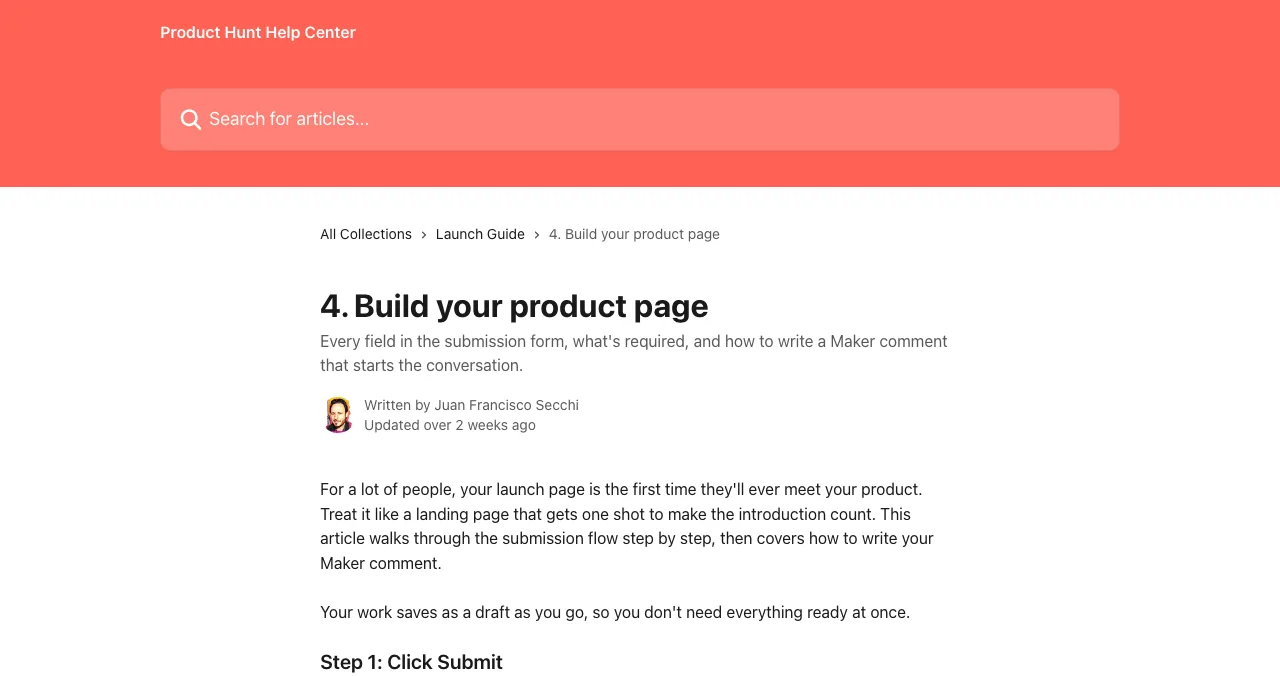
Product Hunt's Before you launch checklist won't let you schedule until these seven are done.
| Field | Limit or size | What to write |
|---|---|---|
| Product link | A direct link | Homepage, app store page or GitHub repo; no link shorteners |
| Name | Up to 40 characters | Just the name: no tagline or emoji |
| Tagline | Up to 60 characters | Exactly what it does; no "the best" or "#1" |
| Description | Up to 500 characters | Value first, then the features that deliver it; the problem and who it's for |
| Logo | 240×240 px recommended; JPG, PNG or GIF up to 2 MB | Square; GIFs only animate on hover, so the first frame must work alone |
| Gallery image | At least 1; 1270×760 px recommended | The product in use: the core flow, a before-and-after, a short GIF |
| Launch tags | Up to 3 | The topics people browse |
| Your role | Maker or hunter | — |
Table: Product Hunt's required launch fields, limits and recommended sizes (Product Hunt Launch Guide, checked 17 Nov 2026)
The tagline test, in Product Hunt's words: if someone reads only your name and tagline, do they know what the product does? "Meeting notes that write themselves" works. "The future of productivity" doesn't.
4. Make it stand out
Optional, but Product Hunt lists them as what makes a launch stand out:

- Three or more gallery images — screenshots of the flow, not logos
- A short video — a simple screen recording with your voice beats a big-budget trailer
- A clickable demo — so people can try the interface without signing up
- Pricing set — Free, Paid, or Free options
- A promo code — offer text up to 25 characters, code up to 15, optional end date
- Every maker added — and shoutouts (20–2,000 characters) thanking tools you built on
- A maker comment — up to 5,000 characters: why you built it, what's different, what feedback you want
5. Two weeks before: book and prepare

- Pick your date. The day you're most prepared for and can be fully present; Product Hunt says no day guarantees a top spot. Schedule from tomorrow up to 30 days ahead.
- Set goals. Sign-ups, feedback, conversations; Product of the Day isn't the only goal worth having.
- Be active on Product Hunt. Comment on other launches and help other makers; those people remember you.
- Use your pre-launch dashboard. Grab your launch link, add a badge to your website, and start a Forums thread about what's coming.
- Write everything in advance. Emails, social posts and any in-app banner, so you're not writing at 1 AM.
- Prepare a landing page for Product Hunt visitors with one clear call to action, and your offer front and centre.
- Publish a permanent page. Somewhere launch-day visitors can land that keeps working after the day, such as a free Launchpad listing.
6. Launch week
- Tell your people — team, users and newsletter subscribers know the date
- Co-makers confirmed — accounts working, a rota agreed so someone is always online, including overnight
- Final flow test — sign up in a clean browser on desktop and mobile
- UTM links ready — so you can measure Product Hunt traffic and sign-ups
- Demo answers ready — short videos or links you can reply with
7. Launch day

- 12:01 AM Pacific: your launch goes live. Post your maker comment if it isn't pinned already.
- Share where your audience already is: email, X, LinkedIn, your Slack or Discord, inside your product. Not in communities you've never posted in.
- Ask people to try it and give feedback. Never ask for upvotes.
- Reply to every comment, as close to real time as you can. Engage like a human: thank people, answer hard questions, share your story.
- Watch your launch-day dashboard for position, points and comments, and reply from there.
- Report spam you see on your launch with the three-dot menu.
8. After launch day
- Keep replying — people keep finding your launch for days
- Follow up — thank users, prospects and partners who engaged, and remind them of your offer
- Measure against your goals — sign-ups, feedback, traffic, conversations; write down what worked
- Turn feedback into updates — and tell the community how it shaped the product when you relaunch
- Grow your Product Page — collect reviews, add a "Leave a review" badge, post updates in the Forums
- Add your badge — if you won an award, Product Hunt emails you one
Your permanent page, and a product test

Two items on this checklist are hard to do well alone: testing the whole flow like a first-time user, and having a page that keeps working after launch day. A free Science of Apps Launchpad listing covers both. Your profile is permanent and found by the problem you solve, and once it's live your product is tested end to end, in a real browser on desktop and mobile, with experts reviewing the screens behind your login and a detailed report ranking what to fix first.
- Areas of your product tested
- 22
- Automatic measurements, desktop and mobile
- 39
- Expert checks behind your login
- 74
- Verdicts that rank what to fix first
- 5
Ready to launch?
How we built this checklist
Every field, limit, size and rule comes from Product Hunt's Launch Guide in its help centre (What kind of products get featured; Build your product page; How to promote your launch; What to do during and after your launch; Launch FAQ and myths), read on 17 November 2026. Product Hunt updates its guide; check it before your launch. Science of Apps runs the Launchpad mentioned above and has no relationship with Product Hunt.
Key terms, defined
- Maker: anyone who helped build the product.
- Hunter: the person who submits the launch; usually the maker.
- Maker comment: the first, pinned comment on a launch, written by the maker.
- Launch tags: up to three topics that help people find your launch.
- Shoutout: a short public review thanking a tool you built on.
- Featured: chosen by Product Hunt's team for the homepage leaderboard.
Frequently asked questions
What do I need to launch on Product Hunt?
A personal account with a verified email, your product URL, a name, a tagline, a description, at least one launch tag, a logo, at least one gallery image and your role (maker or hunter). Product Hunt won't let you schedule until these required items are done.
What size should Product Hunt images be?
Product Hunt recommends a 240×240 px logo (JPG, PNG or GIF, up to 2 MB; GIFs only animate on hover) and 1270×760 px gallery images. Show the product in use, such as the core flow or a before-and-after, not just your logo.
How long can a Product Hunt tagline be?
Up to 60 characters. The name can be up to 40 characters and the description up to 500. Product Hunt's test: if someone reads only your name and tagline, do they know what the product does? 'Meeting notes that write themselves' works; 'The future of productivity' doesn't.
What should a Product Hunt maker comment say?
Why you built it, what makes it different and what feedback would help most. It's pinned at the top of the discussion, can be up to 5,000 characters and can use formatting, links and @mentions of co-makers. Keep it personal and specific.
When should I start preparing for a Product Hunt launch?
Weeks before. Product Hunt says the makers who do best usually started weeks earlier: being active in the community, sharing progress publicly and telling their users, team and subscribers when they'll launch. Schedule the launch up to 30 days ahead and prepare emails and posts in advance.
Can I relaunch on Product Hunt?
Yes, every time you ship a major update. If the same link launched in the last two months, Product Hunt asks you to request a relaunch. When you launch again, choose your existing product so the new launch is added to your Product Page.
Sources
- Product Hunt Help Center — Build your product page (checked 17 Nov 2026)
- Product Hunt Help Center — What kind of products get featured (checked 17 Nov 2026)
- Product Hunt Help Center — How to promote your launch (and what to avoid) (checked 17 Nov 2026)
- Product Hunt Help Center — What to do during and after your launch (checked 17 Nov 2026)
- Product Hunt Help Center — Launch FAQ and myths (checked 17 Nov 2026)
- Science of Apps — Product investigation: what we investigate and how
- Checked November 17, 2026. Figures that change — fees, salaries, prices — are reviewed every six months; if something is out of date, tell us.
Where to go from here
- How to launch on Product Hunt — the hour-by-hour plan
- Uneed vs Product Hunt vs Microlaunch — pick your second launch
- 14 Product Hunt alternatives — where else to launch
- Science of Apps - LaunchpadThe startup launch checklist for 2027: everything to do before, during and after launch, in orderA startup launch checklist for 2027: product, page, visibility, assets, launch-day and follow-up items, in order, with the platform rules that matter.
- Science of Apps - LaunchpadHow does Product Hunt work? Featuring, the daily leaderboard, upvote weighting and Product of the Day, from Product Hunt's own rulesHow Product Hunt works: launches go live at 12:01 AM PT, editors pick what's featured, and the leaderboard weighs upvotes, comments, time and more.
- Science of Apps - LaunchpadProduct launch taglines that get clicks: Product Hunt's 60-character rules, patterns that work, examples by product type, and the hype to cutHow to write a product launch tagline: Product Hunt's 60-character rule, patterns that work, examples for SaaS, apps, AI and dev tools, and what to cut.
- Science of Apps - LaunchpadA product launch email template you can copy: the launch-day email, the heads-up, the follow-up, and the rules that keep a Product Hunt launch safeA product launch email template to copy: heads-up, launch-day and follow-up emails, subject lines, and the Product Hunt rules on asking for upvotes.
- Science of Apps - LaunchpadHow to run a launch week, and why launching is a habit, not a day: every kind of launch a startup can do, from silent launches to feature dropsHow to run a launch week and launch repeatedly: silent launches, communities, Hacker News, Product Hunt, request-access waitlists and feature drops, in order.
- Science of Apps - LaunchpadHow to announce your product launch on LinkedIn and X: post templates, what to show, timing around a Product Hunt day, and the rules on asking for votesHow to announce a product launch on LinkedIn and X: copy-ready post templates, what to show, launch-day timing, and why never to ask for upvotes.
Get the ideas, not the noise.
Sign up with Google and we’ll send you short UX psychology tips by email — why people tap, stall and leave, and what to do about it. Unsubscribe anytime. Prefer something to keep? Get the free Laws of UX guide as a PDF.
Launch day ends. Your listing shouldn't.
Product Hunt says to test your main flow before launch. List free on the Launchpad and your product is tested end to end, with a detailed report on what to fix, plus a permanent page for launch-day visitors.