 By
Quick answer: How long should a launch video be?
- Length: short; aim for about 60–90 seconds.
- Script: problem, product solving it, key moment, how to try.
- Style: a screen recording with your voice is enough.
- Captions: many people watch with the sound off.
- Where: launch pages, your homepage, your listings.
Key takeaways
- Show the product working in the first seconds.
- One clear use case beats a feature tour.
- Your real voice builds more trust than stock music.
- Captions and a strong first frame matter on muted autoplay.
- Reuse one recording everywhere you launch.
Founders put off the launch video longer than anything else on the checklist, because they picture a studio, a motion designer and a voiceover artist. Product Hunt's own launch guide says the opposite: the video "doesn't need to be polished", and a simple screen recording with your voice can do more than a big-budget trailer. What a launch video needs is a clear script and the product on screen. This guide gives you that script, what to show, how to record it in an afternoon and where to use it, with Product Hunt's guidance as read on 17 November 2026. Jump to the script, recording or where to use it.
- A sensible length for a launch page
- 60–90 s
- Beats in the script
- 4
- Use case to show
- 1
- Budget needed for a screen recording
- 0
What Product Hunt says about launch videos
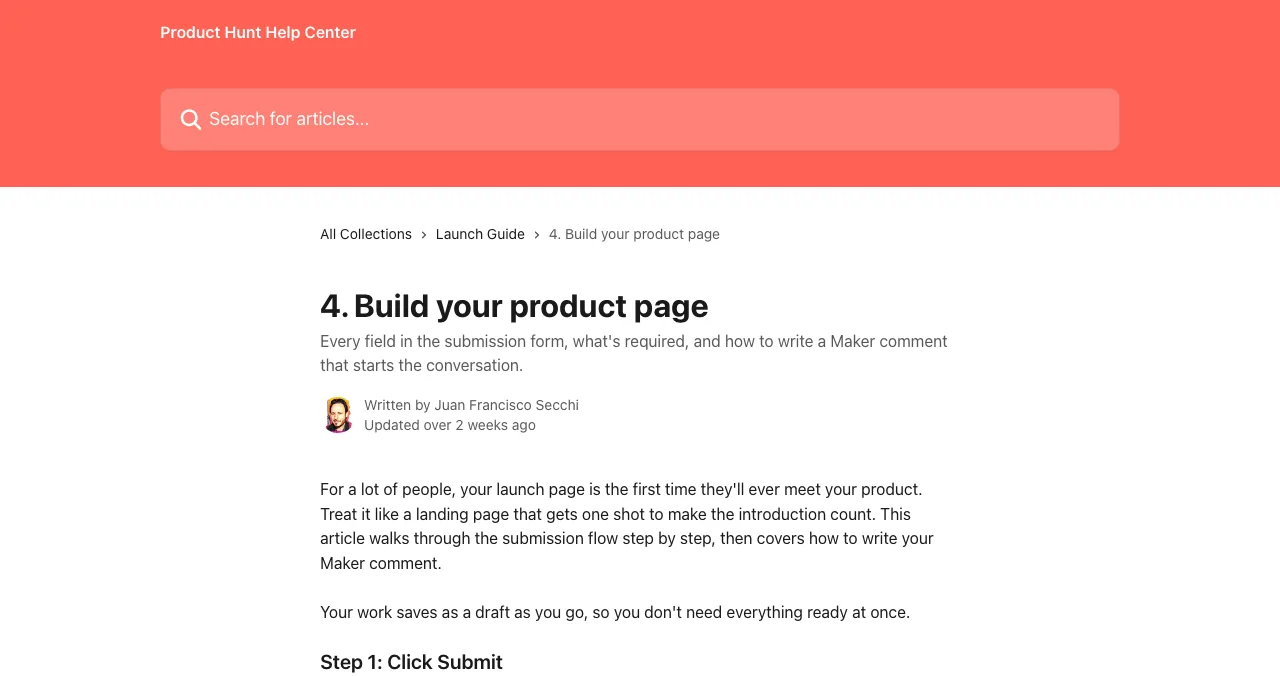
In its launch guide, Product Hunt lists video as optional but recommended: "a quick demo of the product doing its thing." It recommends a clickable demo too, requires at least one image (recommended size 1270×760px) and counts a video or demo among the extras that make "a much stronger first impression".
The four-beat script

- The problem (5–10 s) — one line your user would say: "Chasing clients for payments takes my evenings."
- The product solving it (20–40 s) — on screen, the main job done start to finish.
- The key moment (10–20 s) — the one thing that makes it different, shown, not told.
- How to try it (5–10 s) — "Free to start at acme.com" on screen and in your voice.
Example script (illustrative) "If you invoice clients, you know the follow-up emails. Here's Acme. I add a client, set the amount, and send. Three days later, Acme reminds them, politely, on WhatsApp. When they pay by UPI, it marks the invoice paid. That's it. Try it free at acme.com."
How to record it in an afternoon

- Clean the screen — hide bookmarks, notifications and personal data
- Use real-looking data — not "test test 123"
- Record your voice separately if needed — a quiet room and a headset
- Zoom on the key moment — viewers watch on phones
- Cut every pause — keep it moving
- Add captions — and correct auto-generated ones (WCAG 2.2)
- Pick a strong first frame — the product, not a logo
Where to use your launch video
| Place | How |
|---|---|
| Product Hunt | Add by link in the launch media box |
| Your homepage | Near the headline, muted autoplay with captions or click to play |
| Launch listings | In the gallery of each launch page |
| Social posts | A 20–30 second cut of the key moment |
| Sales and support | The full version as a quick explainer |
Table: Where to use a product launch video (editorial guidance; Product Hunt details from its launch guide, checked 17 Nov 2026)
Mistakes

- A logo intro — viewers leave before the product appears
- A feature tour — show one job done well
- Stock music over silence — your voice explains and builds trust
- No captions — muted viewers miss everything
- Waiting for polish — a clear recording today beats a trailer next month
Ready to publish it?
How we know
Product Hunt's video guidance comes from its launch guide ("Build your product page"), read on 17 November 2026. The four-beat script, the length target and the example script are our editorial guidance; the example product is illustrative.
Key terms, defined
- Launch video: a short video showing a product working, used on launch day.
- Demo: a walkthrough of the product, recorded or clickable.
- Captions: on-screen text of what's said, for muted or deaf viewers.
- First frame: the image shown before a video plays.
- Launch media: the images, video and demo on a launch page.
Frequently asked questions
How long should a launch video be?
Short enough to watch in full: about 60–90 seconds for a launch page is a sensible target, with the product on screen in the first few seconds. Make a longer walkthrough separately for people who want detail.
Does a launch video need to be professional?
No. Product Hunt's launch guide says the video doesn't need to be polished and that a simple screen recording with your voice can do more than a big-budget trailer.
What should a product launch video show?
The problem in one line, the product solving it on screen, the one or two moments that make it special, and how to try it. Skip logos, long intros and feature lists.
Is a video required on Product Hunt?
No. Product Hunt lists video as optional but recommended; at least one image is required, and a clickable demo is also optional but recommended.
What tools can I use to record a launch video?
Any screen recorder with a microphone: built-in recorders on macOS and Windows, or dedicated tools. Clear audio matters more than the tool; use a headset or a quiet room.
Should I add captions?
Yes. Many viewers watch with the sound off, and captions make the video accessible. Most platforms let you upload a caption file or generate one you can correct.
Sources
- Product Hunt Help Center — 4. Build your product page (checked 17 Nov 2026)
- W3C — Web Content Accessibility Guidelines (WCAG) 2.2
- Science of Apps — Launchpad: launch your product free
- Checked November 17, 2026. Figures that change — fees, salaries, prices — are reviewed every six months; if something is out of date, tell us.
Where to go from here
- Product Hunt launch — where the video goes
- Laws of UX — attention and memory
- Product launch taglines — the words around it
- Science of Apps - LaunchpadHow to market an AI tool in 2027: positioning by task, AI directories, AI search, demos and the trust that makes people payHow to market an AI tool in 2027: position by task, list in AI directories, get cited by AI search, show real outputs and earn trust that converts.
- Science of Apps - LaunchpadHow much does a Product Hunt launch cost? Nothing to launch, but here's what founders actually spend time and money onA Product Hunt launch costs nothing to submit. What founders really spend on: time, a demo video, a launch offer, optional ads, and the services to avoid.
- Science of Apps - LaunchpadThe best product launch platforms in 2027, matched to what you're launching: SaaS, AI, developer tools, apps and pre-launch, with costs and rulesThe best product launch platforms in 2027 by use case: Product Hunt, Science of Apps Launchpad, DevHunt, Peerlist, Uneed, BetaList, Show HN and more.
- Science of Apps - LaunchpadHow to launch an AI product: prove the outputs, describe the task not the model, pick free and paid launch sites, and make sure AI search can find youHow to launch an AI product in 2027: show real outputs, describe the task, launch on Product Hunt and AI directories, and get found by AI search engines.
- Science of Apps - LaunchpadDo startup badges and 'featured on' badges help conversions? The psychology, the evidence gap, what makes a badge credible, where to place it and how to test it yourselfDo 'featured on' startup badges help conversions? What social proof research supports, why verifiable badges beat decorative ones, and how to A/B test your own.
- Science of Apps - LaunchpadHow to launch on Product Hunt in 2027: the rules, the timing, the page and an hour-by-hour plan for launch dayHow to launch on Product Hunt in 2027, step by step: eligibility, scheduling, your launch page, promotion rules and an hour-by-hour launch-day plan.
Get the ideas, not the noise.
Sign up with Google and we’ll send you short UX psychology tips by email — why people tap, stall and leave, and what to do about it. Unsubscribe anytime. Prefer something to keep? Get the free Laws of UX guide as a PDF.
Launch day ends. Your listing shouldn't.
A free, permanent Launchpad profile shows your demo video and screenshots to people searching for the problem you solve, ranked by relevance, never payment.