 By
Quick answer: Do launch badges build trust?
- Can help: when the source is known to your visitors.
- Must be verifiable: a click should prove it.
- No universal uplift: ignore made-up percentages.
- Place it near the decision: by the sign-up button or pricing.
- Test it: A/B test with and without on your own traffic.
Key takeaways
- Badges borrow trust; they can't create it from nothing.
- Recognition matters: a source your audience doesn't know adds little.
- Verifiable beats decorative.
- Too many badges look like clutter and lower trust.
- Your own test is the only reliable number.
Scroll to the bottom of almost any new SaaS site and you'll find them: a strip of "Featured on" badges from launch sites, directories and award lists. Founders add them because everyone does, and because a blog post somewhere promised badges lift conversions by some impressive percentage. The honest answer is more useful. Badges work by a well-understood mechanism, there's no trustworthy public number for how much, and a few choices decide whether yours helps or quietly hurts. This analysis covers all three, as checked on 17 November 2026. Jump to why badges work, what makes one credible or how to test.
- Principles behind badges: social proof, authority
- 2
- Click it should take to verify
- 1
- Badges worth showing at once
- 1–3
- Reliable source of your uplift: your own test
- 1
Why badges can work
A badge borrows trust from a third party. A visitor who doesn't know you yet looks for signs that someone else has checked. That's social proof (others like me chose this) and authority bias (a source I respect vetted it). Both are strongest when the visitor is uncertain, which describes nearly everyone on a new startup's site.
The mechanism has limits. A badge transfers only as much trust as the visitor already gives the source. "Featured on" a site your audience has never heard of borrows almost nothing.
Do they increase conversions?
You'll find blog posts quoting specific uplift figures for trust badges. Most trace back to a single company's test, often on a different kind of badge (payment security seals at checkout, not launch badges), or to no source at all. We don't know of independent, public data on 'featured on' launch badges that would support a typical number, so we don't give one. The reliable approach is to test on your own traffic.
| Claim you'll see | What to check |
|---|---|
| "Badges lift conversions by X%" | Whose test, which badge, which page, how much traffic? |
| "Trust seals increase sales" | Usually checkout security seals, a different job |
| "Every site should show badges" | Only if the source means something to your visitors |
Table: Questions to ask of badge-conversion claims (editorial guidance)
What makes a badge credible

- A source your audience knows — Product Hunt for tech early adopters; an industry body for B2B buyers
- Verifiable — it links to a live page that confirms it
- Specific — "#2 Product of the Day, 14 Mar 2026" beats "Featured"
- Earned, not bought — paid "awards" erode trust when discovered
- Current — a 2021 award on a 2027 product raises questions
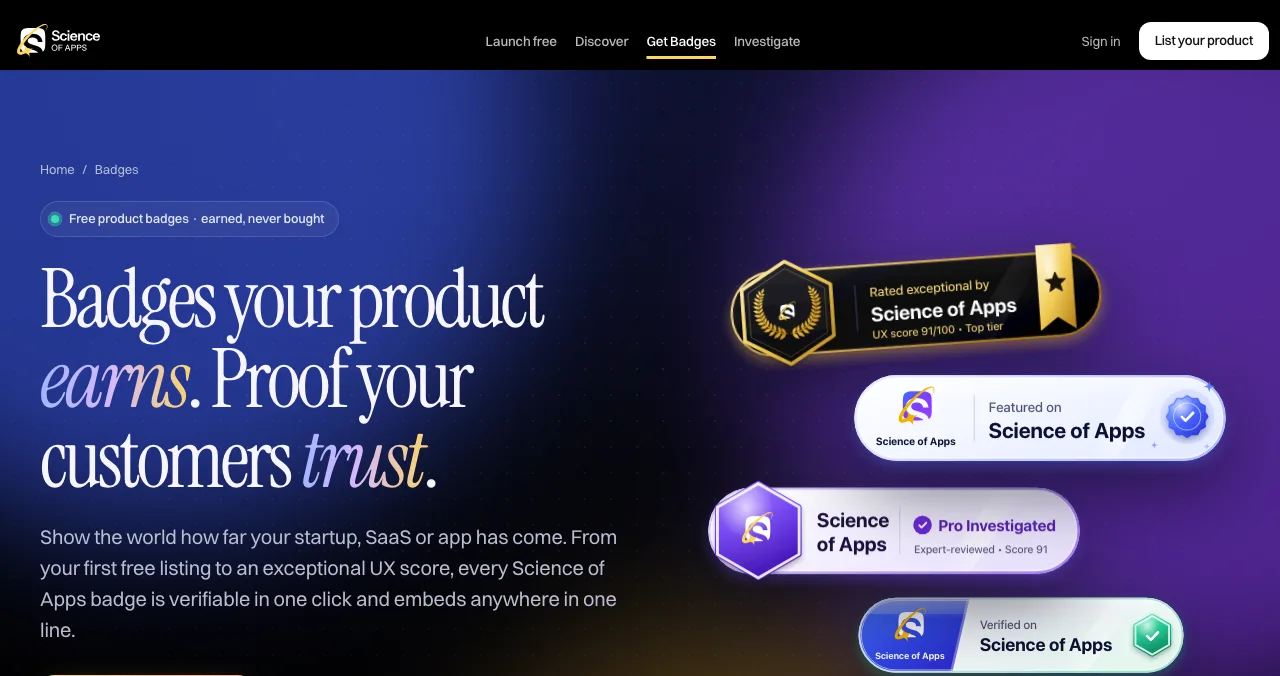
Science of Apps Launchpad badges are built around those rules: each unlocks only when a listing reaches that stage (a published listing for Featured, proven domain ownership for Verified, 25 trusted vouches for Community favourite, a released UX investigation for Investigated), is verifiable in one click and embeds without scripts or cookies.
Where to place badges

Beside the main button
The moment of doubt; one strong badge.
On pricing
Where visitors weigh the risk of paying.
Under the hero
A small row of one to three, after the headline has done its job.
In the footer
Fine for a full set; few people see it while deciding.
How to test badges yourself

- Pick one page and one metric — e.g. home page to sign-up.
- Make two versions — with the badge near the button, and without.
- Split traffic evenly — with an A/B testing tool or a feature flag.
- Wait for enough data — set the sample size before you start; don't stop at the first good day.
- Check behaviour — session recordings show whether people even notice it.
- Keep the winner, then test placement — near the button vs under the hero.
With low traffic, a clean test can take weeks. If you can't reach a meaningful sample, use judgement: one relevant, verifiable badge near the decision is a reasonable default.
Mistakes

- A wall of badges — clutter weakens the best one
- Badges that don't link — unverifiable looks invented
- Paid "awards" — visitors increasingly recognise them
- Hiding them in the footer only — put the strongest near the decision
- Quoting someone else's uplift figure — test your own
Ready to earn one?
How we know
Badge rules come from the Science of Apps badges page and Product Hunt's help centre, read on 17 November 2026. The psychology comes from the social proof and authority principles in our Laws of UX library. We don't know of independent, public data on launch-badge conversion effects that we'd rely on, so this analysis gives a testing method instead of a number.
Key terms, defined
- Featured on badge: an image showing a site has listed or featured your product.
- Trust badge: any visual signal meant to reduce a visitor's doubt.
- A/B test: comparing two versions of a page on split traffic.
- Authority bias: giving more weight to trusted sources.
- Verifiable: linked to a live source that confirms the claim.
Frequently asked questions
Do launch badges build trust?
They can, when visitors recognise the source and can check the claim. A badge works through social proof and authority: someone else has looked at this product. Unverifiable or unknown badges add little and can look like padding.
Do 'featured on' badges increase conversions?
Sometimes, but there's no reliable public figure for a typical uplift, and results depend on the audience and the source. The only trustworthy answer for your site is an A/B test on your own traffic.
How do I get a Product Hunt badge?
From your launch: Product Hunt's dashboards let you embed a launch badge, and award winners (such as Product of the Day) get an award badge. Our Product Hunt badge guide covers the steps.
Where should I put badges on my website?
Near the decision: beside the main call to action, on pricing, or in a small row under the hero. The footer is fine for a full set, but visitors rarely see it at the moment they decide.
How many badges should I show?
One to three relevant ones. A long strip of badges from sites your audience doesn't know looks like clutter and weakens the strongest one.
Are badge backlinks good for SEO?
A badge links from your site to the platform, not the other way round. The SEO value comes from the platform's listing page linking to you, which depends on that site's link policy.
Sources
- Science of Apps — Launchpad badges (checked 17 Nov 2026)
- Product Hunt Help Center — How to add a Product Hunt badge to your website
- US FTC — The Consumer Reviews and Testimonials Rule: Questions and Answers
- Science of Apps — Laws of UX: Social Proof
- Checked November 17, 2026. Figures that change — fees, salaries, prices — are reviewed every six months; if something is out of date, tell us.
Where to go from here
- Product Hunt badge — how to get one
- Places to launch a startup — where badges come from
- Backlinks for startups — the SEO side
- Science of Apps - LaunchpadSocial proof for startups with no customers yet: 12 honest ways to build trust (founder proof, transparency, verifiable badges, early testimonials) and the tactics to avoidSocial proof for startups with no customers: 12 honest ways to build trust, from founder credibility to verifiable badges, and what never to fake.
- Science of Apps - LaunchpadProduct Hunt badges: how to get one, how to add it to your website, what each badge means, and other earned launch badgesHow to get and add a Product Hunt badge: launch badges from your dashboard, award badges by email, review badges, and other earned startup badges.
- Science of Apps - LaunchpadThe top 5 websites to launch your startup for free, checked against each site's own rulesThe 5 best free websites to launch a startup: Science of Apps Launchpad, Product Hunt, Show HN, Uneed and Peerlist, with costs, rules and who each one suits.
- Science of Apps - LaunchpadA landing page review checklist for startups: 36 evidence-based checks for clarity, trust, speed, mobile and the call to action, with the research behind eachA landing page review checklist for startups: 36 checks for the first 10 seconds, trust, speed, mobile and the call to action, from NN/g and Google research.
- Science of Apps - LaunchpadWhere to launch your startup in 2027: 24 launch sites, directories and communities, each checked on its own pages24 places to launch your startup in 2027, free and paid: launch sites, directories, AI directories, databases and communities, each checked and dated.
- Science of Apps - LaunchpadDo you need a hunter for your Product Hunt launch? No: here's what a hunter is, why self-hunting is recommended, and how featuring really worksYou don't need a hunter on Product Hunt: it says to hunt your own product and that who posts doesn't affect ranking. Here's what actually gets you featured.
Get the ideas, not the noise.
Sign up with Google and we’ll send you short UX psychology tips by email — why people tap, stall and leave, and what to do about it. Unsubscribe anytime. Prefer something to keep? Get the free Laws of UX guide as a PDF.
Launch day ends. Your listing shouldn't.
Launchpad badges are earned, never bought, verifiable in one click and embed with no scripts or cookies: Featured, Verified, Community favourite and more.