 By
Quick answer: How much does Framer cost?
- Framer free: a Framer domain, 1 GB bandwidth, 500 AI credits a month, no custom domain.
- Basic: $10 a month billed yearly; custom domain, 30 pages, 2 CMS collections, 50 GB bandwidth.
- Pro: $30 a month billed yearly; 10 CMS collections, 100 GB, staging, redirects, branching.
- Editors: $20 a month each; content editors $10; viewers free.
- Year one on Basic, yearly: $120 before tax, with a complimentary domain.
Key takeaways
- Framer prices per site, plus per editor seat; a solo founder pays only the site plan.
- Basic is the cheapest way onto a custom domain.
- AI credits power Framer's agents and AI features and can be raised by tier.
- Framer says its Free plan is ideal for non-commercial use.
- Framer builds the site; a free Launchpad listing helps the product get discovered.
Framer has become the default for founders and designers who want a site that looks expensive without a developer. Its pricing is short, but it has a few moving parts: AI credits that scale by tier, per-editor seats and paid add-ons. This explainer covers the Framer free plan, Basic, Pro and Enterprise, and works out a real year-one bill. Every figure comes from Framer's own pricing page on 20 November 2026. Prices are in US dollars, the page's server-rendered default, confirmed against the US view archived by the Wayback Machine on 16 November 2026, with yearly billing selected (Framer's default view). Jump to the plans, seats and add-ons or year one.
Framer pricing plans at a glance
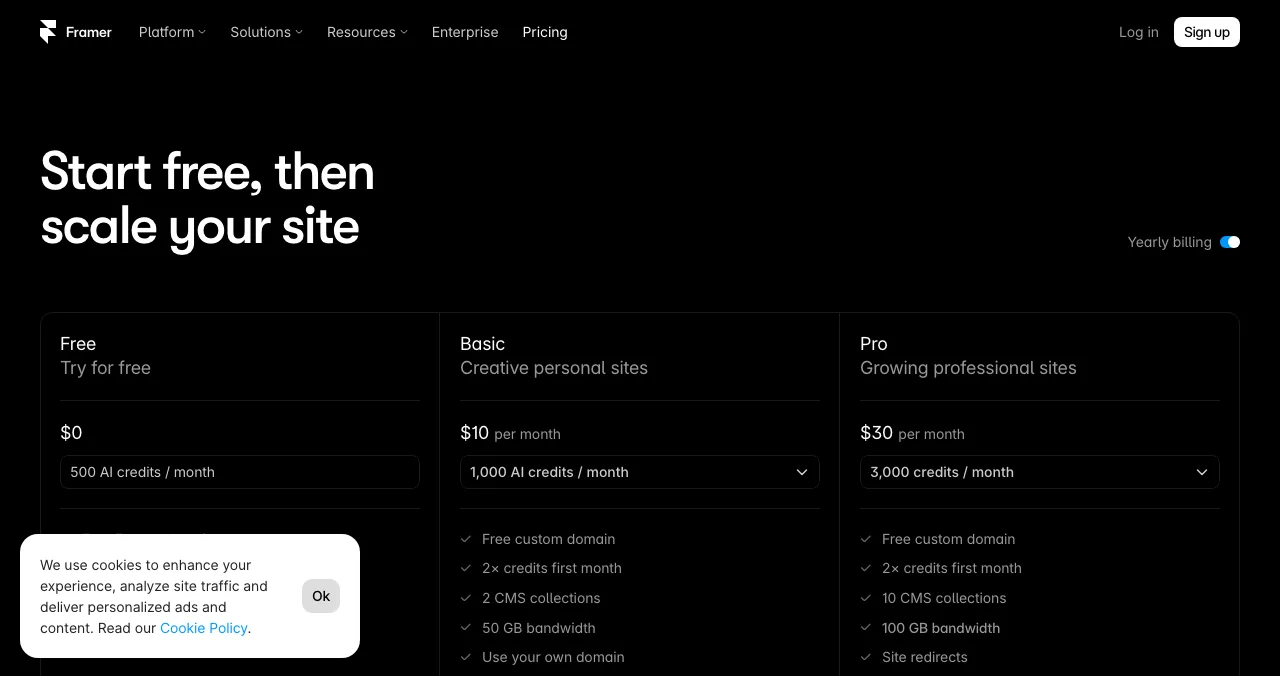
| Plan | Per month, billed yearly (USD) | Year one (USD) | AI credits a month | Highlights |
|---|---|---|---|---|
| Free | $0 | $0 | 500 | Framer domain, 1 GB bandwidth, design pages |
| Basic | $10 | $120 | 1,000 (higher tiers available) | Custom domain, 30 pages, 2 CMS collections, 50 GB bandwidth |
| Pro | $30 | $360 | 3,000 (higher tiers available) | 10 CMS collections, 100 GB, redirects, staging, branching |
| Enterprise | Custom | Custom | Volume discounts | Custom limits, unlimited editors, SSO, SCIM, uptime guarantee |

Table: Framer pricing, yearly billing, before tax (framer.com/pricing, checked 20 Nov 2026)
Both paid plans get double credits in the first month. The credit selector on each paid card lets you buy a bigger monthly allowance, from 1,000 up to 15,000 credits on Basic and 3,000 up to 100,000 on Pro, at a higher price. Monthly-billing prices weren't displayed in the view we checked; Framer says prices are billed according to the cycle you choose at checkout.
Is Framer free?
The Framer free plan is real and permanent. The plan card lists a free Framer domain, 1 GB bandwidth, design pages, the MCP server and 500 AI credits a month (only while the workspace has no subscription). Framer's FAQ adds 10 CMS collections, 1,000 pages, 5 MB file uploads and one free locale to try, and up to three editors in a workspace without a subscription. Two catches: you can't connect a custom domain, and Framer itself says the Free plan is ideal for non-commercial use.
What do Framer Basic and Pro include?
| Feature | Basic | Pro |
|---|---|---|
| Custom domain | Yes, complimentary domain on yearly billing | Yes, complimentary domain on yearly billing |
| Site pages | 30 | More (raised with add-ons, up to 700) |
| CMS collections / items | 2 / 1,000 | 10 / more (up to 40 collections and 40,000 items with add-ons) |
| Bandwidth | 50 GB | 100 GB (up to 2 TB with add-ons) |
| Site redirects, staging, branching | No | Yes |
| Add-ons | Localization | Localization, A/B testing (Convert), Advanced hosting |
Table: Framer Basic vs Pro (framer.com/pricing plan comparison and FAQ, checked 20 Nov 2026)
Framer's own guidance: Basic for students, freelancers and small studios; Pro for agencies, startups and scale-ups that run their full marketing stack on Framer; Enterprise for custom limits and dedicated support.
Framer cost of seats and add-ons
- Additional editors: $20 a month each to design, edit and publish. Framer Pro Experts get free editor access to client projects.
- Content editors: $10 a month each to update the CMS and use on-page editing.
- Viewers: free, and they can comment.
- Locales: AI translation into up to 20 languages, $20 a month per locale.
- Convert: A/B tests, funnels and triggers, billed by analytics events; up to 5 A/B tests.
- Overages: Framer says it lets you exceed bandwidth for one month and emails you to upgrade.
Seat prices are the cost that grows fastest for teams. If three people need full editing on Pro, year one is $360 plus two editors at $480, or $840 before tax.
Framer free vs paid: which should you pick?
| You need | Plan | Why |
|---|---|---|
| A portfolio or prototype on a Framer address | Free | No cost; non-commercial use |
| A personal or simple startup site on your domain | Basic | Cheapest custom domain |
| A startup marketing site with a blog and redirects | Pro | 10 CMS collections, staging, redirects |
| A product page people discover by the problem it solves | A free Launchpad listing | Discovery, not design |
Table: Which Framer plan fits (Science of Apps guidance from Framer's published plans)
Beautiful sites earn more trust, the aesthetic-usability effect, which is Framer's real selling point. Discovery is a separate problem.
What does year one really cost?
| What you buy | Free | Basic | Pro |
|---|---|---|---|
| Site plan, billed yearly | $0 | $120 | $360 |
| Domain | Framer domain | Complimentary on yearly billing | Complimentary on yearly billing |
| One extra full editor | — | +$240 | +$240 |
| One extra locale | — | +$240 | +$240 |
| Tax | — | Added at checkout | Added at checkout |
| Science of Apps Launchpad product page | $0 | $0 | $0 |
Table: Total cost of year one on Framer, yearly billing, before tax (checked 20 Nov 2026)
The free first step: a Launchpad product page
Framer is the right tool for a design-led site. It doesn't put your product in front of people who are looking for it. A free Science of Apps Launchpad listing does that part: a permanent product page, found by the problem you solve, with badges and vouches that build proof, and a free check of the Framer landing page you link to. Use both: Framer for the site, the Launchpad for discovery.

- What you get, free forever: a public product page with its own link on launchpad.scienceofapps.com, live in about five minutes in six short steps, after automated checks and a human review.
- How people find it: by the problem your product solves, plus collections and editorial picks. Ranking is by relevance, editorial picks and community interest, never payment (0 paid placements).
- Proof that builds up: a Featured badge when you go live, then earned badges such as Verified (a work email on your domain), Community favourite and Editor's pick, plus vouches and followers.
- Your product, tested: a free baseline diagnosis of your landing page, discoverability and speed runs as you go live; a full investigation covers 22 areas in a real browser on desktop and mobile, private to your team, and never affects ranking.
- What it isn't: a website builder, a host or a domain registrar. It's one product page, not a multi-page site.
- Areas of your product tested
- 22
- Automatic measurements, desktop and mobile
- 39
- Expert checks behind your login
- 74
- Verdicts that rank what to fix first
- 5
See what a new visitor sees
List free, then order the report that fits: the first impression, or the full diagnosis with a plan.

 Economy
See what new customers see
- Store listing and homepage, screen by screen
- Scorecard against 60 Laws of UX
- Customers, competitors and the fixes worth most
PremiumThe full diagnosis and the plan
- Every screen, every finding, every flow
- All 60 laws with evidence and fixes
- 8 strategy chapters and a 90-day roadmap
Researched from your live product and checked by an analyst. Private by default.
How we checked these prices
We read Framer's pricing page, plan comparison and FAQ on 20 November 2026. Framer's page localises prices by the visitor's country, so we quote the US-dollar prices from its server-rendered version ($10, $30, $20 per editor), which match the US view archived by the Wayback Machine on 16 November 2026. Prices exclude tax. The Launchpad's terms come from its homepage, investigation and pricing pages, read on 18 November 2026. Science of Apps runs the Launchpad and has no relationship with Framer.
Key terms, defined
- AI credits: Framer's monthly allowance that powers its agents, localisation and other AI features.
- Editor seat: a paid seat for someone who designs, edits and publishes.
- Content editor: a cheaper seat for CMS and on-page text edits only.
- CMS collection: a set of structured content, such as blog posts.
- Staging environment: a private copy to test changes before publishing; Pro and up.
- Product page: a single public page for one product, such as a Launchpad listing.
Frequently asked questions
How much does Framer cost per month?
On 20 November 2026 Framer's pricing page, with yearly billing selected, listed Basic at $10 a month and Pro at $30 a month in US dollars. The same prices appear in the US view of the page archived by the Wayback Machine on 16 November 2026. Framer says all prices are monthly and billed according to the billing cycle chosen at checkout, with sales tax added by location.
Is Framer free?
Yes, there is a Framer free plan. It includes a free Framer domain, 1 GB of bandwidth, design pages, the MCP server and 500 AI credits a month while your workspace has no subscription. Framer's FAQ adds 10 CMS collections, 1,000 pages and 5 MB uploads. Connecting a custom domain needs a paid plan.
What's the difference between Framer Basic and Pro?
Basic is for personal sites: a custom domain, 30 pages, 2 CMS collections with 1,000 items, 50 GB bandwidth and 1,000 AI credits a month. Pro is for professional sites: 10 CMS collections, 100 GB bandwidth, site redirects, a staging environment, branching with previews and 3,000 credits, plus access to add-ons like A/B testing.
How much do extra Framer editors cost?
The workspace owner is free and viewers are free. Additional editors, who design, edit content and publish, cost $20 a month per editor. Content editors, who update the CMS and localisation, cost $10 a month. Framer bills new editors within 24 hours of adding them.
Does Framer include a domain?
Framer's plan comparison lists a complimentary domain included on yearly billing for paid plans, and the plan cards list a free custom domain. On the free plan you publish to a Framer domain instead. You can also connect a domain you already own on any paid plan.
What does a Framer site cost in the first year?
One Basic site billed yearly costs $120 for year one, and Pro costs $360, before tax, with a complimentary domain on yearly billing. Each extra full editor adds $240 a year. Add-ons such as extra locales ($20 each a month) and A/B testing cost more. The free plan costs nothing but can't use your own domain.
Does Framer give refunds?
Framer's FAQ says customers in the EU or Turkey are legally eligible for a refund if the subscription was bought within the last 14 days; they contact support to cancel and get the refund. Outside those regions the pricing page doesn't promise a refund, so start on the free plan and upgrade when you're ready to publish.
Sources
- Framer — Pricing: Free, Basic, Pro and Enterprise plans (checked 20 Nov 2026)
- Framer — Pricing page, US view archived by the Wayback Machine on 16 Nov 2026 (checked 20 Nov 2026)
- Framer — Pricing FAQ: credits, free plan, editors, limits, refunds (checked 20 Nov 2026)
- Framer — Plan comparison: pages, CMS, bandwidth, editors and add-ons (checked 20 Nov 2026)
- Science of Apps — Launchpad: launch your product free (checked 18 Nov 2026)
- Science of Apps — Product investigation (checked 18 Nov 2026)
- Science of Apps — Pricing: free listing, Economy and Premium reports (checked 18 Nov 2026)
- Checked November 20, 2026. Figures that change — fees, salaries, prices — are reviewed every six months; if something is out of date, tell us.
Where to go from here
- Webflow pricing — the closest rival, checked the same day
- Webflow vs WordPress vs Framer — choose your builder
- Free tools to launch a startup — what to use before you pay
- Science of Apps - LaunchpadWebflow pricing in 2027: Site plans, Workspace plans, ecommerce plans and what a Webflow site really costs a startup in its first yearWebflow pricing checked 20 Nov 2026: the free Starter plan, Basic $15 and Premium $25 a month billed yearly, Workspace plans and the year-one cost.
- Science of Apps - LaunchpadReplit pricing in 2027: the free Starter plan, Replit Core, Replit Pro and Enterprise, how credits work and what it costs to build and launch an appReplit pricing checked 20 Nov 2026: free Starter limits, Replit Core at $20 a month ($18 yearly), Pro at $100 ($90), credits, and build vs launch costs.
- Science of Apps - LaunchpadSquarespace pricing in 2027: the four plans, monthly vs annual billing, transaction fees, the domain catch and what a Squarespace website costs in year oneSquarespace pricing in US dollars, checked 20 Nov 2026: Basic, Core, Plus and Advanced, annual vs monthly billing, fees and the real year-one cost.
- Science of Apps - LaunchpadCarrd pricing in 2027: what Carrd free includes, the Pro Lite, Pro Standard and Pro Plus plans, and whether Carrd Pro is worth it for a one-page launch siteCarrd pricing checked 20 Nov 2026: Carrd free covers 3 sites; Pro Lite is $9, Pro Standard $19 and Pro Plus $49 a year. What each adds, and when Pro pays.
- Science of Apps - LaunchpadHostinger pricing in 2027: the hosting plans, intro prices vs renewal prices for every term, domain prices and what Hostinger really costs in years one and twoHostinger pricing checked 20 Nov 2026: Premium, Unlimited and Cloud Startup intro prices, what each renews at, domain prices and the real two-year cost.
- Science of Apps - LaunchpadWordPress cost in 2027: WordPress.com pricing plans, self-hosted WordPress hosting plans, themes, plugins and what a WordPress website really costs in year oneWordPress pricing checked 20 Nov 2026: WordPress.com plans and renewals, self-hosted hosting plans, themes and plugins, and a real year-one cost table.



Get the ideas, not the noise.
Sign up with Google and we’ll send you short UX psychology tips by email — why people tap, stall and leave, and what to do about it. Unsubscribe anytime. Prefer something to keep? Get the free Laws of UX guide as a PDF.
Launch day ends. Your listing shouldn't.
Framer builds a beautiful, design-led site. A Science of Apps Launchpad listing is the free, permanent product page where people looking for your kind of product find it, and your product is tested with a detailed report.