 By
Quick answer: How much does Squarespace cost?
- Four plans, no free plan: Basic, Core, Plus and Advanced; every site starts with a 14-day free trial.
- Annual billing is cheaper: $19 vs $25 a month for Basic on the US page (archived 19 Nov 2026).
- Basic charges 2% on online store transactions; Core, Plus and Advanced charge 0%.
- The free domain lasts one year on annual plans, then renews at Squarespace's standard rate.
- Year one on Basic, billed annually: $228 before tax.
Key takeaways
- Squarespace has no free plan; the 14-day trial is the only free way in.
- Paying annually saves about 24–29% on the US prices compared with monthly billing.
- Basic's 2% store fee and 7% digital-content fee make Core cheaper once you sell much.
- The free domain and the Google Workspace email are first-year offers that renew at standard rates.
- If you only need a page for a product, a free Launchpad listing costs nothing to renew.
You've picked Squarespace for its templates and now want to know what it really costs: the four plans, the gap between monthly and annual billing, the fees on sales and the first-year offers that quietly renew. Squarespace pricing is simpler than most builders, but it isn't free, and the number on the card isn't your year-one bill. Every figure below is a US price in US dollars, from Squarespace's own pricing page as seen from the US and archived by the Wayback Machine on 19 November 2026 (checked 20 November 2026). Squarespace prices its plans per billing country, so the page may show you a different currency and amount. Jump to the plans, the fees or the year-one cost.
Squarespace pricing plans at a glance
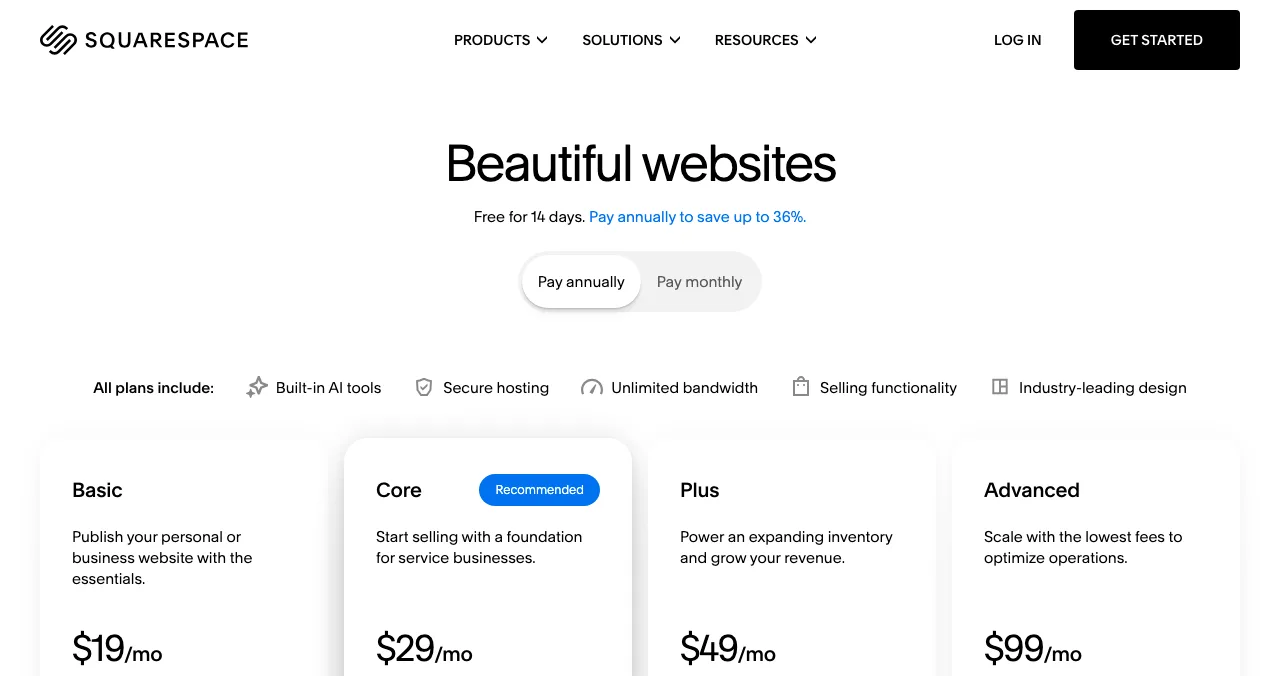
| Plan | Billed annually (per month) | Billed monthly | Year one, annual | Online store fee | Best for |
|---|---|---|---|---|---|
| Basic | $19 | $25 | $228 | 2% | A personal or business site, light selling |
| Core | $29 | $39 | $348 | 0% | Service businesses and stores |
| Plus | $49 | $65 | $588 | 0% | Growing stores with a larger inventory |
| Advanced | $99 | $139 | $1,188 | 0% | High-volume stores, memberships |

Table: Squarespace pricing plans in US dollars, excluding tax (squarespace.com/pricing, US view archived by the Wayback Machine 19 Nov 2026, checked 20 Nov 2026)
The annual totals come from Squarespace's own structured price data on the page, which lists them in US dollars for the US ($228, $348, $588 and $1,188 a year). The page headline promises "up to 36%" savings on annual billing; on the listed US prices, the saving ranges from about 24% on Basic to about 29% on Advanced. The archived page also carried a limited-time "30% off" offer, applied with a code at checkout to new subscriptions and ending 23 November; the prices above are before any promo code.
What does each Squarespace plan include?
All four plans include Squarespace's hosting, unlimited bandwidth, SSL, templates, the drag-and-drop editor, SEO tools, mobile-optimised sites, 24/7 support and selling features. The differences that move the price:
- Basic: 2 contributors, 10 one-time AI credits, 30 minutes of video hosting, a basic code block and CSS editor. It lacks code injection, promotional pop-ups, Google Shopping listings and advanced commerce tools.
- Core: unlimited contributors, 20 AI credits a month, 5 hours of video, a free year of Google Workspace email when you register or connect a domain, advanced code blocks and code injection (for analytics pixels or live chat), discounts, payment plans and abandoned-cart recovery.
- Plus: everything in Core with 40 AI credits a month, lower card rates (from 2.7% + $0.30 with Squarespace Payments), a 1% digital content fee, and reserved carts with countdown timers.
- Advanced: everything in Plus with 120 AI credits a month, card rates from 2.5% + $0.30, unlimited video, reserved carts with countdown timers, high-traffic checkout and the lowest fees.
Watch for: code injection only arrives on Core. If you want to add a tracking pixel, a chat widget or a cookie tool across the site, Basic will feel tight.
Squarespace cost: fees on top of the plan
The plan price isn't the whole Squarespace cost if you sell through the site.
| Fee | Basic | Core | Plus | Advanced |
|---|---|---|---|---|
| Online store transaction fee | 2% | 0% | 0% | 0% |
| Digital content and memberships fee | 7% | 5% | 1% | 0% |
| Automated global tax calculation | Not included | 0.15%, max $0.99 | 0.10%, max $0.99 | 0.05%, max $0.99 |
| Card rates with Squarespace Payments (from) | 2.9% + $0.30 | 2.9% + $0.30 | 2.7% + $0.30 | 2.5% + $0.30 |
| Invoices | No transaction fee | No transaction fee | No transaction fee | No transaction fee |
Table: Squarespace transaction fees by plan, US page (squarespace.com/pricing feature comparison, archived by the Wayback Machine 19 Nov 2026, checked 20 Nov 2026)
Card processing is separate: Squarespace Payments, Stripe or PayPal charge their own rates, and Squarespace Payments is only available in the US, UK, Canada and a list of European countries. Elsewhere you'd use Stripe or PayPal.
A worked example, labelled hypothetical: a store selling $1,000 a month through Basic pays about $20 a month in Squarespace's 2% fee. Core costs $10 a month more than Basic on annual billing, so at that volume Core is the cheaper plan.
The "hidden" costs: what renews at a different price?
Squarespace doesn't advertise intro prices that jump at renewal the way many hosts do. On the page we checked, the plan prices are the same each year; the differences are in the extras:
- The domain: free for one year on annual plans, then it "will renew at our standard rate, plus applicable taxes". The renewal rate isn't printed on the pricing page.
- Google Workspace email: one account free for the first year on Core, Plus and Advanced, then billed at the standard annual or monthly rate. Extra users are billed from day one.
- Taxes: every price on the page is before tax.
- Extensions: Squarespace Extensions are third-party tools with their own pricing.
People anchor on the first number they see, which is why plan cards lead with the lowest monthly figure. That's the anchoring effect at work; budget from the annual total instead.
Is there a Squarespace free trial or free plan?
There's no free plan. Squarespace's FAQ says every site starts with a 14-day free trial, no credit card required, and you can upgrade during or after it. Students can get a discount through Squarespace's student programme. Squarespace also runs occasional promotions, which it says it shares on its website and by email.
Monthly or annual billing?
| If you… | Choose | Why |
|---|---|---|
| Are testing an idea for a few months | Monthly | You can cancel at the end of any month |
| Know you'll keep the site a year | Annual | About 24–29% cheaper on the US prices, plus a free domain for year one |
| Need email on your domain | Annual Core | Includes a free first year of Google Workspace |
| Sell a lot online | Core, Plus or Advanced | 0% store fee beats Basic's 2% |
Table: Monthly vs annual Squarespace billing (Science of Apps guidance from Squarespace's published terms)
Cancelling stops the plan at the end of the period you've paid for, so an annual plan is a twelve-month commitment.
What does year one really cost?
| What you buy | Basic | Core | Plus | Advanced |
|---|---|---|---|---|
| Plan, billed annually | $228 | $348 | $588 | $1,188 |
| Plan, billed monthly × 12 | $300 | $468 | $780 | $1,668 |
| Domain, year one | Free on annual | Free on annual | Free on annual | Free on annual |
| Domain, year two | Standard rate (not shown on the pricing page) | Same | Same | Same |
| Store fee on sales | 2% | 0% | 0% | 0% |
| Science of Apps Launchpad product page | $0, every year | $0 | $0 | $0 |
Table: Total cost of year one on Squarespace, US prices excluding tax (pricing page archived by the Wayback Machine 19 Nov 2026, checked 20 Nov 2026)
The free first step: a Launchpad product page
If your goal is to get a product in front of people, you may not need a full site on day one. A free product page on the Science of Apps Launchpad gives you a public link to share, a listing people find by the problem you solve, and a free check of the landing page you already have. Build the Squarespace site when you need several pages, a blog or a store.

- What you get, free forever: a public product page with its own link on launchpad.scienceofapps.com, live in about five minutes in six short steps, after automated checks and a human review.
- How people find it: by the problem your product solves, plus collections and editorial picks. Ranking is by relevance, editorial picks and community interest, never payment (0 paid placements).
- Proof that builds up: a Featured badge when you go live, then earned badges such as Verified (a work email on your domain), Community favourite and Editor's pick, plus vouches and followers.
- Your product, tested: a free baseline diagnosis of your landing page, discoverability and speed runs as you go live; a full investigation covers 22 areas in a real browser on desktop and mobile, private to your team, and never affects ranking.
- What it isn't: a website builder, a host or a domain registrar. It's one product page, not a multi-page site.
- Areas of your product tested
- 22
- Automatic measurements, desktop and mobile
- 39
- Expert checks behind your login
- 74
- Verdicts that rank what to fix first
- 5
See what a new visitor sees
List free, then order the report that fits: the first impression, or the full diagnosis with a plan.

 Economy
See what new customers see
- Store listing and homepage, screen by screen
- Scorecard against 60 Laws of UX
- Customers, competitors and the fixes worth most
PremiumThe full diagnosis and the plan
- Every screen, every finding, every flow
- All 60 laws with evidence and fixes
- 8 strategy chapters and a 90-day roadmap
Researched from your live product and checked by an analyst. Private by default.
How we checked these prices
We read Squarespace's pricing page, its full feature comparison and its pricing FAQ on 20 November 2026, with annual and monthly billing. Because Squarespace prices by billing country, every price here comes from the US view of the pricing page as archived by the Wayback Machine on 19 November 2026 (https://web.archive.org/web/20261119083021/https://www.squarespace.com/pricing); the annual totals come from the US-dollar price data embedded in that page. Prices exclude tax and can change, so confirm on the page before you buy. The Launchpad's terms come from its homepage, investigation and pricing pages, read on 18 November 2026. Science of Apps runs the Launchpad and has no relationship with Squarespace.
Key terms, defined
- Billed annually: you pay twelve months upfront at a lower monthly rate.
- Transaction fee: Squarespace's own percentage on sales, separate from card processing.
- Code injection: adding scripts across a whole site, such as analytics or chat; on Core and above.
- Contributor: a person with access to edit the site; Basic allows two.
- Free trial: Squarespace's 14 days to build before you pay, with no card required.
- Product page: a single public page for one product, such as a Launchpad listing, rather than a full website.
Frequently asked questions
How much does Squarespace cost per month?
Squarespace's US pricing page, as archived by the Wayback Machine on 19 November 2026, lists Basic at $19, Core at $29, Plus at $49 and Advanced at $99 a month when you pay annually, and $25, $39, $65 and $139 a month when you pay monthly. Taxes are extra. Squarespace prices its plans per billing country, so outside the US you may be offered a different currency and amount.
Is there a free Squarespace plan?
No. Squarespace's own pricing FAQ says it doesn't offer a free plan, but every site starts with a 14-day free trial with no credit card required. You can build the whole site during the trial and only pay when you publish on a plan. If you need something free and permanent for a product, look at a free product page instead.
What are Squarespace's transaction fees?
The pricing page lists a 2% online store transaction fee on Basic and 0% on Core, Plus and Advanced. Digital content and memberships carry 7% on Basic, 5% on Core, 1% on Plus and 0% on Advanced. Card processing fees from Squarespace Payments, Stripe or PayPal are separate. If you expect steady sales, the 2% on Basic can cost more than the upgrade to Core.
Does Squarespace include a free domain?
Yes, for one year, and only on annual plans. The pricing page says annual website plans include one year of free registration for a domain on the cheapest pricing tier, registered within a year of the subscription starting, one per site. After the first year the domain renews at Squarespace's standard rate plus tax. Monthly plans don't get the free domain.
What does a Squarespace website cost in the first year?
Using the US prices (pricing page archived 19 November 2026), a site billed annually costs $228 for year one on Basic, $348 on Core, $588 on Plus and $1,188 on Advanced, before tax, with the domain free for that year. Billed monthly, the same plans cost $300, $468, $780 and $1,668 for twelve months, and you buy the domain separately.
Which Squarespace plan should a startup choose?
Pick Basic if you only need a marketing site and won't sell through it, Core if you'll take payments or need code injection for analytics and chat tools, and Plus or Advanced only for growing stores, high volume or paid memberships. If all you need today is a page that explains one product and gets it found, a free Launchpad product page covers that first.
Can I cancel Squarespace at any time?
Yes. Squarespace's FAQ says you can upgrade, downgrade or cancel at any time. Changes take effect at the end of the current billing cycle, and if you cancel, the service continues through the period you've already paid for. That means an annual plan isn't refunded month by month, so start monthly if you're unsure.
Sources
- Squarespace — Pricing plans and features, US view archived by the Wayback Machine on 19 Nov 2026 (checked 20 Nov 2026)
- Squarespace — Pricing FAQ: free plan, trial, domain, cancellation (checked 20 Nov 2026)
- Squarespace — Full feature comparison: transaction fees and add-ons, US view archived 19 Nov 2026 (checked 20 Nov 2026)
- Science of Apps — Launchpad: launch your product free (checked 18 Nov 2026)
- Science of Apps — Product investigation (checked 18 Nov 2026)
- Science of Apps — Pricing: free listing, Economy and Premium reports (checked 18 Nov 2026)
- Checked November 20, 2026. Figures that change — fees, salaries, prices — are reviewed every six months; if something is out of date, tell us.
Where to go from here
- Wix pricing — the closest rival's plans, checked the same day
- Wix vs Squarespace vs Shopify — which builder fits
- What it costs to launch a startup — the full budget
- Science of Apps - LaunchpadWix pricing in 2027: the free plan, the four paid plans, what each one adds and what a Wix website costs in its first yearWix pricing checked 20 Nov 2026: the free plan's limits, Light, Core, Business and Business Elite prices, the free domain catch and year-one cost.
- Science of Apps - LaunchpadWix alternatives in 2027: ten free and cheaper website builders and sites like Wix, with each one's free plan, cheapest paid plan and catch, checked on its own pricing pageThe best Wix alternatives and Wix competitors, free and paid: WordPress.com, Squarespace, Webflow, Framer, Carrd and more, with prices checked 20 Nov 2026.
- Science of Apps - LaunchpadGoDaddy pricing in 2027: domain prices, web hosting plans, the Airo website builder plans and what a GoDaddy website costs in year one and year twoGoDaddy pricing checked 20 Nov 2026: .com domain price and renewal, web hosting plans, Airo builder plans and what a GoDaddy website costs in year two.
- Science of Apps - LaunchpadHostinger pricing in 2027: the hosting plans, intro prices vs renewal prices for every term, domain prices and what Hostinger really costs in years one and twoHostinger pricing checked 20 Nov 2026: Premium, Unlimited and Cloud Startup intro prices, what each renews at, domain prices and the real two-year cost.
- Science of Apps - LaunchpadWordPress cost in 2027: WordPress.com pricing plans, self-hosted WordPress hosting plans, themes, plugins and what a WordPress website really costs in year oneWordPress pricing checked 20 Nov 2026: WordPress.com plans and renewals, self-hosted hosting plans, themes and plugins, and a real year-one cost table.
- Science of Apps - LaunchpadFramer pricing in 2027: the Free, Basic, Pro and Enterprise plans, AI credits, editor seats, add-ons and what a Framer site costs in year oneFramer pricing checked 20 Nov 2026: Free, Basic $10 and Pro $30 a month billed yearly, AI credits, editor seats, add-ons and the real year-one cost.






Get the ideas, not the noise.
Sign up with Google and we’ll send you short UX psychology tips by email — why people tap, stall and leave, and what to do about it. Unsubscribe anytime. Prefer something to keep? Get the free Laws of UX guide as a PDF.
Launch day ends. Your listing shouldn't.
A Squarespace site is a yearly bill. A Science of Apps Launchpad listing is a free, permanent product page that people find by the problem you solve, and it tests your product with a detailed report.