 By
Quick answer: How do I register my startup on Startup India?
- Eligible entities: private limited company, partnership firm, LLP or cooperative society.
- Limits: up to 10 years from incorporation (20 for deep tech); turnover under ₹200 crore (₹300 crore for deep tech).
- Where: the National Single Window System (nsws.gov.in), form 'Registration as a Startup'.
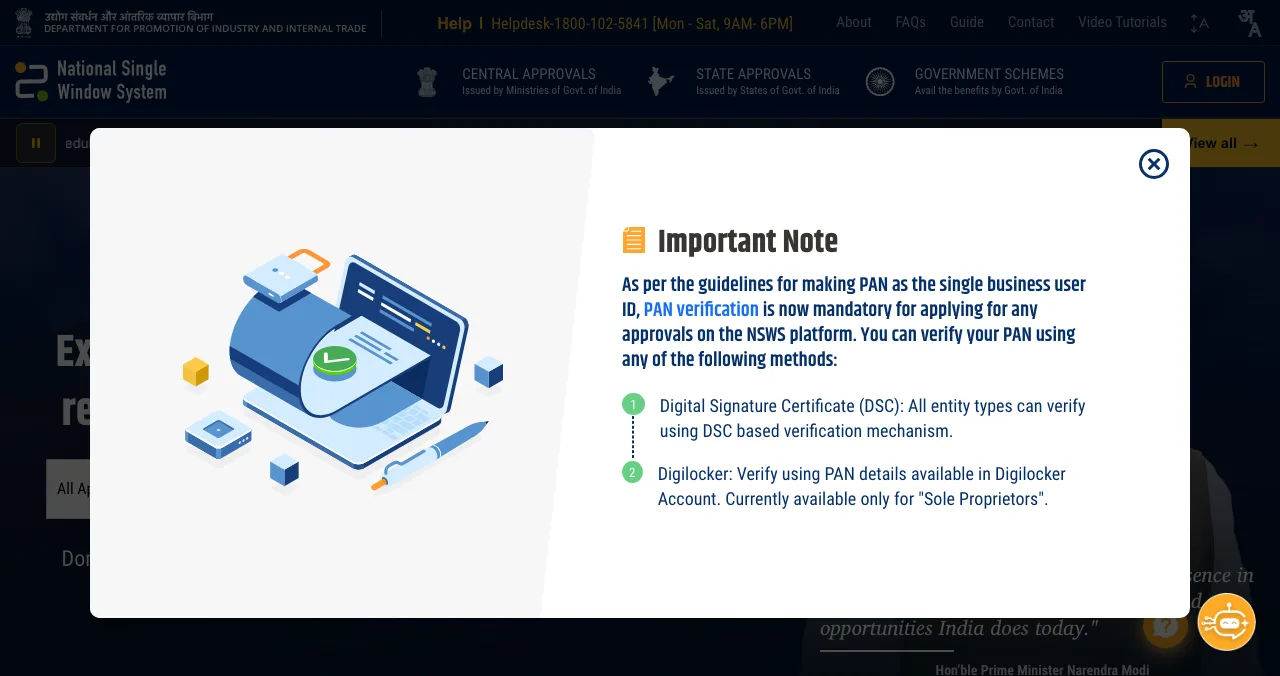
- Before you apply: PAN verification is mandatory on NSWS (via a digital signature certificate, or DigiLocker for sole proprietors).
- Cost: no fee; apply yourself, not through an agent.
- After: apply for the 80-IAC tax exemption if you're an eligible private limited company or LLP.
Key takeaways
- DPIIT recognition is free, and the government says it hasn't appointed any agents for it.
- Applications go through NSWS, which now requires PAN verification before approvals.
- Eligibility depends on entity type, age, turnover and genuine innovation, not on funding.
- Recognition is the gateway to the 80-IAC tax holiday and other Startup India benefits; each has its own criteria.
- Recognition doesn't bring customers; pair it with listings people use to find products.
Startup India recognition, formally DPIIT recognition, is the Indian government's official stamp that your company is a startup. It's free, it's done online, and it's the gateway to the 80-IAC tax holiday and other Startup India benefits. It's also surrounded by agents offering to "register" you for a fee you don't need to pay. This guide walks through the real process, using the Startup India portal's recognition page (last updated 30 October 2026) and the NSWS portal, both checked on 17 November 2026. Jump to eligibility, the steps or what comes after.
- Fee for DPIIT recognition
- ₹0
- Startup status window (20 for deep tech)
- 10 yrs
- Turnover limit (₹300 crore for deep tech)
- ₹200 cr
- Portal to apply on: NSWS
- 1
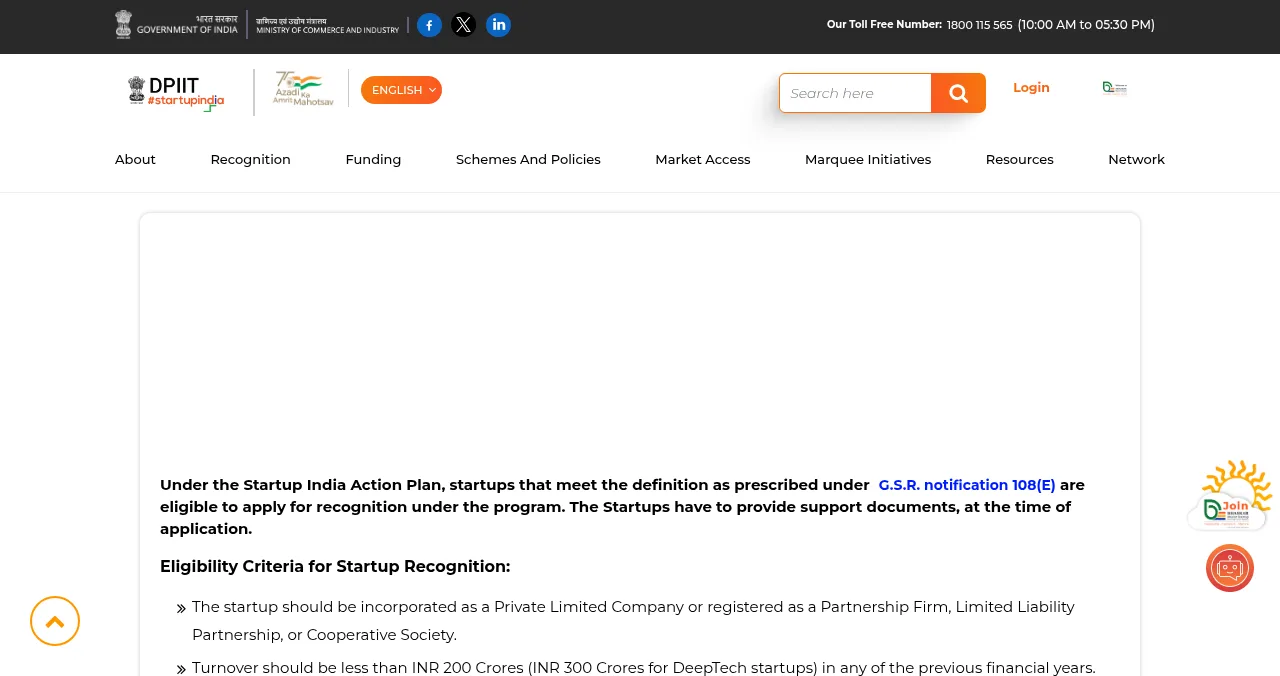
Are you eligible?
| Criterion | Rule on the Startup India portal |
|---|---|
| Entity | Private limited company, partnership firm, LLP or cooperative society |
| Age | Up to 10 years from incorporation; 20 years for deep tech |
| Turnover | Under ₹200 crore in every previous financial year; ₹300 crore for deep tech |
| Purpose | Innovation or improvement of products, services or processes, with potential for jobs or wealth |
| Exclusion | Not formed by splitting up or reconstructing an existing business |
Table: DPIIT startup recognition eligibility (Startup India portal, updated 30 Oct 2026)
How to register on Startup India, step by step

- Check eligibility against the table above, and keep your incorporation details ready.
- Go to NSWS. DPIIT recognition for all eligible entities is available through the National Single Window System (nsws.gov.in).
- Create an NSWS account with your own details, email and mobile number.
- Verify your PAN. NSWS says PAN verification is now mandatory for applying for approvals, using a digital signature certificate (all entity types) or DigiLocker (currently sole proprietors only).
- Add the form "Registration as a Startup". Fill in your entity details and describe how you're innovating or improving a product, service or process.
- Upload the supporting documents the form asks for; the portal says startups must provide them at the time of application.
- Submit and track the status on NSWS. Once recognised, you receive the DPIIT Certificate of Recognition.
What comes after recognition
- Section 80-IAC tax exemption: apply after recognition. If approved, a tax holiday for three consecutive financial years out of your first ten. Only private limited companies and LLPs incorporated after 1 April 2016 are eligible.
- Section 56 (angel tax) exemption: the portal links to it alongside 80-IAC; check the current rules and notification before applying.
- Other approvals on NSWS: the same portal handles a range of central and state business approvals.
Get found by customers, too

DPIIT recognition is for the government, banks and investors. Customers find products by searching for their problem. A free Science of Apps Launchpad profile covers that side, and once it's live, your product is tested end to end with a detailed report. For databases, media and launches, see how to list your startup in India.
Common mistakes

- Paying for registration — it's free
- Applying through someone else's account — use your own details, email and mobile
- Skipping PAN verification — NSWS requires it before approvals
- Assuming every entity qualifies — sole proprietorships aren't in the eligible list
- Expecting recognition to bring customers — list your product where people search too
Ready to be found?
How we know
Eligibility, the NSWS route, the no-fee and no-agent notices and the 80-IAC criteria come from the Startup India portal's recognition page, last updated 30 October 2026, and the PAN notice from the NSWS homepage, both read on 17 November 2026. The exact form fields and documents are set on NSWS and may change; follow the form and the portal's current notification. This isn't legal or tax advice. Science of Apps runs the Launchpad mentioned above.
Key terms, defined
- DPIIT: the Department for Promotion of Industry and Internal Trade, Ministry of Commerce and Industry.
- DPIIT recognition: official recognition as a startup under the Startup India programme.
- NSWS: the National Single Window System, the portal for business approvals.
- PAN verification: confirming your Permanent Account Number on NSWS, now mandatory for approvals.
- Section 80-IAC: the income tax exemption available to eligible recognised startups.
Frequently asked questions
How do I register on Startup India?
Create an account on the National Single Window System (nsws.gov.in), complete PAN verification, add the form 'Registration as a Startup' (DPIIT recognition) and submit it with the supporting documents the form asks for. The Startup India portal links to NSWS and to quick guides.
Is Startup India registration free?
Yes. The Startup India portal says the Ministry of Commerce and Industry does not charge any fee for the DPIIT Certificate of Recognition or Certificate of Eligibility, and that startups should apply themselves, as no agency or representative has been appointed.
Who is eligible for DPIIT recognition?
An entity incorporated as a private limited company or registered as a partnership firm, LLP or cooperative society; up to 10 years from incorporation (20 for deep tech); with turnover under ₹200 crore (₹300 crore for deep tech) in every previous financial year; working on innovation or improvement with potential for jobs or wealth. Entities formed by splitting or reconstructing an existing business don't qualify.
Can a sole proprietorship get DPIIT recognition?
Not under the eligibility criteria on the Startup India portal, which list private limited companies, partnership firms, LLPs and cooperative societies. A sole proprietor would need to form one of those entities first.
What is the 80-IAC tax exemption?
After DPIIT recognition, a startup can apply for an income tax exemption under Section 80-IAC. If approved, it gets a tax holiday for three consecutive financial years out of its first ten. Only private limited companies and LLPs incorporated after 1 April 2016 are eligible.
Why is PAN verification needed on NSWS?
NSWS shows a notice that PAN is being made the single business user ID and that PAN verification is now mandatory for applying for any approvals on the platform, using a digital signature certificate (all entity types) or DigiLocker (currently for sole proprietors).
Sources
- Startup India (DPIIT) — Startup recognition and tax exemption (updated 30 Oct 2026; checked 17 Nov 2026)
- National Single Window System (NSWS) — homepage notice on PAN verification (checked 17 Nov 2026)
- Science of Apps — Launchpad: launch your product free
- Checked November 17, 2026. Figures that change — fees, salaries, prices — are reviewed every six months; if something is out of date, tell us.
Where to go from here
- How to list your startup in India — databases, media and product listings
- How to start a startup in India — from incorporation onwards
- Angel investors in India — who you'll meet next
- Startups in IndiaDPIIT registration: Startup India recognition benefits, eligibility and the step-by-step processDPIIT startup registration explained: 2026 eligibility rules, documents, the step-by-step process and every benefit — tax, compliance, IP and funding.
- Science of Apps - LaunchpadHow to list your startup in India in 2027: DPIIT recognition, startup databases, media and launch platformsHow to list your startup in India in 2027: free DPIIT recognition via NSWS, Tracxn and Crunchbase profiles, YourStory, Google Business and launch platforms.
- Startups in IndiaHow to start a startup in India: a step-by-step founder's guide, from idea to first fundingHow to start a startup in India: validate the idea, pick a structure, register, get DPIIT recognition, open banking, comply and raise your first money.
- Science of Apps - LaunchpadChatGPT SEO for startups: how to get your product recommended and cited by ChatGPT, from OpenAI's own rulesChatGPT SEO for startups in 2027: what OpenAI says makes a site eligible for ChatGPT search, and how to get your product recommended and cited.
- App developmentGoogle Play developer account: cost, setup and verificationA Google Play developer account costs a one-time US$25. Personal vs organisation, documents, D-U-N-S, identity checks and the 12-tester rule.
- Science of Apps - LaunchpadA mobile app launch plan for 2027: what to do eight weeks before, on launch day and in the 30 days after, with store rules, pre-orders and pre-registration, launch marketing and how to know it workedA mobile app launch plan in three phases: 8 weeks before, launch day and 30 days after. Store rules, pre-orders, launch marketing and the metrics to watch.




Get the ideas, not the noise.
Sign up with Google and we’ll send you short UX psychology tips by email — why people tap, stall and leave, and what to do about it. Unsubscribe anytime. Prefer something to keep? Get the free Laws of UX guide as a PDF.
Launch day ends. Your listing shouldn't.
DPIIT recognition makes you official; a permanent, free Launchpad profile makes your product findable by customers, and your product is tested end to end with a detailed report.