 By
Quick answer: How do I get my startup to show up on Google?
- Home page: Organization structured data with name, url, logo, sameAs.
- Site name: WebSite structured data with your preferred name.
- One name: "Acme", not "Acme Inc" here and "AcmeHQ" there.
- Profiles: the same facts on LinkedIn, Crunchbase and directories.
- Verify: Rich Results Test, then URL Inspection in Search Console.
Key takeaways
- Google decides how your brand appears; you supply clear, consistent signals.
- Organization markup has no required properties; add all that apply.
- WebSite markup is the main way to state your preferred site name.
- Generic names are unlikely to be used as site names.
- Consistency across profiles helps search and AI engines alike.
Search your startup's name and you may see three things that make you wince: a stranger's company with a similar name, your site listed as "acme-app-v2.vercel.app", and no logo. Google builds its picture of a brand from your home page and from references across the web. Entity SEO is the work of making that picture clear and consistent. This guide covers the markup Google documents and the profile hygiene that supports it, as read on 17 November 2026. Jump to the markup, profiles or checking it.
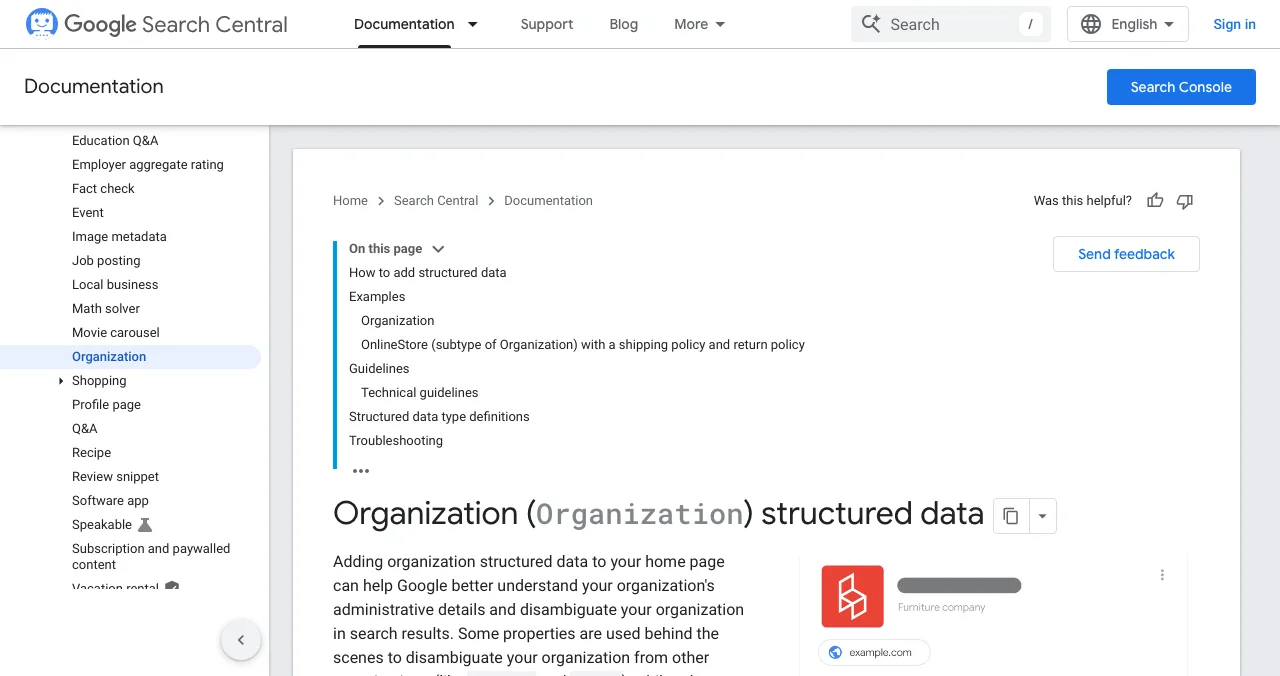
What Google uses to understand your brand
Google's documentation says Organization structured data on your home page helps it understand your organisation's administrative details and disambiguate it from others, and some properties can influence what appears in results, such as the logo in your knowledge panel. For the site name shown above results, WebSite structured data is the most important signal, alongside og:site_name, the title, headings and other home-page text.
Both are automated. Google says it can't manually change a site name; you can only state your preference clearly.
The markup

- Organization on the home page — name, url, logo, description, sameAs; Google lists no required properties, so add all that apply.
- sameAs — URLs of your official profiles: LinkedIn, Crunchbase, your Launchpad profile, app store pages.
- WebSite with your site name — a concise, recognised name ("Google", not "Google, Inc"), plus an alternate name.
- Match the visible page — the same name in the title, logo alt text and headings.
- Validate — Rich Results Test, then URL Inspection in Search Console.
| Property | Example | Why |
|---|---|---|
| name | Acme | The name you want to be known by |
| url | https://acme.com | Your canonical home page |
| logo | https://acme.com/logo.png | Can influence the logo Google shows |
| description | Invoicing for freelancers in India | A plain statement of what you do |
| sameAs | LinkedIn, Crunchbase, Launchpad URLs | Connects your official profiles |
Table: Organization structured data properties for a startup (from Google's Organization documentation; example values are illustrative)
Profile hygiene

- One name everywhere — same spelling, same capitalisation
- One description — the same one-liner on every profile
- The same logo — square, recognisable at small sizes
- Link back to your site — from each profile
- Keep facts current — founding year, location, funding, team size
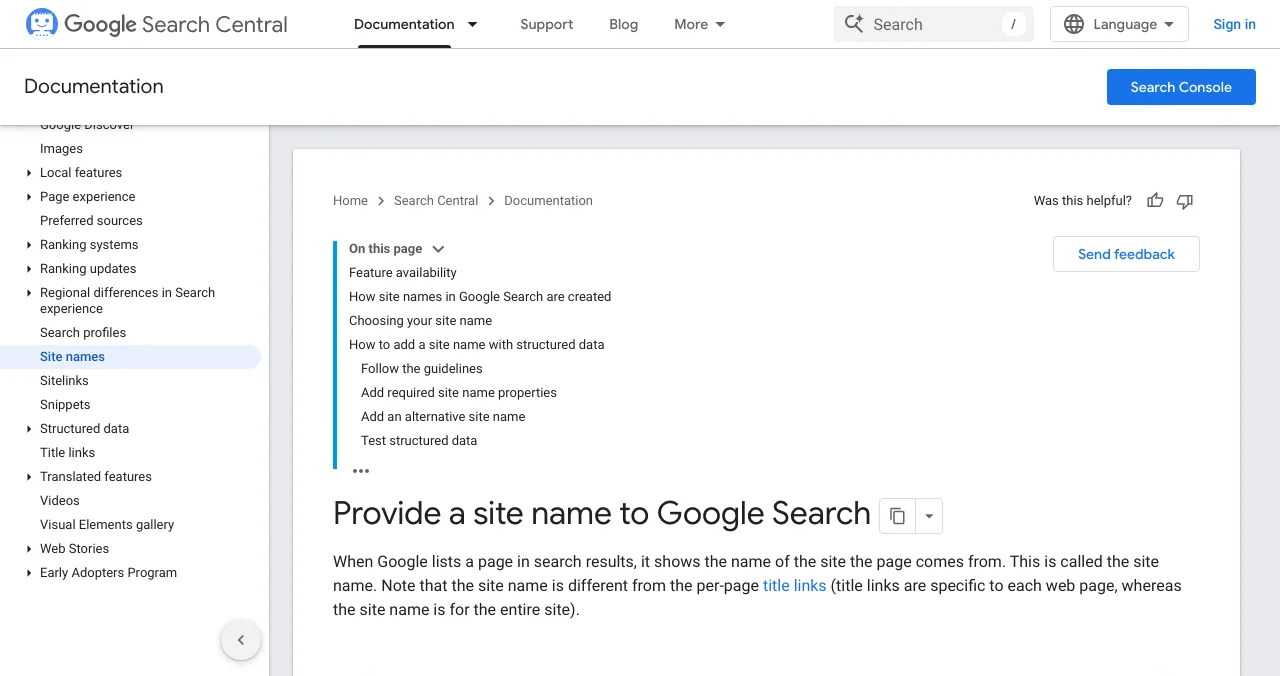
Checking it worked

- Rich Results Test — the markup parses with no critical errors
- URL Inspection — Google can fetch your home page
- Search your name — site name and logo, after recrawling
- Search name + category — "Acme invoicing" should return you
Mistakes

- A generic name — Google says names like "Best Dentists In Iowa" are unlikely to be used
- Different names on different pages — confuses every system
- sameAs to pages you don't control — list official profiles only
- Markup that disagrees with the page — keep them consistent
- Expecting instant changes — recrawling takes time
Ready to be recognised?
How we know
Markup guidance comes from Google Search Central's Organization structured data and site-name documentation, and its generative AI guidance, read on 17 November 2026. The profile checklist is our editorial recommendation.
Key terms, defined
- Entity: a distinct thing search engines recognise, like an organisation.
- Structured data: code describing a page's content in a standard format.
- sameAs: a property listing your official profiles elsewhere.
- Site name: the name Google shows for your whole site.
- Knowledge panel: the information box Google shows for some entities.
Frequently asked questions
How do I get my startup to show up on Google?
Make sure Google can find and index your site (Search Console, a sitemap, links from other sites), then help it understand your brand with Organization and WebSite structured data on your home page and consistent profiles elsewhere.
How do I get a Google knowledge panel for my startup?
You can't request one directly; Google generates them. Organization structured data can influence elements such as the logo shown, and consistent facts on your site and authoritative profiles help Google recognise you as an entity.
What is entity SEO?
Making it easy for search engines to identify your organisation as a distinct thing, with a name, logo, website and official profiles, so they connect mentions of you across the web.
What is sameAs in schema?
A property in structured data listing URLs of your official profiles elsewhere, such as LinkedIn, Crunchbase or a directory page, which helps search engines link them to your organisation.
How do I change the site name Google shows?
Add WebSite structured data to your home page with your preferred name and, optionally, an alternate name. Google says the process is automated, can't be changed manually, and may take time.
Does entity SEO help with AI search?
Consistent facts across your site and profiles make it easier for any system, including AI assistants, to describe you correctly. Google's generative AI guidance says no special markup is needed for its AI features.
Sources
- Google Search Central — Organization structured data (checked 17 Nov 2026)
- Google Search Central — Provide a site name to Google Search (checked 17 Nov 2026)
- Google Search Central — Optimizing your website for generative AI features on Google Search (updated 10 Jul 2026)
- Google — Rich Results Test
- Schema.org — Organization
- Checked November 17, 2026. Figures that change — fees, salaries, prices — are reviewed every six months; if something is out of date, tell us.
Where to go from here
- SEO for startups — the six-month plan
- Rank in ChatGPT — AI search
- What is AEO? — answer engines
- Career guidesStructured data and schema markup skills employers want in 2027: JSON-LD, rich result eligibility, entities, validation and maintenance at scaleSchema markup skills employers want in 2027: JSON-LD, rich result eligibility, product and article data, entities, validation and keeping markup accurate.
- Science of Apps - LaunchpadHow to write a startup one-liner: the formula, the test Product Hunt uses, before-and-after examples, and why the same line everywhere helps search and AI enginesHow to write a startup one-liner: a simple formula, Product Hunt's tagline test, before-and-after examples, and why one consistent line helps AI search.
- Science of Apps - LaunchpadHow to get backlinks for a new startup for free, and which link tactics Google treats as spamHow a new startup can earn backlinks for free in 2027: launch sites, reviewed directories, data, free tools, partners and press, plus the link tactics to avoid.
- Science of Apps - LaunchpadHow to get organic visibility for your startup on Google and in AI search, without paying for adsHow to get organic visibility for your startup in 2027: get indexed, let AI search crawlers in, build profiles and citations, and write pages engines quote.
- Science of Apps - LaunchpadSEO for startups: a prioritised plan for the first six months, from getting indexed to pages that answer buyers' questions, using Google's own starter guideSEO for startups, month by month: get indexed, fix the basics, earn a few relevant links and publish pages answering buyers' questions, per Google's own guide.
- Science of Apps - LaunchpadHow to get your startup mentioned by Gemini, Claude and Grok: what each company documents about crawling and search, and the levers that work for all threeHow to get your startup mentioned by Gemini, Claude and Grok: what Google, Anthropic and xAI document about crawling, and the levers that work for all three.
Get the ideas, not the noise.
Sign up with Google and we’ll send you short UX psychology tips by email — why people tap, stall and leave, and what to do about it. Unsubscribe anytime. Prefer something to keep? Get the free Laws of UX guide as a PDF.
Launch day ends. Your listing shouldn't.
A free, permanent Launchpad profile with your name, description and links is another consistent source you can list in sameAs, ranked by relevance and never by payment.