Flow
Also known as Flow state
Flow is the state of full, energized focus people reach when a task's challenge closely matches their skill and they get clear, immediate feedback.
See it in action
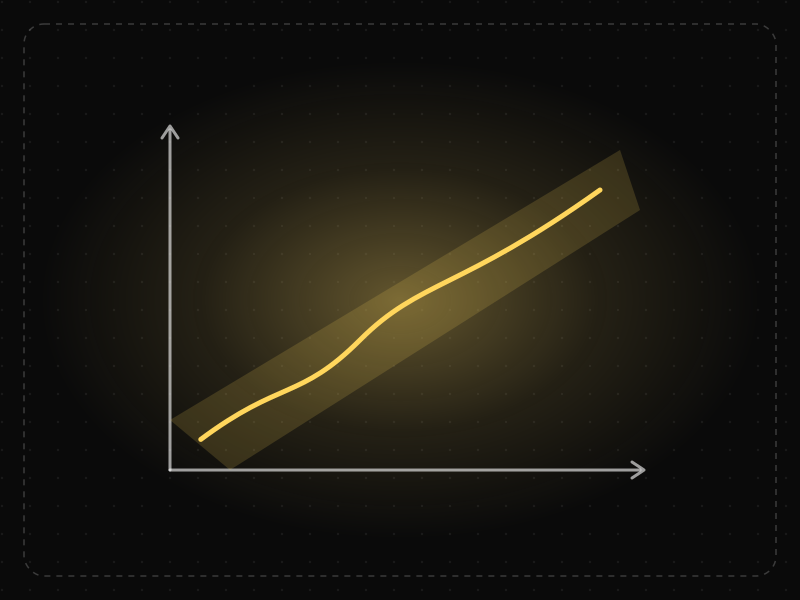
The same screen without and with Flow. Watch both sides play out, then compare the outcome.
Sudden spikes overwhelm people, then easy stretches bore them — either way they drop out.
Each step is a little harder as skill grows, keeping people absorbed and moving.
What to watch: the path staying inside the gold channel where challenge matches skill.
Ramp difficulty gradually, give clear goals and immediate feedback, and remove interruptions.
Interrupt focused work with pop-ups, or throw advanced tasks at newcomers.
Key takeaways
- Too hard creates anxiety; too easy creates boredom — keep challenge matched to skill.
- Clear goals and instant feedback help people stay immersed.
- Remove interruptions and unnecessary decisions from core loops.
Quick facts
- Also known as
- Flow state
- Described by
- Mihaly Csikszentmihalyi
- Year
- 1975
- Category
- Motivation & emotion
- Related laws
- Doherty Threshold, Goal-Gradient Effect, Cognitive Load, Variable Reward
Flow explained
Flow is a mental state of deep, energised focus in which a person is fully absorbed in an activity. Time seems to pass quickly, self-consciousness fades and the activity feels rewarding in itself.
Flow appears when the challenge of a task is well matched to a person's skill, goals are clear and feedback is immediate. If the task is too hard, people become anxious; if it is too easy, they become bored. Both states break flow.
Products cannot force flow, but they can remove the things that break it: interruptions, unclear next steps, slow responses, confusing feedback and difficulty spikes that are out of line with the user's growing skill.
Where it comes from
Psychologist Mihaly Csikszentmihalyi described flow in the 1970s after studying artists, athletes and other people absorbed in their work, and popularised it in Flow: The Psychology of Optimal Experience (1990).
How it shows up in apps
Habit-forming products — learning, fitness, creative and productivity apps — depend on getting users into flow in their core loop. Difficulty curves, progress feedback and the absence of friction keep sessions going and bring people back.
Flow examples
A language app adapts lesson difficulty to recent answers and gives instant right/wrong feedback, so learners stay challenged without getting stuck.
Language learning lessons
Learning apps keep lessons short, adapt difficulty to past answers and give instant right-or-wrong feedback, so learners stay in the zone between too easy and too hard.
Focused writing modes
Writing tools offer distraction-free modes that hide toolbars and notifications, letting people stay absorbed in their work instead of the interface.
Games and onboarding
Well-designed games introduce one mechanic at a time and gradually raise difficulty. The same approach in software onboarding teaches features as users become ready for them.
How to apply Flow
- Make goals and the next step obvious at every point in a task.
- Give immediate, clear feedback on actions so users always know whether they are on track.
- Match difficulty to skill: offer simple paths for newcomers and shortcuts or depth for experienced users.
- Minimise interruptions such as modal pop-ups, unnecessary confirmations and non-urgent notifications during focused tasks.
- Keep the interface fast and predictable so the tool disappears behind the task.
Want Flow checked in your own product? Our retention & churn audit evaluates it alongside the other principles that shape how users decide, onboard and stay.
Common mistakes
- Interrupting focused work with upsells, surveys or feature announcements.
- Introducing every advanced feature at once, overwhelming new users and boring experienced ones.
- Confusing compulsive engagement with flow; flow is valuable to the user, not just to engagement metrics.
How to measure it
Look at uninterrupted session length on core tasks, task completion rates and how often users leave a flow to search for help. Experience sampling or short in-product surveys can ask how absorbed users felt, and session recordings reveal where interruptions or confusion break concentration.
Frequently asked questions
What is Flow?
Flow is the state of full, energized focus people reach when a task's challenge closely matches their skill and they get clear, immediate feedback.
Where does Flow come from?
Psychologist Mihaly Csikszentmihalyi described flow in the 1970s after studying artists, athletes and other people absorbed in their work, and popularised it in Flow: The Psychology of Optimal Experience (1990).
How does Flow apply to app design?
Habit-forming products — learning, fitness, creative and productivity apps — depend on getting users into flow in their core loop. Difficulty curves, progress feedback and the absence of friction keep sessions going and bring people back.
Who discovered the flow state?
Psychologist Mihaly Csikszentmihalyi introduced and studied flow from the 1970s onwards, describing it in his 1990 book Flow: The Psychology of Optimal Experience.
How do you design for flow in an app?
Set clear goals, give instant feedback, balance challenge with skill, remove interruptions and keep the interface responsive so users can focus on their task rather than the tool.
How do you measure Flow in a product?
Look at uninterrupted session length on core tasks, task completion rates and how often users leave a flow to search for help. Experience sampling or short in-product surveys can ask how absorbed users felt, and session recordings reveal where interruptions or confusion break concentration.
Sources
- Csikszentmihalyi, M. (1990). Flow: The Psychology of Optimal Experience. Harper & Row. Find on Google Scholar ↗
- Csikszentmihalyi, M. (1975). Beyond Boredom and Anxiety. Jossey-Bass. Find on Google Scholar ↗
Related laws
 Interaction & speed
Doherty Threshold
Productivity and engagement rise sharply when a system responds in under about 400 milliseconds, so neither the user nor the computer is left waiting on the other.
 Motivation & emotion
Goal-Gradient Effect
People speed up their effort as they get closer to a goal, so visible progress — even artificial head starts — increases completion.
 Memory & attention
Cognitive Load
Cognitive load is the amount of mental effort needed to understand and use an interface; when it exceeds what people can handle, they slow down, make mistakes or give up.
 Motivation & emotion
Variable Reward
Rewards that come unpredictably are more engaging than predictable ones, because anticipation of what might come next keeps people returning.
Flow in practice
- UI/UX designOnboarding screen examples: 40 patterns that get users to value faster40 app onboarding examples and patterns — welcome, sign-up, personalisation, permissions, empty states and first success — and why each works.
- Career guidesDesign handoff and developer collaboration skills employers want in 2027: specs, states, tokens, components, annotations, Dev Mode and working with engineersDesign handoff skills employers want in 2027: specs, states, design tokens, components, annotations, Figma Dev Mode and collaborating closely with engineers.
- Career guidesHow to succeed as a first-time manager in 2027: one-on-ones, delegation, setting expectations, feedback, managing former peers, hiring, handling conflict and leading hybrid teamsHow to succeed as a new manager in 2027: one-on-ones, delegation, clear expectations, feedback, managing former peers, hiring, conflict and hybrid teams.
- Career guidesHow to get a behavioral design job in 2027: applying behavioural science to products ethically — friction, defaults, motivation and testingHow to get a behavioral design job in 2027: behavioural science for products, friction, defaults, motivation, ethics, dark pattern rules and testing.
- Career guidesHow to pass a UX designer interview in 2027: portfolio walkthroughs, whiteboard challenges, take-home tasks, critique, behavioural questions and AIHow to pass a UX designer interview in 2027: portfolio walkthroughs, whiteboard challenges, take-homes, critique, behavioural questions and AI.
- Career guidesHow to get an interaction designer job in 2027: feedback, states, motion, response times, affordances and prototypes that feel rightHow to get an interaction designer job in 2027: feedback, states, motion, response times, affordances, prototyping, accessibility and pay in India.
Get the ideas, not the noise.
Sign up with Google and we’ll send you short UX psychology tips by email — why people tap, stall and leave, and what to do about it. Unsubscribe anytime. Prefer something to keep? Get the free Laws of UX guide as a PDF.