 By
Quick answer: How do I get a free product page?
- Free product page: list on the Science of Apps Launchpad; $0 forever, no card needed.
- Account first: sign up with Google, or your name, work email and a password of at least 10 characters.
- Six short steps: name, story, details, media, links and the founder behind it; save as a draft any time.
- Checked, then live: automated checks plus a person; review usually takes a day or less.
- Not a site builder: one product page, not a multi-page website or a domain.
Key takeaways
- A product page answers three questions fast: what it is, who it's for, where to try it.
- A hosted product page on a directory gets you live today; your own site can follow.
- The problem you solve is the most important field, because that's how people search.
- Real screenshots and a working demo link do more than any adjective.
- Once the page is live, test the product people land on, not just the page.
You've built something and you need one link to send people: a page that says what the product does, shows it, and gets them to try it. You don't need a designer, a domain or a weekend in a site builder for that. This guide walks through getting a free product page on the Science of Apps Launchpad, step by step, as the live pages showed it on 20 November 2026, then covers what to write in each field and when a product page builder is the better choice. Jump to the walkthrough, what to write or builder or listing?.
- To list, forever
- $0
- Short steps from draft to live
- 6
- To launch, per the Launchpad
- 5 min
- Badge on day one (Featured)
- 1
What is a free product page?
A product page is one page about one product: what it does, who it's for, what it looks like, and where to try it. A product landing page is the same thing with one job, turning a visitor into a sign-up, a download or a waitlist entry. You can build either yourself on a site builder, or get a hosted one from a directory that adds discovery on top.
| Hosted product page (Launchpad) | Product page builder (e.g. Carrd) | Full website | |
|---|---|---|---|
| Cost | Free, forever | Free on a subdomain; custom domain from $19/year (Carrd Pro Standard) | Builder plan plus a domain |
| Time to live | Minutes to fill in; review usually a day or less | An afternoon | Days |
| Design control | Structured fields, consistent layout | Full, one page | Full, many pages |
| Your own domain | No: a custom link on launchpad.scienceofapps.com | On paid plans | Yes |
| Discovery built in | Yes: by problem, category, collections | No | No |
| Proof built in | Vouches, followers, earned badges | Whatever you add | Whatever you add |
| Product tested with a report | Yes, once live (optional) | No | No |
Table: A hosted product page vs a product page builder vs a full website (each provider's own pages, checked 20 Nov 2026)
How to create a free product page, step by step
Before the six steps: create a free founder account
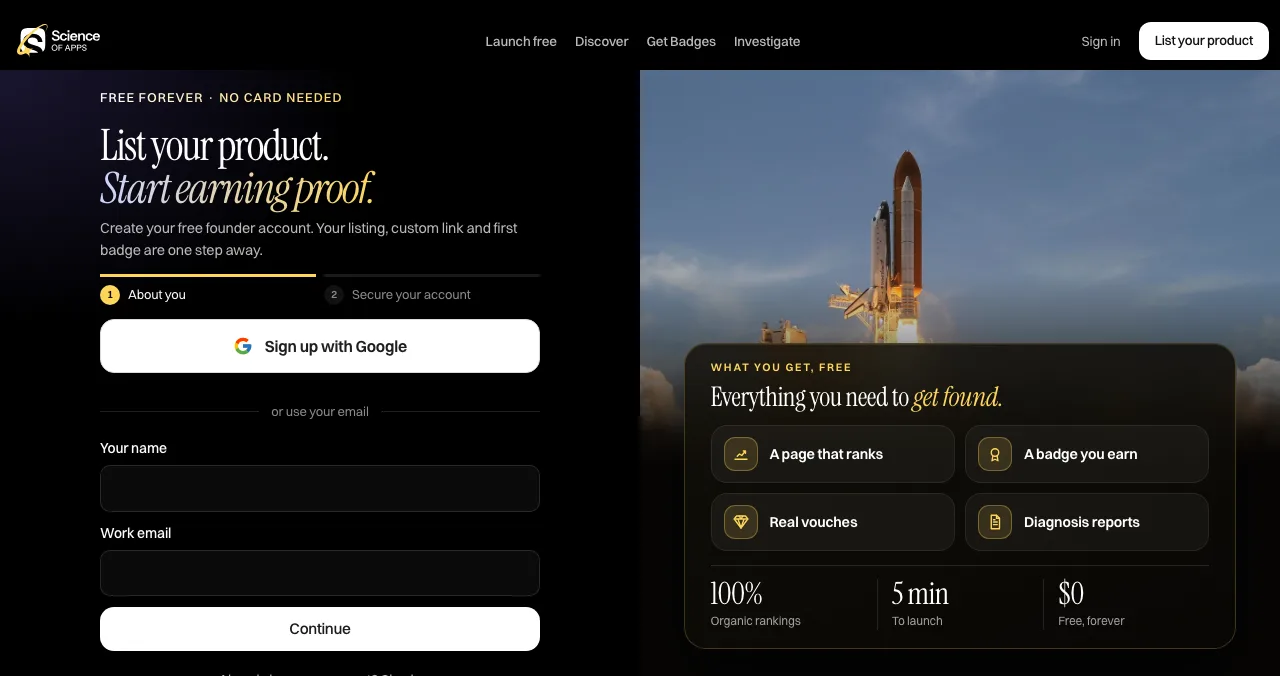
The "List your product" button opens a sign-up page headed "List your product. Start earning proof." It has two short stages, About you and Secure your account. You can sign up with Google, or enter your name and a work email, then create a password of at least 10 characters. The page says "Free forever · no card needed".
Use the email on your product's domain if you have one: confirming a work email on your domain is how you later earn the Verified badge.
The six short steps
The Launchpad's homepage describes the listing as "name, story, details, media and links, and the founder behind it", in six short steps, with "Save as a draft any time". Here is what each covers, matched to what a live profile shows:

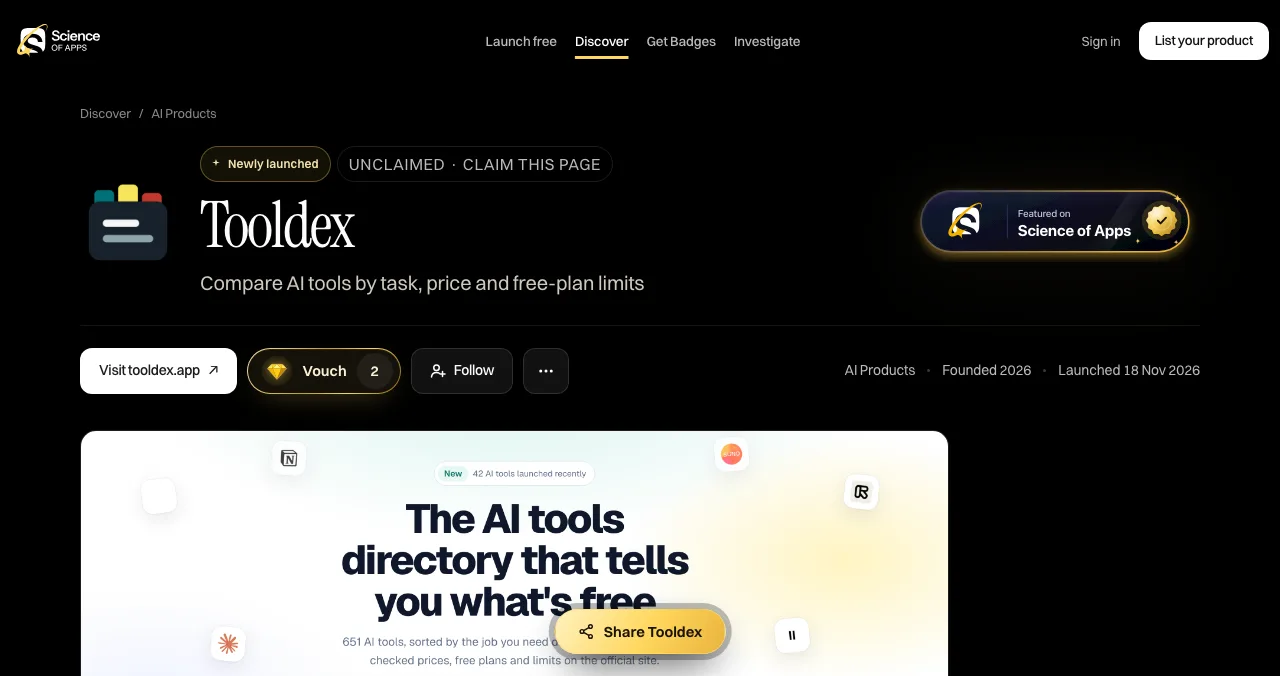
- Name — your product's name and a one-line tagline. On a live profile this is the headline, e.g. "Compare AI tools by task, price and free-plan limits".
- Story — what the product is and why it exists. Profiles show it as "About", followed by "The problem it solves" and "Who it's for".
- Details — category, pricing model (Free, Freemium, Free trial…), platforms (Web, iOS, Android) and the year founded. These drive the "At a glance" box and where you appear in Discover.
- Media — screenshots and video of the real product. Profiles open with a large image.
- Links — your website and a live demo or app link. These become the "Visit website" button and the demo link.
- Founder — the founder card: your photo, name and LinkedIn, shown only when you choose.
Then: checked, published and claimed
After you submit, automated checks confirm your link works and nothing breaks the content policy, and moderators step in on anything reported. Every listing is also reviewed by a person; the FAQ says review usually takes a day or less. Then you verify that you own the product and publish. Your profile, custom link and Featured badge go live and become discoverable.
What to write in each field
The fields are short, so each word counts. People land here from search and AI answers, often with a problem in mind, not your brand.

- Tagline: the outcome, in plain words — "Compare AI tools by task, price and free-plan limits" beats "The future of AI discovery"
- The problem it solves: the searcher's words — write the sentence a buyer would type
- Who it's for: a real group — "small teams comparing AI tools", not "everyone"
- Media: the product, not a logo — the screen people will see first after sign-up
- Links: the shortest path to value — a demo, a free tier or the store page
- Founder: a face — people trust products with a person behind them (social proof starts here)
Builder or listing: which product page do you need?
- Cost
- Free on carrd.co; Pro Lite $9/year; Pro Standard $19/year
- Custom domain
- Pro Standard and up
- Free limit
- Up to three sites, with Carrd branding
- Catch
- No discovery: you bring every visitor
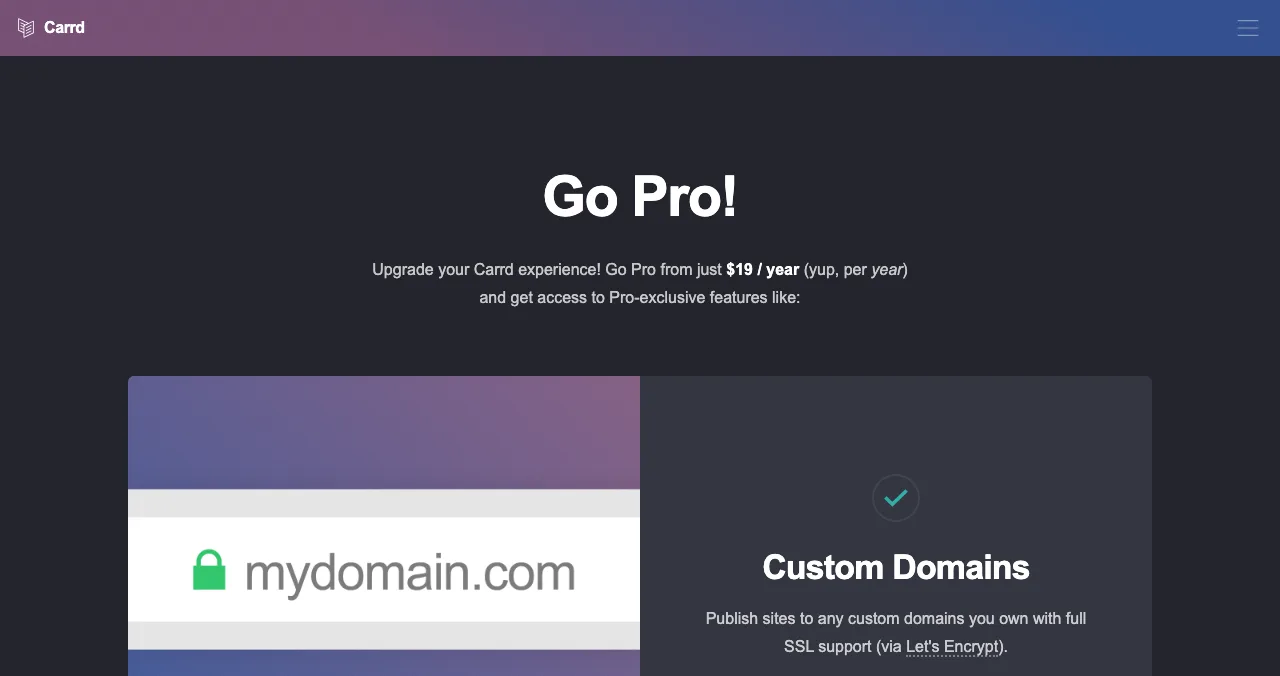
A product page builder makes sense when you need your own domain, your own design, or a form that collects emails into your stack. Carrd is the simplest: the Pro page lists Pro Lite at $9 a year and Pro Standard, with custom domains, forms and embeds, at $19 a year, and free accounts can publish up to three sites with Carrd branding. Our no-code builders and Webflow vs WordPress vs Framer comparisons cover the bigger tools.
Most early products end up with both: a hosted product page that people find, and their own page that they own. Point the listing at your site and put the badge on your site.
| Your situation | Start with | Add later |
|---|---|---|
| Idea or prototype, no domain yet | Launchpad product page | Own page when you have a domain |
| Live SaaS with a site | Launchpad listing linking to it | Directory listings that point at it |
| Mobile app | Launchpad page with your store link | A one-page app landing page |
| Need email capture today | A builder or waitlist tool | Launchpad listing linking to it |
Table: Which product page to start with, by stage
After you're live: test what people land on
A product page sends people to your product, so the product has to hold them. Once your listing is live, a free baseline diagnosis covers your landing page, discoverability and speed, and you can order a full investigation of the product itself.
- Areas of your product tested
- 22
- Automatic measurements, desktop and mobile
- 39
- Expert checks behind your login
- 74
- Verdicts that rank what to fix first
- 5
Arrive
First impression
Discoverability on Google, AI and social; landing page, pricing, trust and speed.
Join
The first minutes
Sign-up, sign-in, recovery and onboarding.
Use
The everyday job
Home, core flow, dashboards, search, microcopy and error states.
Pay
Value into revenue
Paywall, upgrade, checkout and payments.
Stay
Coming back
Notifications, account, settings and help.
Every screen
Throughout
Accessibility to WCAG 2.2, visual design and consistency.
See what visitors see after they click
List free, then order the report that fits your stage.

 Economy
See what new customers see
- Store listing and homepage, screen by screen
- Scorecard against 60 Laws of UX
- Customers, competitors and the fixes worth most
PremiumThe full diagnosis and the plan
- Every screen, every finding, every flow
- All 60 laws with evidence and fixes
- 8 strategy chapters and a 90-day roadmap
Fact-checked against the evidence. Private to your team, and never affects ranking.
An optional Premium listing also exists: a labelled spotlight in Discover and five articles. It adds reach, and the pricing page says paying never changes organic ranking.
A first-week plan
- Day 1
Create the page
Founder account, six steps, submit.
- Day 2
Go live
Review passes; your custom link and Featured badge are live.
- Day 3
Claim it
Confirm a work email on your domain to earn Verified.
- Day 4
Share the link
Post it where your users are; ask early users to vouch.
- Day 5
Read the baseline
Fix the landing-page and speed issues it flags first.
Mistakes to avoid

- A clever tagline — clarity wins; say the outcome
- Logo-only media — show the product
- A dead or slow link — automated checks catch broken links, and visitors leave slow ones
- Skipping the problem field — it's how people find you
- Treating the page as the finish line — the product behind the link decides whether visitors stay
Ready to launch?
How we know
Every Launchpad detail comes from its homepage, sign-up page, launch page, badges, pricing and investigation pages and a live public profile, all read on 20 November 2026. We did not create an account or submit a listing, so the six steps are described from the public pages and the fields shown on live profiles. Carrd's plans come from its Pro page, read the same day. Science of Apps runs the Launchpad.
Key terms, defined
- Product page: one page about one product: what it does, who it's for, what it looks like and where to try it.
- Product landing page: a product page built to drive one action, such as a sign-up or download.
- Product page builder: a tool for designing and hosting your own product page, usually on your own domain.
- Custom link: your product's own address on the Launchpad, to share and embed.
- Featured badge: the badge every live, moderated Launchpad listing earns on day one.
- Vouch: a signed-in member's public endorsement; one per person, never bought.
Frequently asked questions
How do I get a free product page?
List your product on the Science of Apps Launchpad. Create a free founder account, complete six short steps covering the name, story, details, media, links and founder, and submit. Automated checks and a person review it, usually within a day, and then the page goes live at its own link with a Featured badge. Listing is free forever.
What is a product landing page?
A product landing page is a single page built to explain one product and get one action, such as signing up, downloading or joining a waitlist. It covers the problem, the promise, proof such as screenshots and reviews, and one clear call to action. A directory product page does the same job on a page someone else hosts.
Is the Launchpad a product page builder?
Not in the website-builder sense. You don't design layouts or connect a domain. You fill in structured fields and the Launchpad turns them into a consistent product page at its own link, alongside discovery, vouches and badges. If you want full design control or several pages, use a builder such as Carrd, Framer or Webflow, and link the two.
Can I make a free app landing page for an iOS or Android app?
Yes. The Launchpad accepts mobile apps alongside SaaS, AI products, developer tools, browser extensions, games and open-source projects, and a live profile shows the platforms you support. Add your App Store or Google Play link as the main link so visitors can install straight from the page.
How long does it take to go live?
The Launchpad says five minutes to launch, and most founders finish the listing form in about two minutes. After you submit, automated checks confirm your link works and nothing breaks the content policy, and a person reviews it; the homepage says review usually takes a day or less.
Does a free product page help SEO?
It can help people find you. Launchpad profiles are built to be indexed by Google and read by AI engines, and they link to your website. On 18 November 2026 the website links on public profiles we inspected had rel="noopener" only. That is a dated observation, not a promise of rankings.
What does the free product page include?
A public profile at a custom link with your tagline, story, the problem you solve, who it's for, platforms, pricing model, screenshots and links, the founder card if you choose, vouches, followers, comments and earned badges. Everyone gets the Featured badge on going live; Verified and others unlock later.
Sources
- Science of Apps — Launchpad homepage: how listing works, FAQ (checked 20 Nov 2026)
- Science of Apps — Create your free founder account (checked 20 Nov 2026)
- Science of Apps — Launch page: what a free listing gives you (checked 20 Nov 2026)
- Science of Apps — Badges: seven stages (checked 20 Nov 2026)
- Science of Apps — Pricing: free listing, reports, Premium listing (checked 20 Nov 2026)
- Science of Apps — Product investigation (checked 20 Nov 2026)
- Science of Apps — Example live profile: Tooldex (checked 20 Nov 2026)
- Carrd — Pro plans (checked 20 Nov 2026)
- Checked November 20, 2026. Figures that change — fees, salaries, prices — are reviewed every six months; if something is out of date, tell us.
Where to go from here
- Landing page conversion checklist — once you have your own page
- List your startup before launch — pre-launch listings
- Launchpad review — what it is and isn't
- Science of Apps - LaunchpadHow to make a free startup landing page with no code: the sections every startup landing page template needs, the six-step Launchpad route, and when to build your own on Carrd, Framer or WebflowMake a free startup landing page with no code: the sections a startup landing page template needs, the six-step Launchpad route, and builder options.
- Science of Apps - LaunchpadHow to market an AI tool in 2027: positioning by task, AI directories, AI search, demos and the trust that makes people payHow to market an AI tool in 2027: position by task, list in AI directories, get cited by AI search, show real outputs and earn trust that converts.
- Science of Apps - LaunchpadThe best free landing page builders for startups in 2027: 9 free plans compared by pages, forms, branding, subscribers and custom domains, and the free product page that's live in five minutesA free landing page is easy; one with forms and your own domain isn't. 9 free landing page builders compared for startups, limits checked 20 Nov 2026.
- Science of Apps - LaunchpadHow to start a tech company without being technical: four ways to build the product without coding, what the non-technical founder must own, and how to launch and get the product testedHow to start a tech company without coding: no-code tools, AI app builders, a technical co-founder or hired developers, and the jobs only you can do.
- Science of Apps - LaunchpadThe best free backlink checkers for startups in 2027: six tools compared on their own pages, what each free version shows, its limits, and how to check my backlinks in ten minutesThe best free backlink checker depends on whose links you check: Search Console and Ahrefs Free for yours, Semrush, Moz and Bing for any site. Limits compared.
- Science of Apps - LaunchpadSEO for startups: a prioritised plan for the first six months, from getting indexed to pages that answer buyers' questions, using Google's own starter guideSEO for startups, month by month: get indexed, fix the basics, earn a few relevant links and publish pages answering buyers' questions, per Google's own guide.
Get the ideas, not the noise.
Sign up with Google and we’ll send you short UX psychology tips by email — why people tap, stall and leave, and what to do about it. Unsubscribe anytime. Prefer something to keep? Get the free Laws of UX guide as a PDF.
Launch day ends. Your listing shouldn't.
A Science of Apps Launchpad listing is a free, permanent product page with its own link, found by the problem you solve, and your product can be tested end to end with a detailed report once it's live.