 By
By Quick answer: What makes a good paywall design for a subscription app?
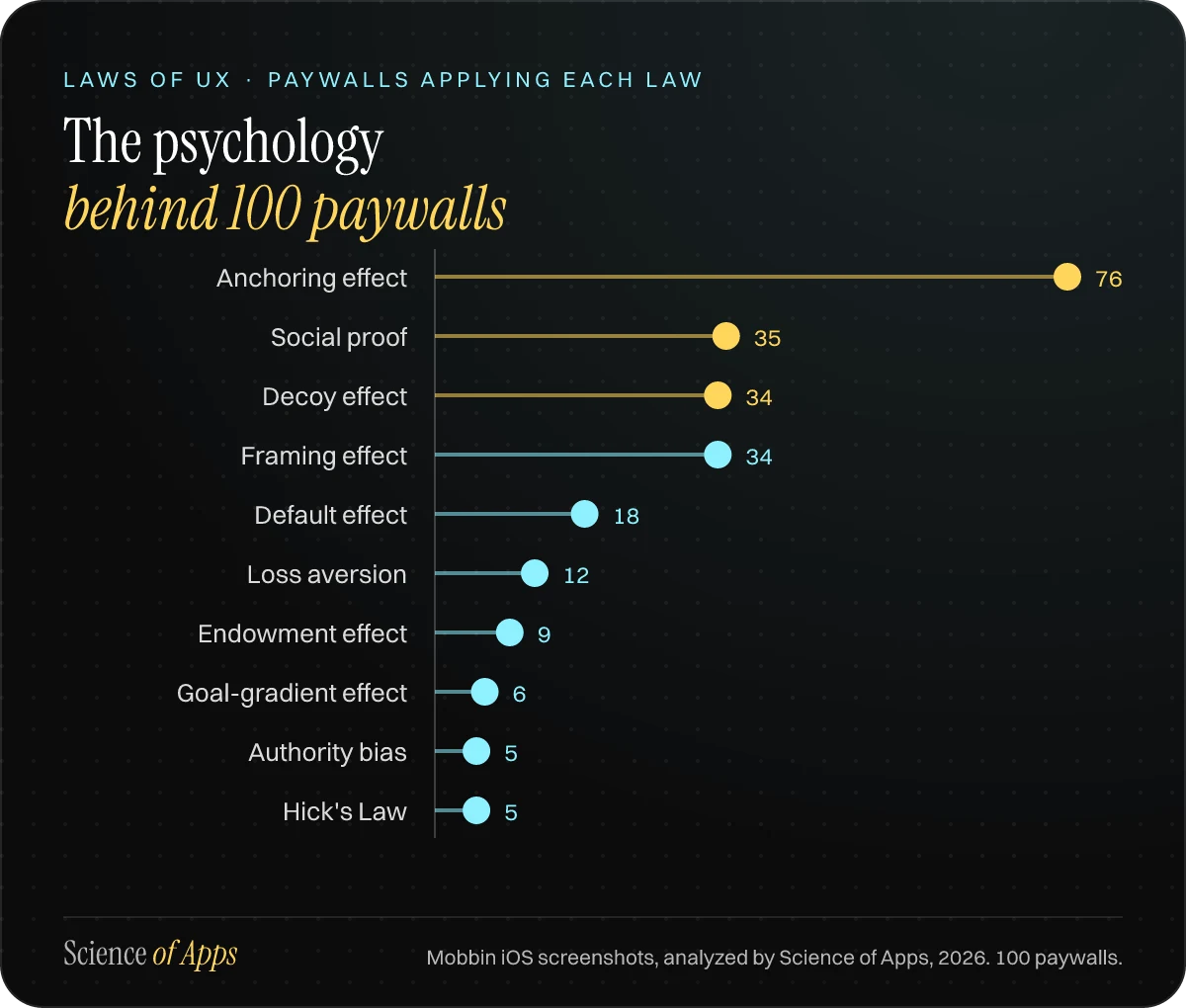
- Anchor the price — 76 of 100 paywalls compared the price with something: a struck-out price, a per-week figure or a 'Save 52%' badge.
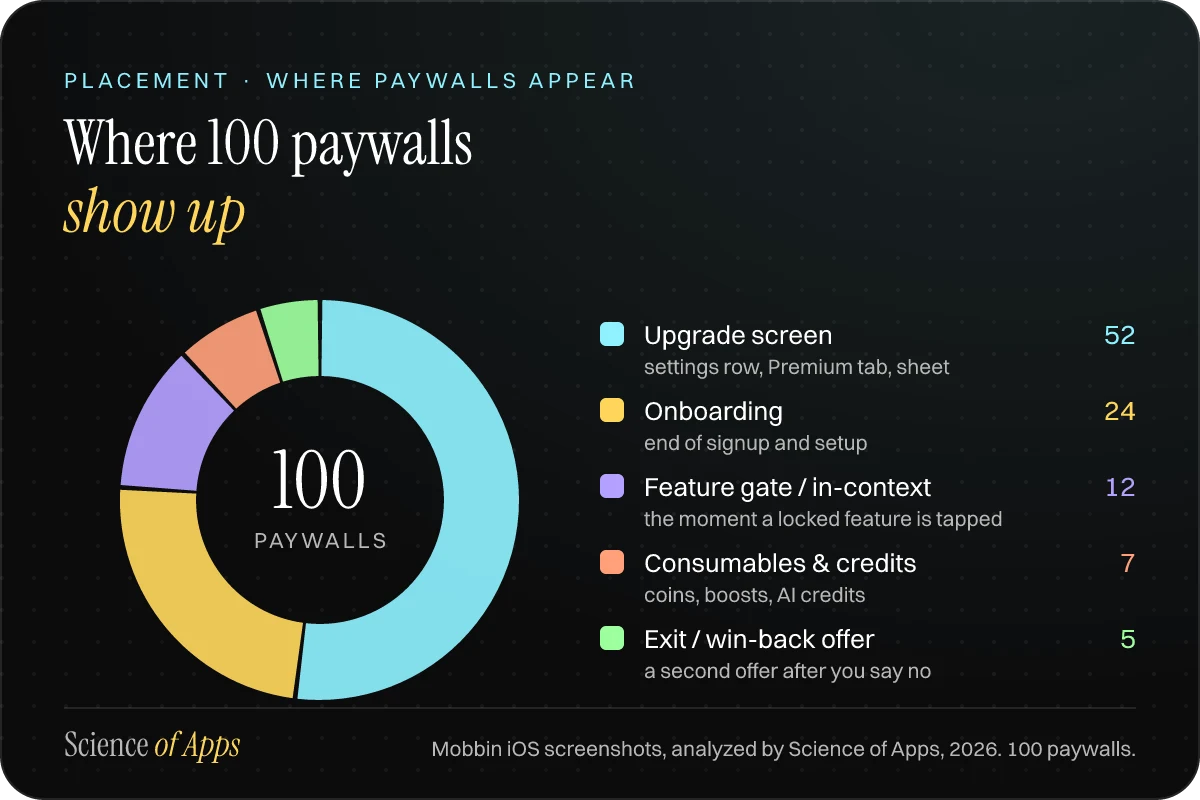
- Place it where intent peaks — 24 sat in onboarding and 12 at the moment a locked feature was tapped; 5 were last-chance offers after a dismissal.
- Offer a trial, then explain it — 45 offered a free trial, but only 15 of those showed a reminder date or a 'how your trial works' timeline.
- Pick a default on purpose — of 41 paywalls with a preselected billing length, 20 picked the longer plan and 21 the shorter one.
- Leave a door open — 97 of 100 could be dismissed; only 3 were hard paywalls with no close button.
Key takeaways
- Most top paywalls use 2–3 plans, one preselected, with the annual price restated per month or week.
- The cleanest decoy is a monthly plan with no trial, placed under an annual plan that has one.
- A dated trial timeline (today, reminder, charge date) is the most under-used trust signal we saw.
- Exit offers like '80% off forever' work on loss aversion; use them once, honestly, or not at all.
- Our Paywall of the Year goes to Duolingo's Choose a plan screen; Quizlet wins for honest pricing.
Every subscription app has one screen that pays for everything else. ChatGPT, YouTube, Tinder and Duolingo together took more than $6 billion from in-app purchases in 2025, according to AppMagic estimates2. Most of that money moved through a paywall a few centimetres tall.
So we went and read them. We pulled 100 iOS paywalls from Mobbin's library of real app screens1, 66 apps in all. They range from the top-grossing apps of 2025 to the indie favourites designers keep bookmarking. Every screen was coded on the same 12 points: where it appears, how many plans it offers, which plan is preselected, how the price is anchored, whether there's a decoy, how the trial is framed, how you get out, and which laws of UX it leans on. This is what we found, with the screens to prove it. At the end we give out an award.
- Paywalls analysed, from 66 iOS apps
- 100
- Anchored the price against something
- 76%
- Offered a free trial
- 45%
- Trials that showed a reminder or charge date
- 1 in 3
- Hard paywalls with no way to close them
- 3

What makes a good paywall design?
A good paywall makes one honest choice obvious. The best ones we saw do four things: they show up when the user wants what's behind them, preselect a sensible plan, make the price feel small with a truthful reference point, and explain the trial before asking for anything. The weakest bury the price in grey text under a button that just says "Continue".
The numbers across all 100 screens:
| Paywall element | Paywalls |
|---|---|
| Any price anchor | 76 of 100 |
| Per-period price | 41 of 100 |
| Decoy or contrast plan | 34 of 100 |
| Social proof | 35 of 100 |
| "Save X%" badge | 27 of 100 |
| Struck-out price | 17 of 100 |
| Free trial | 45 of 100 |
| Trial reminder or timeline | 15 of 100 |
| Intro price | 8 of 100 |
| Hard paywall | 3 of 100 |
Table: How often each paywall element appears. A price anchor is any struck price, per-period price, savings badge or comparison; a hard paywall has no visible close button. Mobbin iOS screenshots, analyzed by Science of Apps, 2026. 100 paywalls.
This is a screen-by-screen view: what the highest-earning apps actually put in front of people, and the psychology behind each choice. It shows patterns, not conversion rates; for that you need your own A/B tests.
The Science of Apps Paywall of the Year 2026: Duolingo
Duolingo's "Choose a plan" screen wins our first Paywall of the Year. It is the clearest example in the sample of every tactic in this playbook working together, with nothing hidden. Duolingo took an estimated $563 million in in-app revenue in 2025, more than every other education app in AppMagic's top ten combined2.
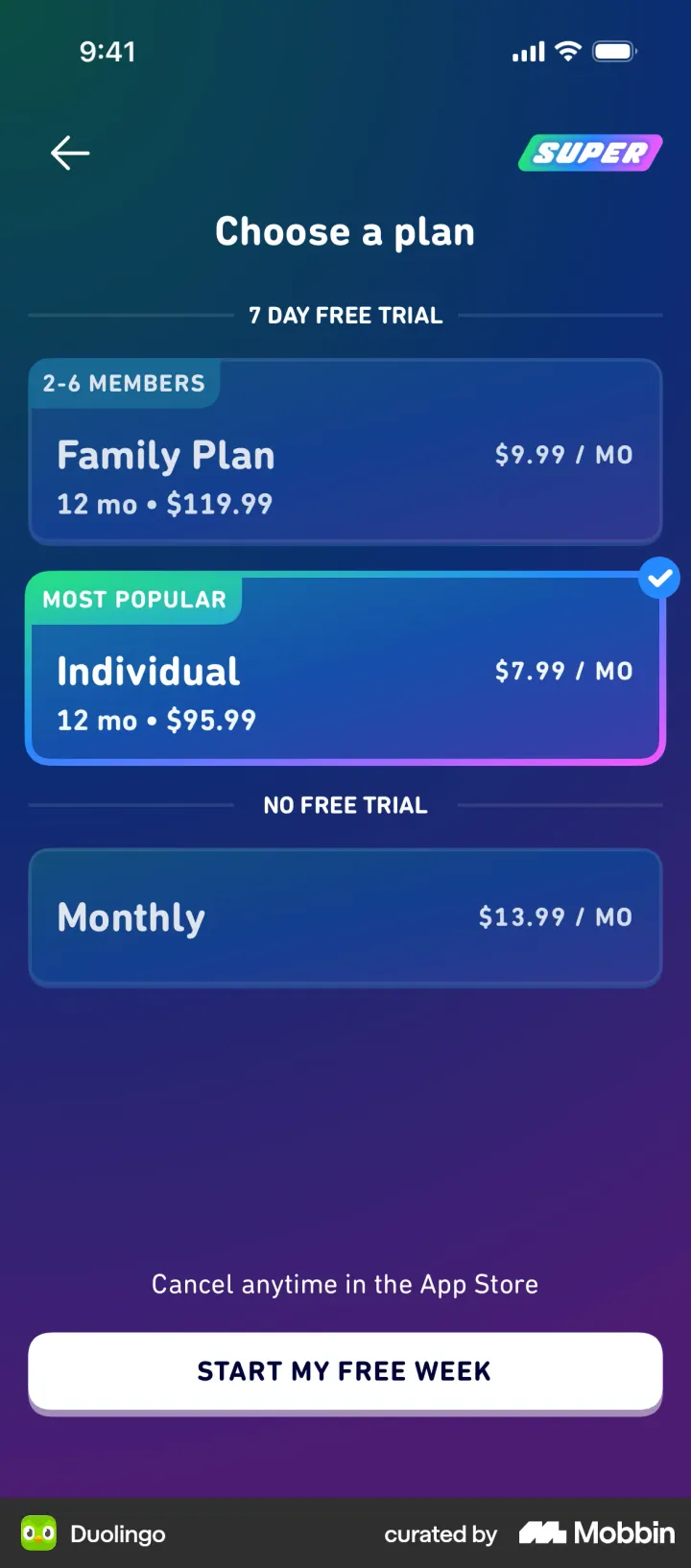
Why it wins:
- The decoy is honest. Monthly costs $13.99 and comes with no trial. Annual works out to $7.99 a month and does. Two dividers, "7 DAY FREE TRIAL" and "NO FREE TRIAL", sort the plans for you. The monthly plan is a real plan that some people want, so it isn't fake. It just makes annual look like the obvious deal: the decoy effect in its cleanest form4.
- The default is a recommendation, not a trap. Individual annual is preselected and marked "Most popular". A default is the strongest nudge a screen has5, and here it points at the plan most learners should pick.
- Every price uses the same unit. All three plans are priced per month, so the comparison takes seconds. The yearly total ($95.99) sits right beside it.
- The button says what happens. "Start my free week", with "Cancel anytime in the App Store" above it.
Runners-up, each winning one category:
| Award | App | Why |
|---|---|---|
| Paywall of the Year | Duolingo | Honest decoy, sensible default, same price unit for every plan |
| Honest pricing | Quizlet | Explains how each plan bills, with real dates, and the explainer changes when you switch plans |
| Best trial explainer | Headspace | The whole paywall is a three-step "How your trial works" timeline |
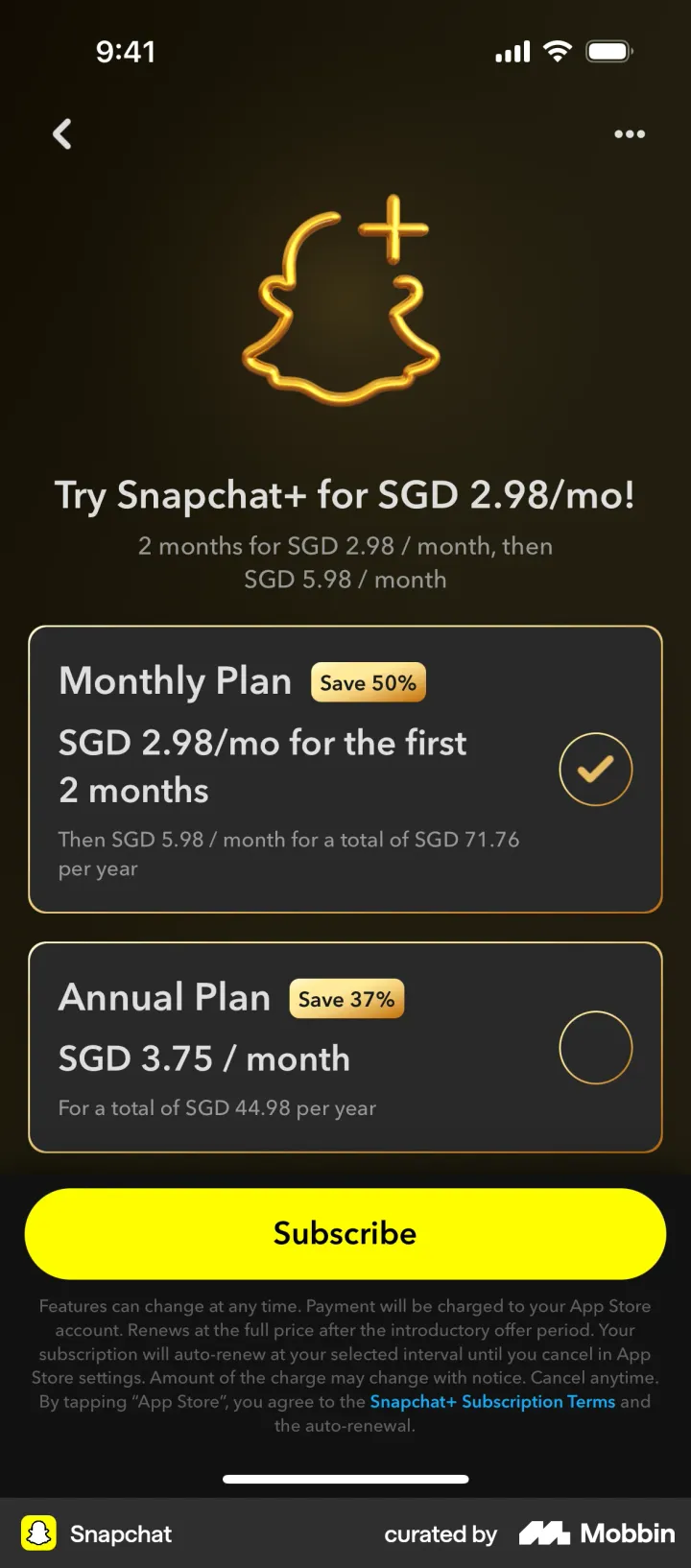
| Best anchor | Snapchat | Shows the full yearly total for both plans, so the "Save 50%" can be checked |
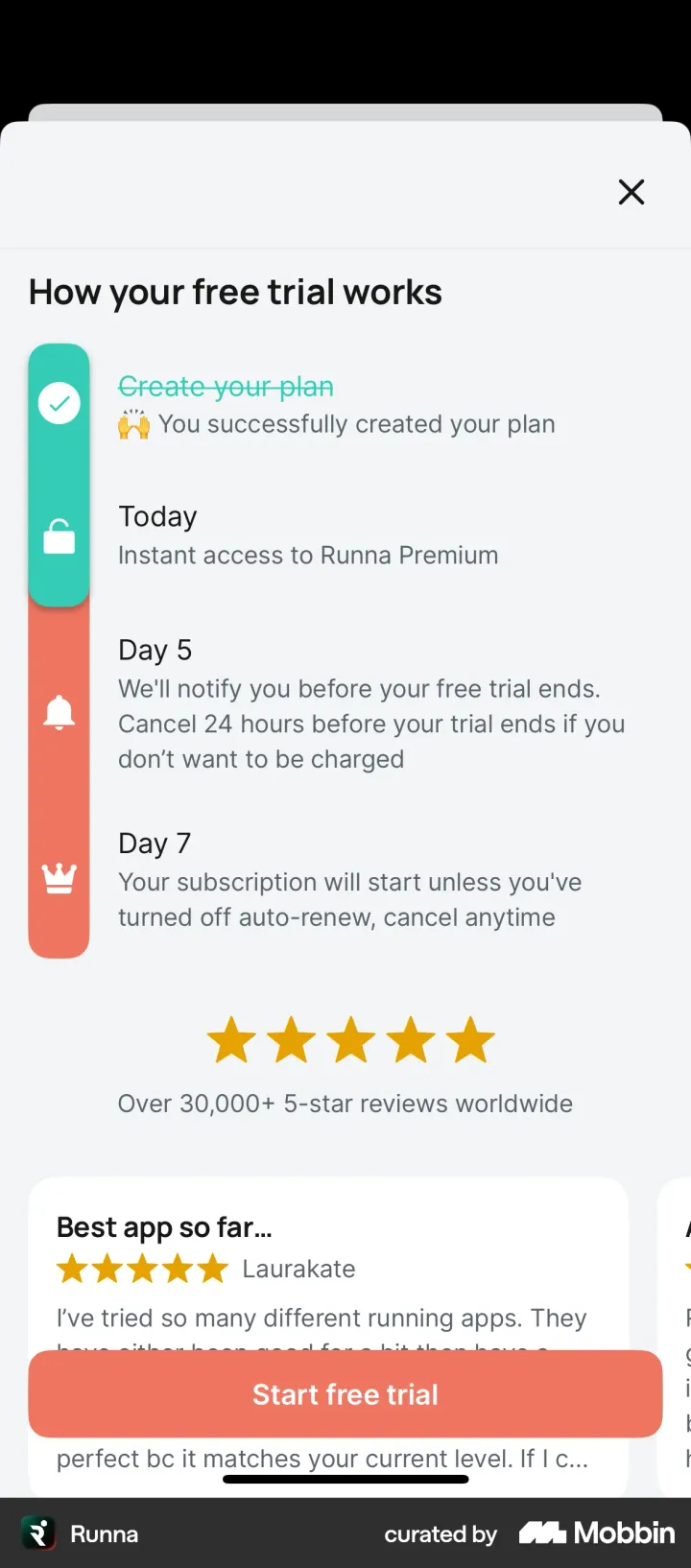
| Best use of endowment | Runna | The trial timeline opens with a step you've already finished: "You created your plan" |
Table: Science of Apps Paywall Awards 2026. Editorial picks from Mobbin iOS screenshots, analyzed by Science of Apps, 2026. 100 paywalls.
The awards are editorial: our own scoring for clarity, honesty, use of psychology and ease of choosing. Nobody sponsored them, and no app was asked.
Placement: where paywalls appear
Where a paywall appears matters as much as what's on it. About half the paywalls in our sample (52) were upgrade screens a user opens on purpose, from a settings row, a Premium tab or a sheet. The other half were placed at a moment the app chose:
| Placement | Paywalls | Examples |
|---|---|---|
| Upgrade screen (settings, tab, sheet) | 52 of 100 | ChatGPT, Spotify, Claude, Calm |
| Onboarding | 24 of 100 | Headspace, Babbel, Runna, Cal AI |
| Feature gate / in-context | 12 of 100 | Bumble, Snapchat, Photoroom, Duolingo |
| Consumables and credits | 7 of 100 | Tinder, CapCut, WHOOP |
| Exit or win-back offer | 5 of 100 | Flo, Yazio, Cal AI, Headway |
Table: Where paywalls appear. Mobbin iOS screenshots, analyzed by Science of Apps, 2026. 100 paywalls.
Onboarding is where intent peaks. A new user has just told the app what they want, so the paywall can promise exactly that. The strongest onboarding paywalls we saw reuse what the user just said. Yazio's reads "We'll help you lose weight to hit 70.0 kg by April 7!" Runna's says "Alex, get started with a free trial" right after building Alex's plan. Both use the goal-gradient effect: the goal feels close, so paying feels like the last step.
In-context paywalls sell the thing you just tried. Bumble's paywall headline names the feature you tapped, "Unlimited Backtrack" or "Travel mode". Photoroom shows a blurred preview of the video you were about to generate. Snapchat puts an "exclusive lens" in your camera with a "Get Snapchat+" button on top. These rely on curiosity and the endowment effect: people value what feels half-theirs already.
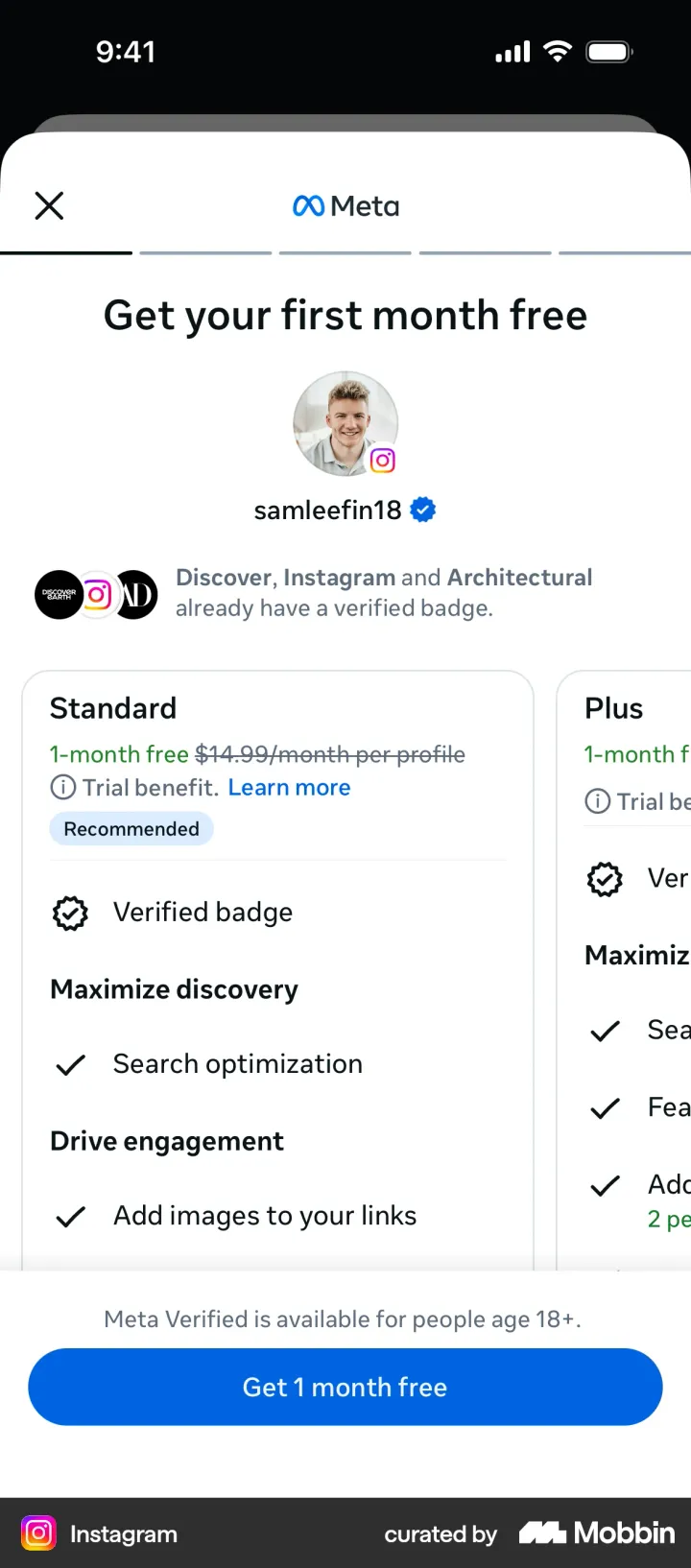
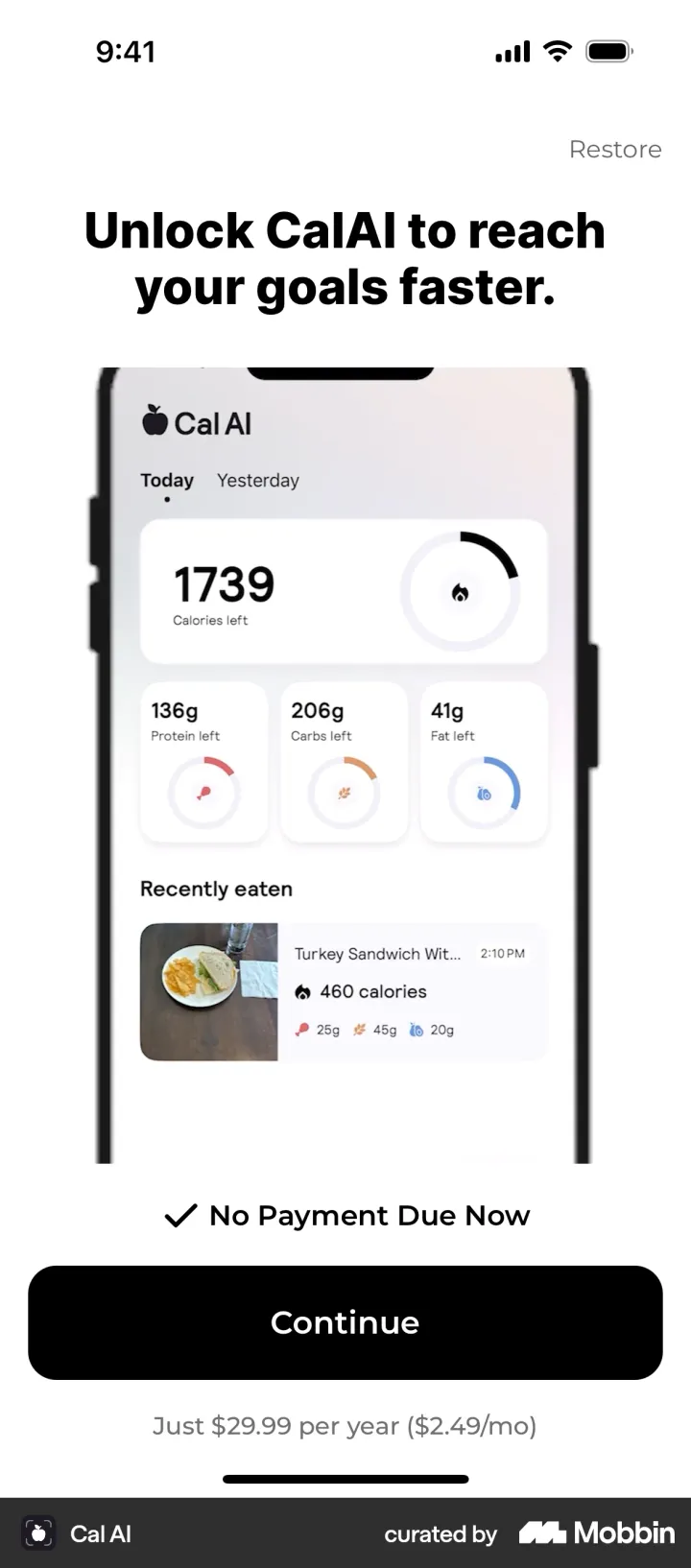
Hard paywalls are rare at the top. Only 3 of the 100 had no visible way out: Cal AI, Opal's onboarding and Photoroom's onboarding. 86 had a clear close or back button, and 11 offered a text link such as "Maybe later", "Skip" or "Continue without subscribing". The New York Times makes its "Continue without subscribing" button the same size as "Subscribe Now". That is a confident design: the paywall trusts its offer.
Price anchoring: making the price feel smaller
76 of the 100 paywalls set the price against another number. Anchoring is the most-used law in the sample by a wide margin: people judge a number by the first number they see near it3. Paywalls do it in four ways:
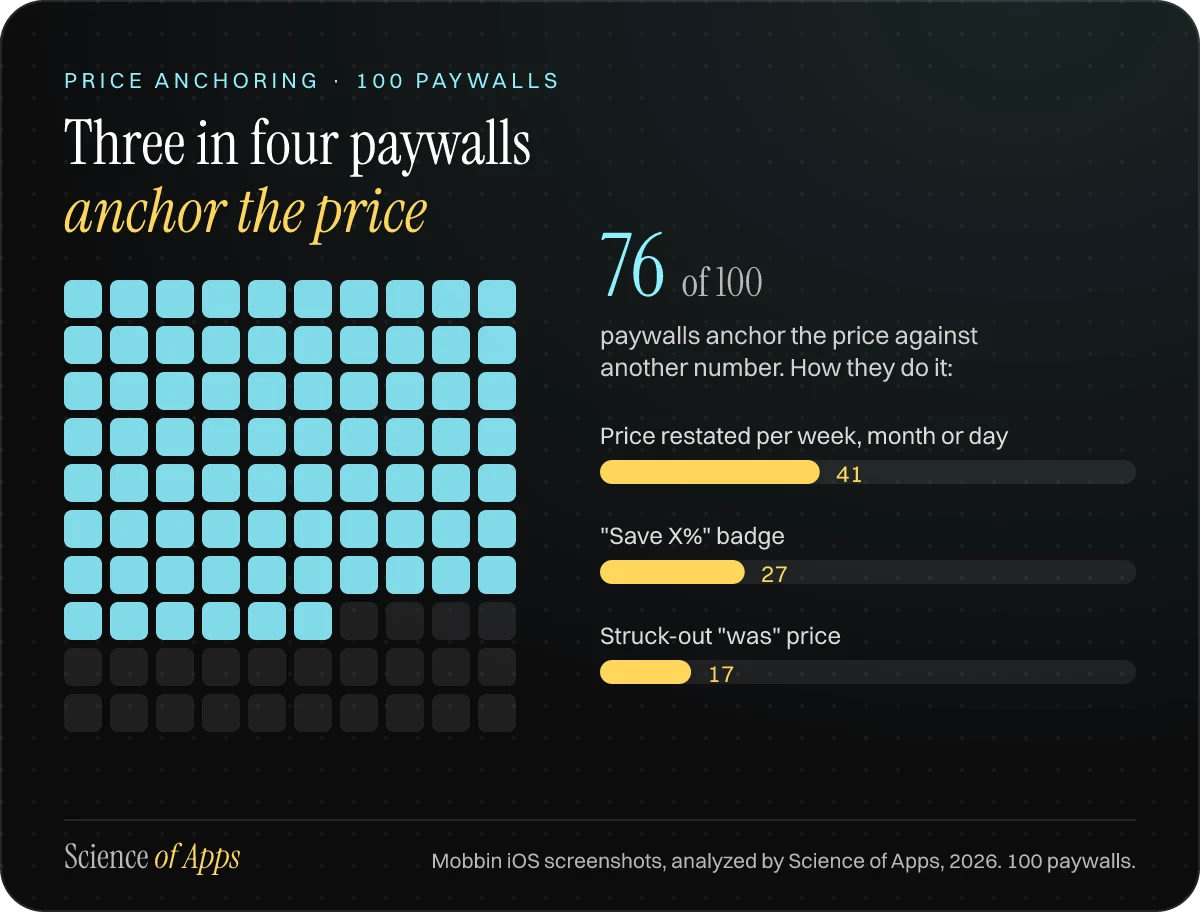
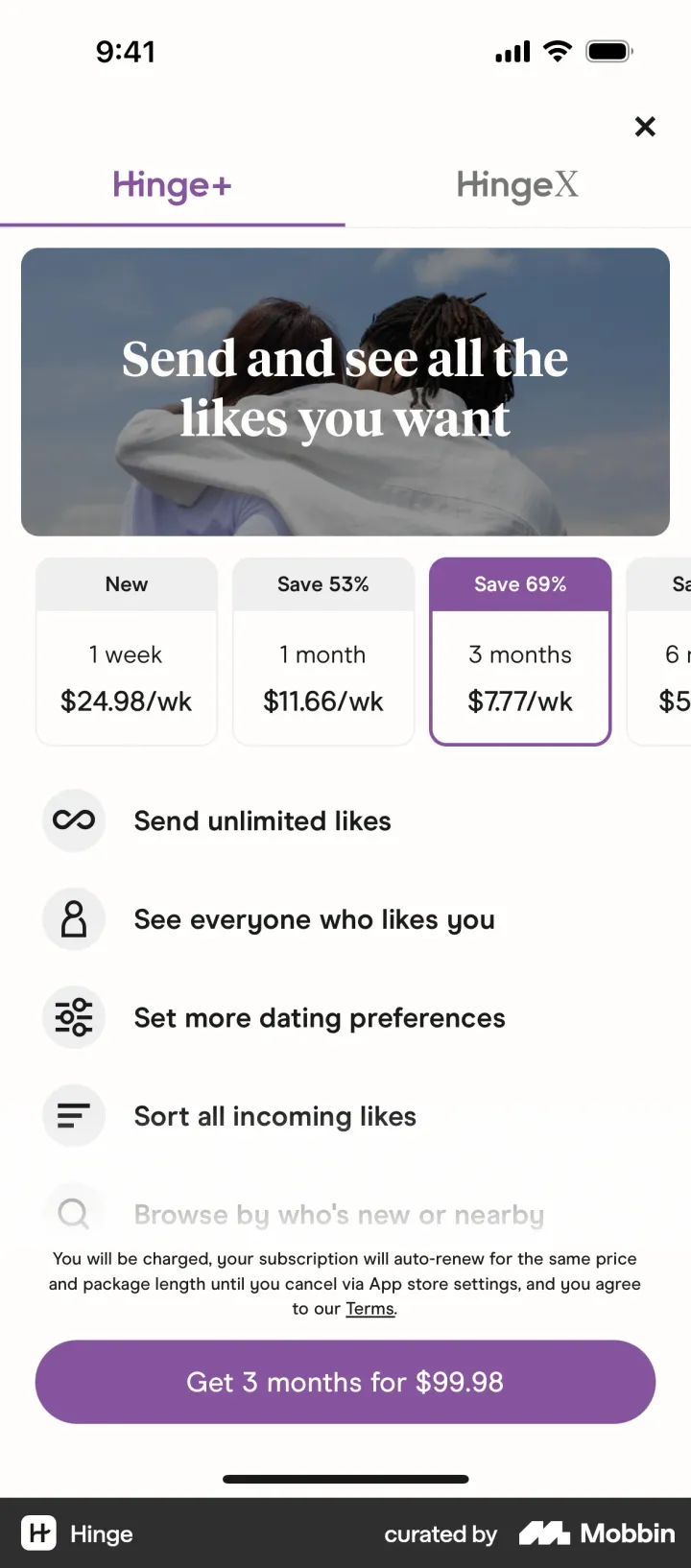
- Per-period restating (41 paywalls). An annual price becomes "$4.16/month" (Yazio), "$2.11/week" (Runna) or "$1.43/day" (Coffee Meets Bagel). Hinge and Bumble price every plan per week, so the one-week plan at $24.98 a week becomes the anchor that makes three months at $7.77 a week look cheap.
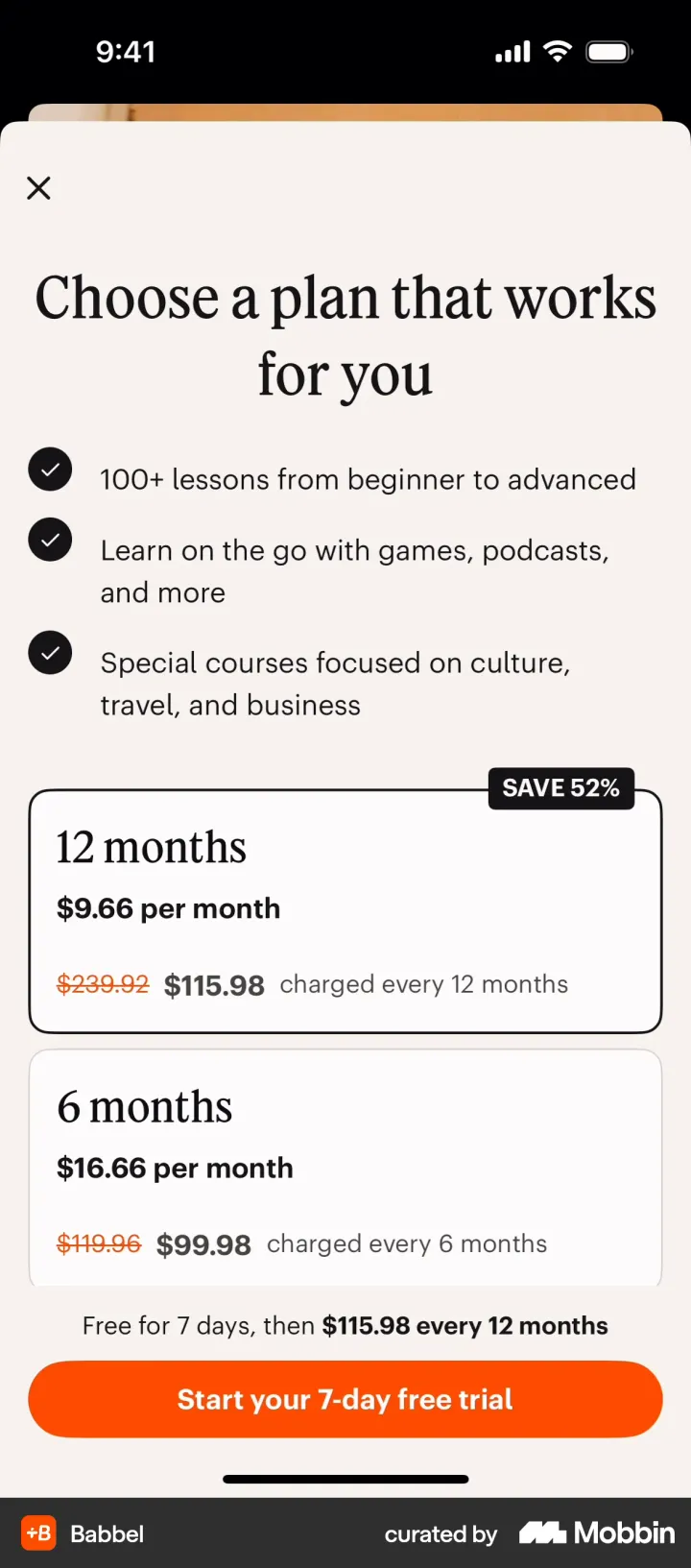
- Savings badges (27). "Save 52%" (Babbel), "Save 69%" (Hinge), "-45%" (Telegram).
- Struck-through prices (17). Babbel crosses out $239.92 next to $115.98. That figure is 12 months of its own 1-month price ($19.99), so the anchor is real.
- Annualising the monthly plan. Perplexity shows its $30 monthly plan as "$360/yr" next to $300 yearly. Atoms prints "$299.76/year" under the monthly price.
The decoy option: three plans, one target
34 of the 100 paywalls included an option that exists mainly to make another look better. This is the decoy effect: add a third option that is clearly worse than one of the others, and that one wins more often4. The patterns we saw:
- The no-trial monthly. Duolingo and Quizlet attach the free trial to the annual plan only. Quizlet's button even changes from "Try free and subscribe" to plain "Subscribe" when you tap Monthly. You can see the trial disappear, which is loss aversion at work.
- The expensive top tier. Claude stacks Max (S$179.98 and S$349.98 a month in Singapore dollars) under Pro. TradingView lists Premium at $79.99 a month under Essential at $19.49. The big number makes the smaller plan feel modest.
- The short-plan anchor. Hinge's one-week plan at $24.98 a week exists mostly to be compared with.
- The bundle-versus-single choice. Tinder's Super Like bundles cut the per-unit price from $4.99 to $2.97. Below them sits "Get Tinder Platinum", with three free First Impressions a week.
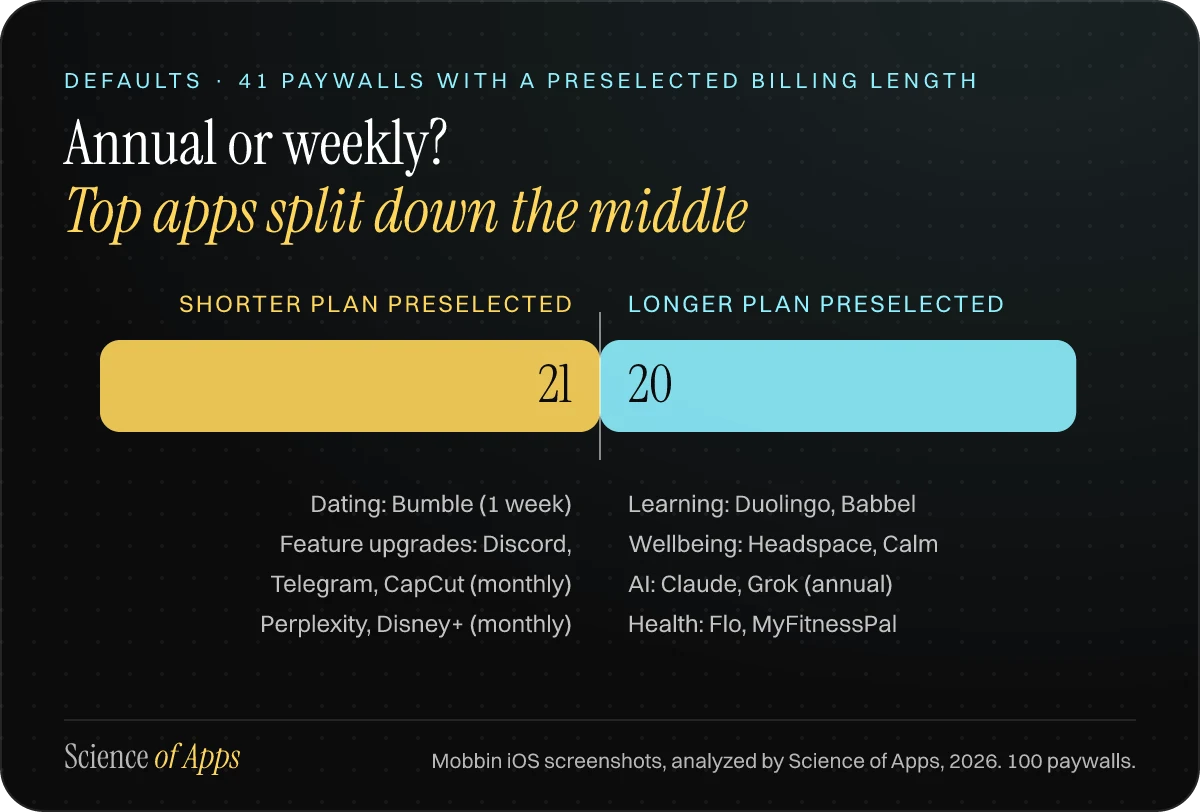
Defaults are evenly split. Of the 41 paywalls that preselected one billing length, 20 picked the longer plan and 21 the shorter one. The split follows the category. Health, learning and AI apps (Duolingo, Headspace, Babbel, Claude) mostly preselect annual. Dating apps like Bumble (one week) and feature-gated upgrades like Discord, Telegram and CapCut (monthly) preselect short. Neither is wrong: short plans suit urgent, one-off needs; annual plans suit habits that take months to pay off.
Trial framing: what "free" has to explain
45 of the 100 paywalls offered a free trial and 8 used an intro price instead (Snapchat, X, NordVPN, The New York Times). Trials work because "free" removes the pain of paying today. That's hyperbolic discounting: a cost next month feels much smaller than the same cost now. Spotify's "US$0 for 4 months" is the extreme case.
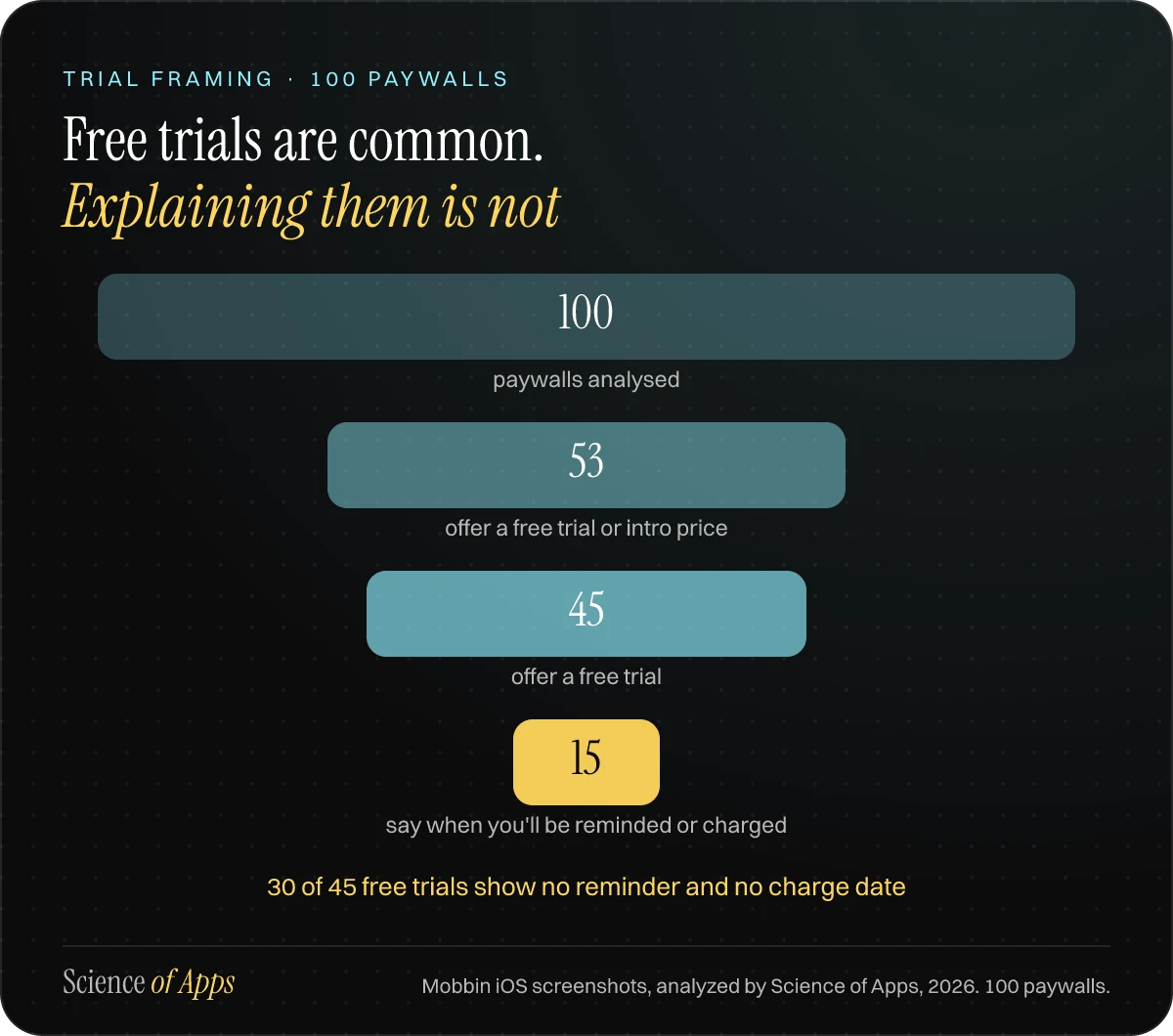
The trouble is what comes after. Only 15 of the 45 trials told the user when they would be reminded or charged. The ones that did are the best trial screens in the sample:
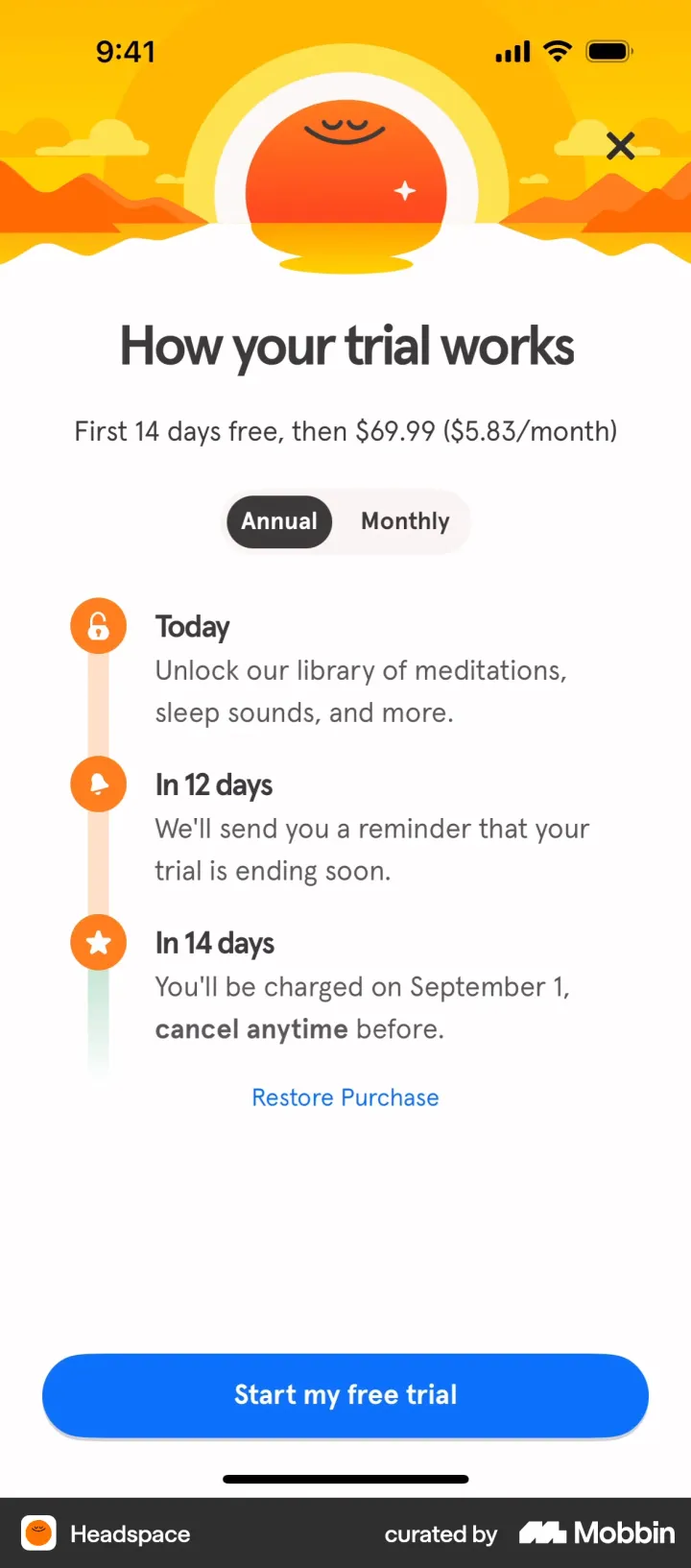
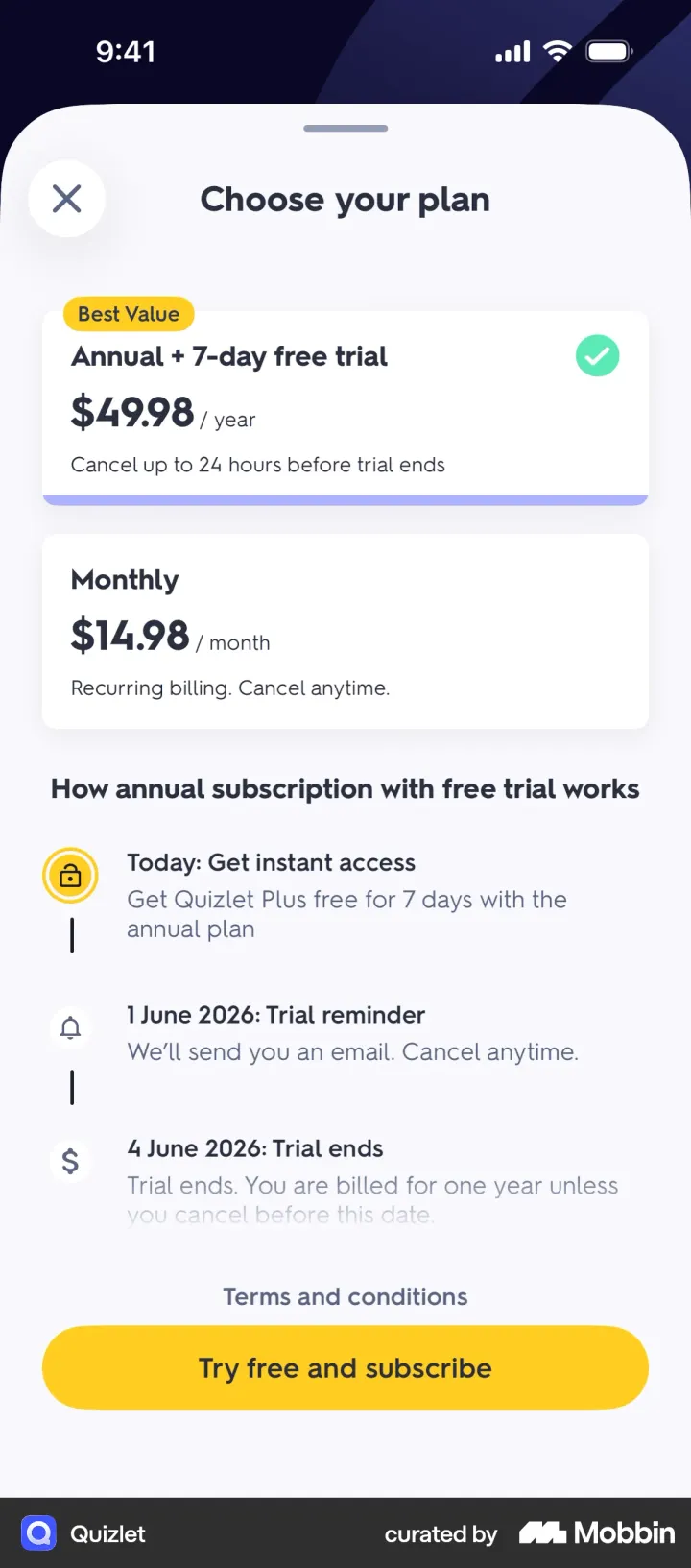
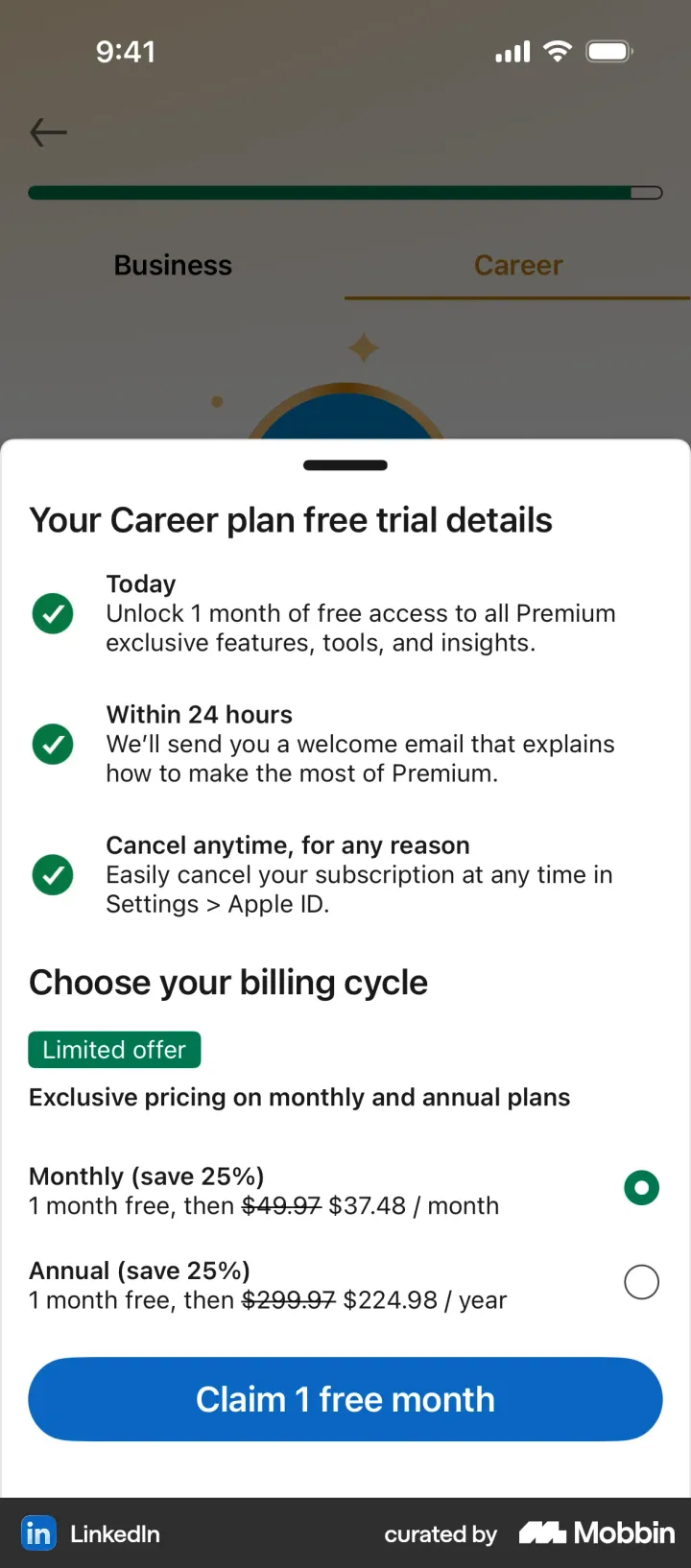
The trial patterns worth copying:

- Dated timeline — Today, reminder day, charge day, with real dates (Quizlet, Blinkist, Oura, Strava).
- Opt-in reminder — Calm puts a "Remind me 2 days before renewal" toggle on the paywall itself.
- Due today line — Canva's checkout-style "Due today S$0 (14 days free)" and the date and amount of the first charge.
- Trial toggle — Flo, Picsart and Cal AI let you switch the trial on or off, and the plan list updates.
- Price with the trial — YouTube writes "1-month trial for SGD 0 · Then SGD 17.98/month" on one line.
This matters for more than conversion. Apple requires subscription screens to state clearly what the user gets for the price and how renewal works6. A trial that explains itself loses less to "I forgot to cancel" anger later. That's the peak-end rule: people remember how the experience ended.
Exit offers and win-backs: handle with care
Five paywalls appeared after the user said no. Flo ("Claim your gift before it's gone · 44% OFF FOREVER"), Yazio ("75% OFF FOREVER · Your one-time offer") and Cal AI ("80% OFF FOREVER") all show a bigger discount the moment you close the first paywall. Headway's win-back lists what you'll lose ("Without Premium, you lose…") with crossed-out icons.
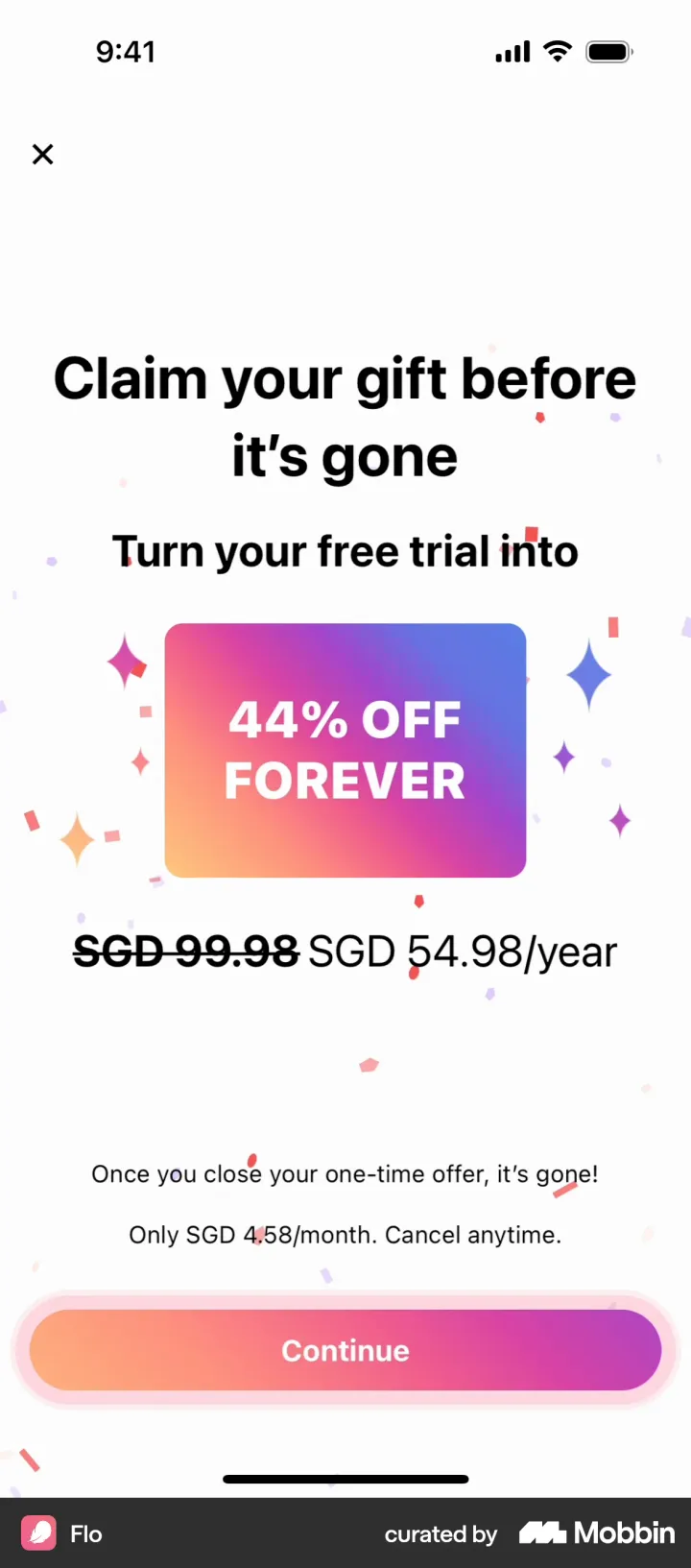
These offers work on scarcity and loss aversion. Our rule: an exit offer is fine if it is genuinely one-time and the discount is real. It stops being fine when the same "one-time" offer comes back every session. Users notice, and a pricing page they can't trust taxes every future purchase.
The 40 top-earning apps and their paywalls
These are the 40 highest-earning apps we could find on Mobbin with a published 2025 in-app revenue estimate. Revenue is AppMagic's estimate of worldwide consumer spend inside each app in 2025 (App Store and Google Play combined), as published by Business of Apps2. Several bigger earners, including TikTok, Google One and Amazon, had no subscription paywall on Mobbin, so they're not here. Prices on Mobbin were captured in different regions, often in Singapore dollars (S$, SGD).
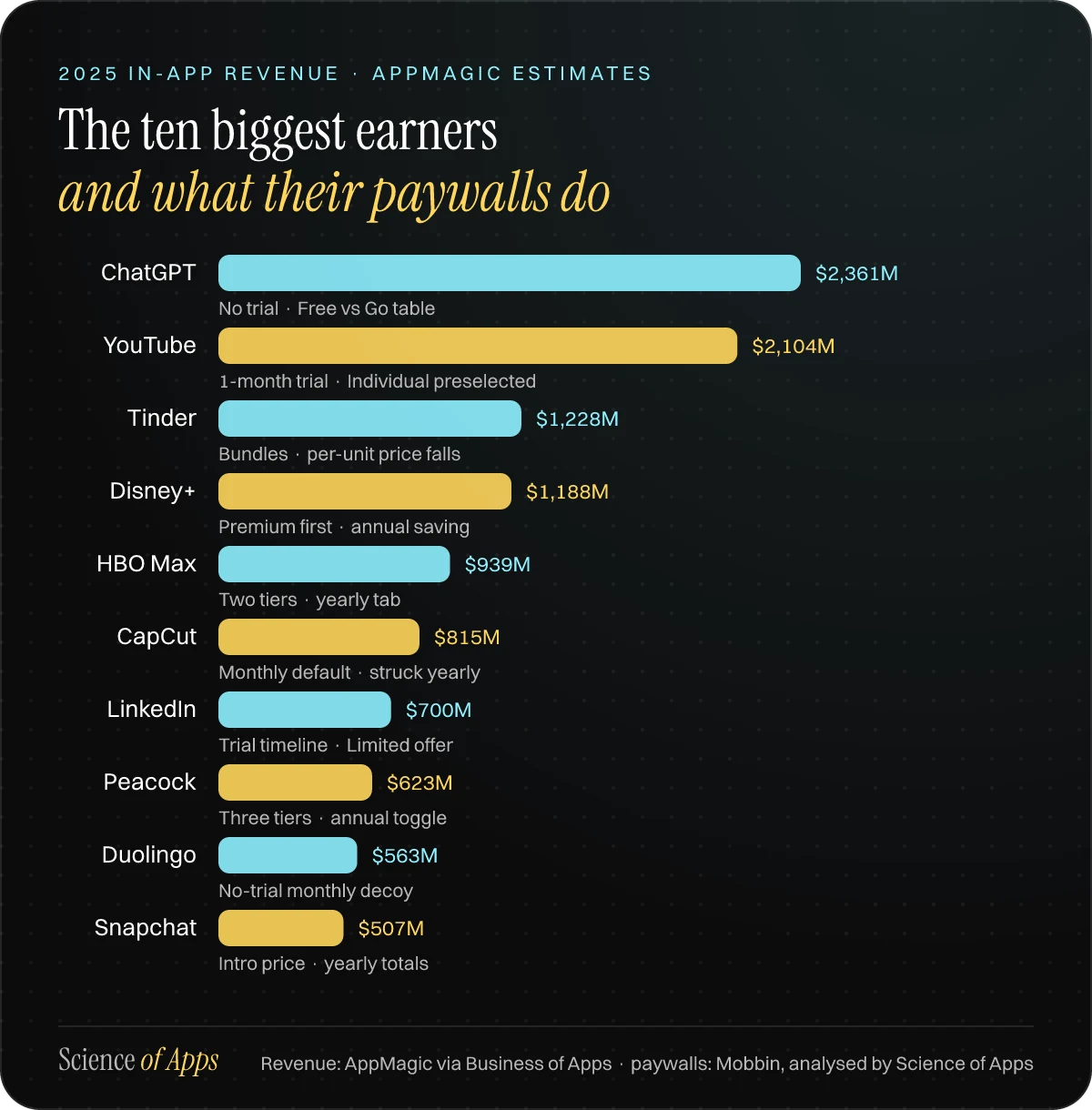
| App | 2025 revenue ($M) | What its paywall does | Screen |
|---|---|---|---|
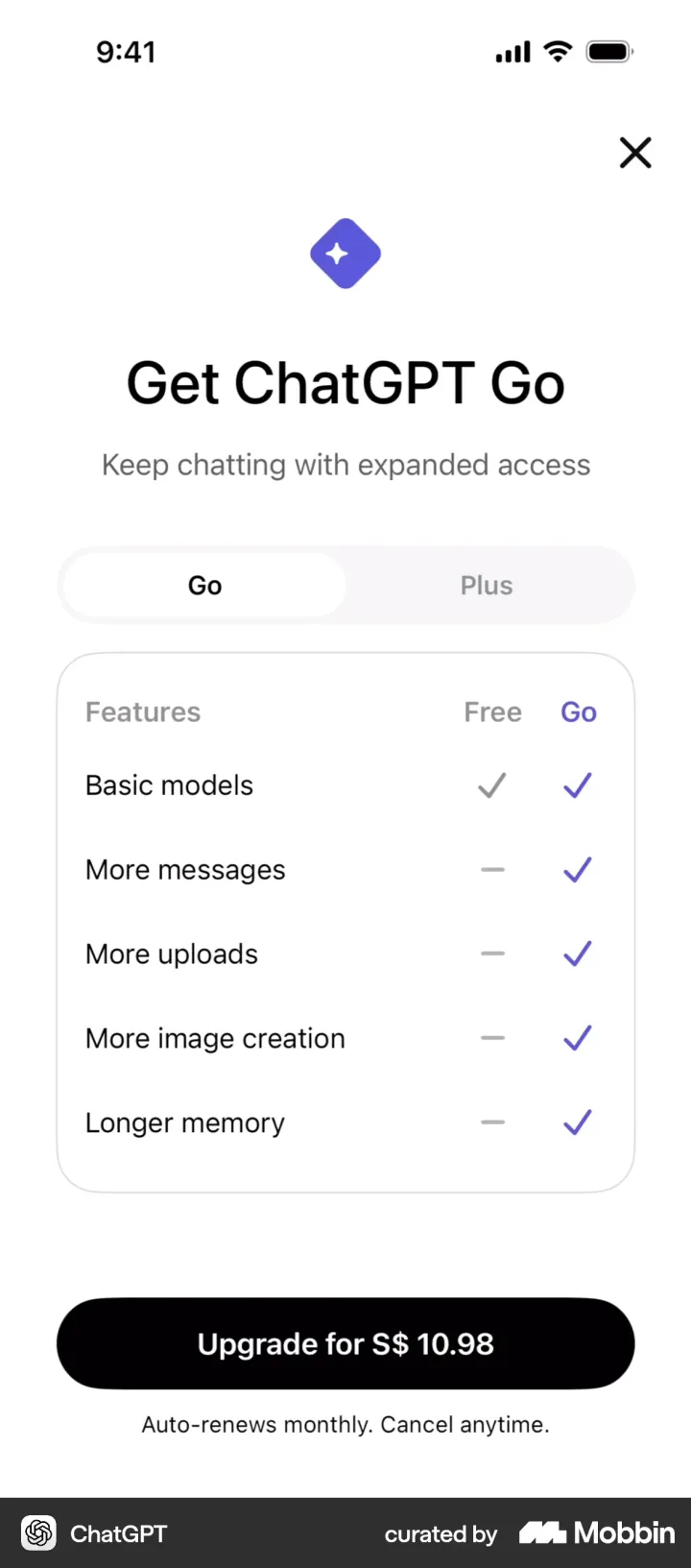
| 1. ChatGPT | 2,361 | Upgrade. Go vs Plus tabs, Free vs Go comparison table, no trial | View |
| 2. YouTube | 2,104 | Upgrade. Individual preselected beside Family; "1-month trial for SGD 0, then…" | View |
| 3. Tinder | 1,228 | Consumables. 3/12/50 bundles, per-unit price falls, "Popular" and "Best Value", Platinum cross-sell | View |
| 4. Disney+ | 1,188 | Web checkout. Premium listed first; annual "Save about 31%" under each monthly price | View |
| 5. HBO Max | 939 | Sign-up. Two tiers, Monthly or Yearly "Save up to 25%" tab | View |
| 6. CapCut | 815 | Feature gate. Monthly preselected; yearly with struck $129.99 | View |
| 7. LinkedIn | 700 | Upgrade. Goal tabs, "2.7x more likely to get hired", trial timeline, "Limited offer" | View |
| 8. Peacock | 623 | Upgrade. Three tiers in a carousel, "Annual (Save More)" toggle | View |
| 9. Duolingo | 563 | Upgrade. Paywall of the Year: no-trial monthly decoy | View |
| 10. Snapchat | 507 | Upgrade. Intro price, savings badges, yearly totals for both plans | View |
| 11. Bumble | 394 | Feature gate. One week preselected as "Most popular", every plan priced per week | View |
| 12. Hinge | 358 | Upgrade. Per-week prices, 3 months preselected, "Save 69%" | View |
| 13. Spotify | 319 | Premium tab. "$0 for 4 months", checkout on Spotify's website | View |
| 14. Telegram | 212 | Feature gate. Annual shown as $4.16/month with "-45%", 20+ feature rows | View |
| 15. Dropbox | 207 | Upgrade. Plan tabs; the price is the button | View |
| 16. X | 173 | Upgrade. "Don't lose 50% off your first 2 months" | View |
| 17. Discord | 161 | Upgrade. Nitro sheet, Monthly preselected, yearly "Save 16%" | View |
| 18. MyFitnessPal | 159 | Upgrade. One annual plan with a "$12.50/mo" tag, outcome-led benefits | View |
| 19. Deezer | 159 | Upgrade. "A stress-free trial" card: reminder 7 days before it ends | View |
| 20. Strava | 150 | Upgrade. 30-day trial timeline with charge date and amount | View |
| 21. Instagram | 145 | Upgrade. Meta Verified badge shown on your own photo | View |
| 22. NordVPN | 125 | Plans. "Save 40%" with a note on what the saving compares | View |
| 23. Flo | 123 | Onboarding. 14-day trial toggle, 5-star review, Friends plan | View |
| 24. SoundCloud | 105 | Upsell. Headline is the offer: "No ads. Offline listening. $5.99/month." | View |
| 25. Picsart | 79 | Feature gate. Plans are the buttons; "Use Free Trial" toggle | View |
| 26. Fitbit | 75 | Upgrade. Annual "Save 31%", struck $155.76 | View |
| 27. Calm | 58 | Premium tab. "Remind me 2 days before renewal" toggle, research claim | View |
| 28. The New York Times | 56 | After sign-up. Intro price for 6 months, equal-weight "Continue without subscribing" | View |
| 29. Yazio | 55 | Onboarding. Personal goal headline, struck price, "Most popular" | View |
| 30. Grok | 55 | Onboarding. Yearly preselected at "$25/month", Skip instead of X | View |
| 31. Babbel | 54 | Onboarding. 12/6/3 months, struck prices, renewal line updates per plan | View |
| 32. Feeld | 47 | Onboarding. Step 11 of 13, intro discounts, full-width Skip | View |
| 33. Photoroom | 47 | Onboarding. "Built to help you sell", 7-day Pro trial | View |
| 34. Runna | 42.9 | Onboarding. Personalised headline, annual "Save 54%" per week | View |
| 35. Peloton | 41 | Onboarding. Tier first, then annual or monthly in a second step | View |
| 36. TradingView | 40 | Onboarding. Three stacked tiers, 30-day trial, "Skip trial" | View |
| 37. Headspace | 38 | Onboarding. Best trial explainer | View |
| 38. Claude | 31 | Upgrade. Pro annual preselected "Save 17%", Max stacked below | View |
| 39. Quizlet | 29 | Upgrade. Honest pricing: dated explainer per plan | View |
| 40. Perplexity | 20 | Upgrade. Monthly annualised to "$360/yr" beside $300 yearly | View |
Table: The 40 top-earning apps on Mobbin and their paywalls, ranked by revenue. Revenue: AppMagic 2025 estimates via Business of Apps. Screens: Mobbin iOS screenshots, analyzed by Science of Apps, 2026. 100 paywalls.
Two things stand out at the top. The biggest earners have the plainest paywalls. ChatGPT's is a two-column Free vs Go table with one button. Dropbox's button is just the price. When the product is the reason people came, the paywall doesn't need tricks. Dating apps are the most engineered. Tinder, Bumble and Hinge use per-unit and per-week pricing, savings badges and bundle ladders more than any other category in the sample.
The paywall playbook: how to design yours
If you are designing or fixing a paywall this quarter, this is the order we'd work in, from the patterns the top earners share:

- Place it at the moment of intent — at the end of onboarding, right after the user has told you their goal, and again at every locked feature. Name the feature in the headline.
- Show two or three plans, preselect one — make the default the plan you'd recommend to a friend, and label it ("Most popular" only if it's true).
- Use one price unit — restate every plan per month or per week so they compare at a glance; print the real total beside it.
- Add an honest anchor — a struck price that was really charged, or the monthly plan annualised. Never invent a "was" price.
- Attach the trial to the plan you want chosen — and let the plan without it be the contrast, as Duolingo and Quizlet do.
- Explain the trial with dates — today, reminder day, charge day and amount. Add an opt-in reminder if you can.
- Make the button say what happens — "Start my free week" beats "Continue". Put the renewal line right above it.
- Leave a visible way out — a close button or "Not now". Win the hesitant users later with a contextual paywall, not a trap.
What most paywall guides get wrong
They treat "Continue" as a good button. NGL's paywall says "Continue", and the $6.98-a-week price sits in small grey text underneath. Feeld's "Become Majestic" button has a "Skip" button of equal size beneath it, which is far more honest. A button that hides that it charges money might win a sale today and cost a refund and a one-star review tomorrow.
They copy dating-app pricing into the wrong product. Weekly defaults work where intent is urgent and short, like dating, photo fixes or a one-off AI task. For habits that take months, like learning, fitness or meditation, the top apps in our sample default to annual and use the trial to carry the commitment.
They forget the restore button. Many paywalls in the sample show "Restore purchase", and Apple expects a restore option for purchases that can be restored. Without it, a paying customer who reinstalls can't get back what they bought.
They A/B test colours before placement. Where and when a paywall appears decides who sees it at all. Move it first, then polish it.
How we analysed 100 paywalls
Data: Mobbin iOS screenshots, analyzed by Science of Apps, 2026. 100 paywalls. We searched Mobbin's iOS library1 in October 2026 for paywall and plan-selection screens. We started with every subscription app in AppMagic's 2025 top-grossing lists published by Business of Apps2, then added widely referenced indie and mid-size apps. We kept screens that ask the user to pay or choose a plan. We dropped Apple's system purchase sheets, card-entry forms and screens that only list current plans to an existing subscriber.
Coding: each screen was coded on 12 fields: placement, plans offered, default plan, price anchor, decoy or contrast option, trial type, trial reminder or timeline, dismiss option, social proof, CTA text, disclosure text, and the laws of UX applied. Coding was AI-assisted, with each screen read directly rather than from metadata. One screen can use several laws. The full coded dataset is free to download: paywalls-2026.csv.
Revenue: AppMagic's 2025 estimates of in-app consumer spend, as published by Business of Apps2. These are third-party estimates, not company-reported figures, and they cover in-app purchases only. Web sales, such as Spotify's and Disney+'s checkout, aren't included.
Limits: Mobbin captures what one account saw on one day, often in Singapore. Apps run A/B tests and change paywalls often, so another user may see a different screen. 100 screens describe patterns, not conversion. We'll re-run this study each year.
Key terms, defined
Paywall — the screen that asks the user to pay, usually for a subscription, to unlock features or content.
Hard paywall — a paywall with no way to close it; the app can't be used without starting a trial or subscribing.
Soft paywall — a paywall the user can dismiss and keep using the free version.
Price anchor — a reference number shown near the price so the price feels smaller by comparison.
Decoy — an option designed mainly to make another option look better.
Intro price — a discounted price for the first period, after which the full price applies.
Exit offer — a second, cheaper offer shown after the user closes the first paywall.
Frequently asked questions
What is a paywall in an app?
A paywall is the screen that asks a user to pay, usually for a subscription, before they can use a feature or content. It typically shows the plans, prices, any free trial, the benefits of paying and a button to subscribe, plus a way to close it or restore an earlier purchase.
Where should a paywall go in an app?
In our sample, 24 of 100 paywalls appeared during onboarding and 12 at the moment a user tapped a locked feature. Onboarding catches people at peak intent; a paywall at a locked feature catches them when they want one specific thing, so most top apps use both.
How many plans should a paywall show?
Two or three. Most paywalls we analysed showed two or three billing options with one preselected. More options add decision time (Hick's Law); a third option is worth it only when it makes another plan look better, which is the decoy effect.
Should my paywall offer a free trial?
Usually, if your product shows its value within days. 45 of the 100 paywalls offered a free trial. If you offer one, say exactly when the user will be reminded and charged, as Headspace, Strava, Quizlet and Blinkist do.
What is price anchoring on a paywall?
Price anchoring means showing a reference price first so the real price feels smaller. On paywalls it shows up as a struck-out 'was' price, a monthly price annualised for comparison, or an annual plan restated as per week. It works because people judge numbers relative to the first one they see, so the anchor must be truthful.
What is a decoy plan on a paywall?
A decoy is an option few people are meant to choose, placed to make another option look better. Duolingo lists a monthly plan with 'no free trial' under an annual plan that includes one, so the annual plan looks clearly better. 34 of the 100 paywalls we analysed included a contrast option like this.
Are hard paywalls bad?
Not always, but they are rare among top apps. Only 3 of 100 paywalls had no visible way to close them; 86 had a clear close or back button. A hard paywall can work for an app whose value is obvious before signup, but it removes the chance to win users later with a contextual paywall.
Which app has the best paywall in 2026?
Our Science of Apps Paywall of the Year 2026 goes to Duolingo's Choose a plan screen, which combines a clear default, an honest decoy and a free trial on the plan it wants you to choose. Quizlet wins our honest pricing award for explaining exactly how each plan bills.
Sources
- Mobbin — iOS app screens library (paywall screens accessed October 2026)
- Business of Apps — Top Grossing Apps (2026), 2025 in-app revenue estimates from AppMagic
- Tversky & Kahneman — Judgment under Uncertainty: Heuristics and Biases, Science (1974)
- Huber, Payne & Puto — Adding Asymmetrically Dominated Alternatives, Journal of Consumer Research (1982)
- Johnson & Goldstein — Do Defaults Save Lives?, Science (2003)
- Apple — App Review Guidelines, 3.1.2 Subscriptions
- Checked October 26, 2026. Figures that change — fees, salaries, prices — are reviewed every six months; if something is out of date, tell us.
Your users are specific.
A behavioral UX audit of your app or SaaS product: why users hesitate, stall and leave, and a prioritized fix list. Fixed price, 2–4 weeks.