Paradox of the Active User
Users start using software immediately instead of reading instructions, even when learning first would save them time later.

See it in action
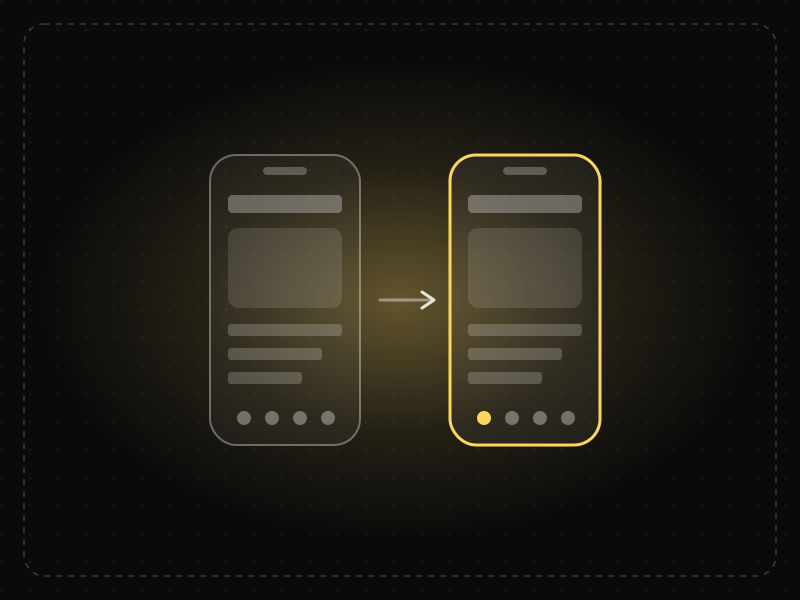
The same screen without and with Paradox of the Active User. Watch both sides play out, then compare the outcome.
Eager to start, people skip the tour — then can't find the feature it explained.
A short tip appears exactly when the task needs it, and people learn by doing.
What to watch: the skipped tour versus the tip that shows up right when it's useful.
Teach in context: inline tips, empty-state guidance, sensible defaults and safe undo.
Rely on long up-front tours or manuals; most people skip them and start clicking.
Key takeaways
- Assume nobody reads the tutorial; teach inside the real task.
- Use contextual tips, empty states and progressive disclosure.
- Make the first steps forgiving so exploration doesn't punish users.
Quick facts
- Also known as
- —
- Described by
- John Carroll & Mary Beth Rosson
- Year
- 1987
- Category
- Interaction & speed
- Related laws
- Mental Model, Jakob's Law, Cognitive Load
Paradox of the Active User explained
The paradox of the active user describes how people rarely read manuals or tutorials before using software. They start using it immediately to get their task done, even though investing time in learning would save them time in the long run.
Users are motivated by their immediate goal, not by learning the tool. They prefer to explore, guess and use features they already know, which means many powerful features remain undiscovered.
Design should therefore teach in context: at the moment a feature is relevant, inside the flow, with minimal interruption.
Where it comes from
Coined by John M. Carroll and Mary Beth Rosson of IBM in 1987, after observing that people learning new software skipped manuals and jumped straight into tasks.
How it shows up in apps
Long carousels and upfront tutorials are skipped by most users. Onboarding works better when it gets people doing the core action right away and explains features at the moment they become relevant.
Paradox of the Active User examples
Instead of a five-screen tutorial, a design app opens a sample project with one highlighted tip: 'Tap any layer to edit it'.
Skipped tutorials
Many users tap Skip on multi-screen onboarding tutorials. Contextual tips that appear when someone first uses a feature are much more likely to be read.
Empty states as guidance
Instead of a separate help page, a project tool shows a short explanation and a create button in an empty board, teaching the feature at the moment it is needed.
Undo over warnings
Email apps offer undo after sending rather than warnings beforehand, supporting users who act first and learn later.
How to apply Paradox of the Active User
- Design for learning by doing: let users start their task immediately.
- Use contextual hints, tooltips and empty states instead of upfront tutorials.
- Make features discoverable within the flow where they are useful.
- Provide undo and safe exploration so mistakes are cheap.
- Keep any onboarding short and skippable, focused on the first valuable action.
Want Paradox of the Active User checked in your own product? Our saas ux audit evaluates it alongside the other principles that shape how users decide, onboard and stay.
Common mistakes
- Relying on long product tours to explain a complex interface.
- Hiding important functionality where users will only find it by reading documentation.
- Punishing exploration with irreversible actions.
How to measure it
Track tour completion and skip rates, feature discovery rates and the time it takes new users to use core features. Compare activation for users who saw contextual help against those who saw an upfront tutorial.
Frequently asked questions
What is Paradox of the Active User?
Users start using software immediately instead of reading instructions, even when learning first would save them time later.
Where does Paradox of the Active User come from?
Coined by John M. Carroll and Mary Beth Rosson of IBM in 1987, after observing that people learning new software skipped manuals and jumped straight into tasks.
How does Paradox of the Active User apply to app design?
Long carousels and upfront tutorials are skipped by most users. Onboarding works better when it gets people doing the core action right away and explains features at the moment they become relevant.
Who described the paradox of the active user?
John Carroll and Mary Beth Rosson described it in 1987 based on studies of how people learn to use computer systems.
How should onboarding account for the paradox of the active user?
Get people to their first meaningful action quickly and teach features in context when they become relevant, rather than through long upfront tutorials.
How do you measure Paradox of the Active User in a product?
Track tour completion and skip rates, feature discovery rates and the time it takes new users to use core features. Compare activation for users who saw contextual help against those who saw an upfront tutorial.
Sources
- Carroll, J. M. & Rosson, M. B. (1987). Paradox of the active user. In J. M. Carroll (Ed.), Interfacing Thought: Cognitive Aspects of Human-Computer Interaction. MIT Press. Find on Google Scholar ↗
Related laws
 Memory & attention
Mental Model
A mental model is a person's internal picture of how a system works; interfaces feel intuitive when they match it and confusing when they don't.
 Interaction & speed
Jakob's Law
Users spend most of their time in other products, so they expect yours to work the same way as the apps and sites they already know.
 Memory & attention
Cognitive Load
Cognitive load is the amount of mental effort needed to understand and use an interface; when it exceeds what people can handle, they slow down, make mistakes or give up.
Paradox of the Active User in practice
- UI/UX designOnboarding screen examples: 40 patterns that get users to value faster40 app onboarding examples and patterns — welcome, sign-up, personalisation, permissions, empty states and first success — and why each works.
- Design historyFamous fonts history: the stories behind 15 typefaces, from Gutenberg to Helvetica to Comic SansThe history of 15 famous fonts, from Gutenberg's blackletter to Times New Roman, Helvetica, Comic Sans and the ₹ sign, and what reading research says.
- Making moneyApp monetization strategies that don't annoy users — designed with behavioural scienceMonetize your app without wrecking retention: value-first paywalls, honest trials, rewarded ads, anchoring and decoy pricing done ethically, and what to avoid.
- Everyday design scienceWhy are stop signs octagons? The design rules behind road signs around the worldStop signs are octagons so drivers recognise them by shape alone, even from behind. The history of road sign shapes, colours and lettering from 1923 to today.
- Everyday design scienceWho invented infinite scroll? Aza Raskin built it in 2006, and has spent years warning about itAza Raskin invented infinite scroll in 2006 to save clicks, and now regrets it. How it works on the brain, what research shows and how regulators are acting.
- Career guidesHow to get an interaction designer job in 2027: feedback, states, motion, response times, affordances and prototypes that feel rightHow to get an interaction designer job in 2027: feedback, states, motion, response times, affordances, prototyping, accessibility and pay in India.


Certifications that test it
- Free certification · UX/UI, Design, Research & CreativeUX Design CertificationCertifies that you can take a product problem from user need to a tested, usable flow — research, information architecture, interaction design and usability evaluation.
- Free certification · Product, Project Management & Business AnalysisUser Onboarding & Retention CertificationCertifies that you can turn sign-ups into retained users — activation and aha moments, onboarding patterns, habit and engagement design, and churn reduction and win-back.


Get the ideas, not the noise.
Sign up with Google and we’ll send you short UX psychology tips by email — why people tap, stall and leave, and what to do about it. Unsubscribe anytime. Prefer something to keep? Get the free Laws of UX guide as a PDF.