Steering Law
Also known as Accot-Zhai steering law
The time it takes to move a pointer through a tunnel or path depends on the path's length and width: long, narrow paths are slow and error-prone.
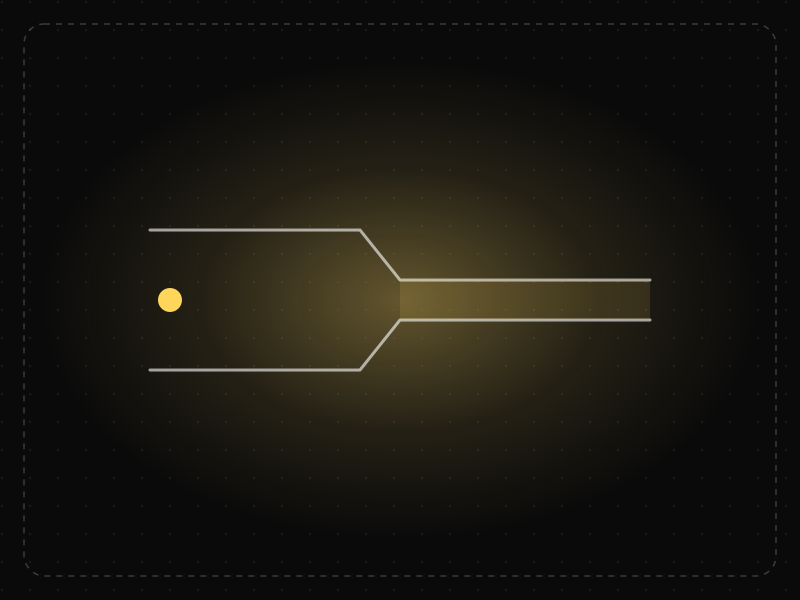
See it in action
The same screen without and with Steering Law. Watch both sides play out, then compare the outcome.
Moving diagonally toward the submenu slips over “Print”, the submenu closes and the path starts over.
A safe triangle keeps the submenu open while the cursor heads for it, so the same diagonal move just works.
What to watch: the diagonal cursor path — the narrow tunnel punishes it, the forgiving one doesn't.
Keep paths short and wide: generous hover areas, hover-intent delays, safe triangles.
Require precise movement along thin corridors (narrow menus, tiny sliders, long drag paths).
Key takeaways
- Make cascading menus and paths wide and short.
- Add tolerance so menus do not close when the pointer slips.
- Avoid interactions that require precise steering on touchscreens.
Quick facts
- Also known as
- Accot-Zhai steering law
- Described by
- Johnny Accot & Shumin Zhai
- Year
- 1997
- Category
- Interaction & speed
- Related laws
- Fitts's Law, Hick's Law, Doherty Threshold
Steering Law explained
The steering law predicts that moving through a path takes longer the longer and narrower the path is. Unlike Fitts's Law, which measures pointing at a target, the steering law measures movement constrained by boundaries.
Cascading menus are the classic example. To reach a submenu, users must move horizontally through a narrow strip without slipping onto another item, which is slow and error-prone.
Designers can reduce steering effort by widening paths, shortening distances and adding tolerance for imprecise movement.
Where it comes from
Johnny Accot and Shumin Zhai published the steering law in 1997, extending Fitts's Law from pointing at targets to steering through constrained paths.
How it shows up in apps
Nested dropdown menus, sliders, drag-and-drop and drawing tools all require steering. Narrow hover paths cause menus to close unexpectedly, and small slider tracks make precise adjustment frustrating.
Steering Law examples
A website's mega menu closes whenever the cursor drifts outside a narrow path to a submenu. Widening the hover area and adding a short delay before closing lets users reach submenu items without frustration.
Mega menus
Large, panel-style menus that display all subcategories at once avoid narrow cascading paths and are easier to navigate.
Hover intent
Menus that use a short delay or detect diagonal movement toward a submenu prevent accidental closing.
Sliders
Sliders with large thumbs and the option to type exact values reduce frustration when precise adjustment is needed.
How to apply Steering Law
- Prefer flat, wide menus over deeply nested cascades.
- Make hover areas generous and add closing delays.
- Offer alternatives to precise dragging, such as input fields.
- Keep paths short and straight.
- Test interactions on both mouse and touch devices.
Want Steering Law checked in your own product? Our mobile app ux audit evaluates it alongside the other principles that shape how users decide, onboard and stay.
Common mistakes
- Deeply nested hover menus with narrow paths.
- Menus that close instantly when the pointer leaves.
- Small sliders with no alternative input.
How to measure it
Measure time to select items in menus, error rates (wrong items selected or menus closing) and use session recordings to spot repeated attempts.
Frequently asked questions
What is Steering Law?
The time it takes to move a pointer through a tunnel or path depends on the path's length and width: long, narrow paths are slow and error-prone.
Where does Steering Law come from?
Johnny Accot and Shumin Zhai published the steering law in 1997, extending Fitts's Law from pointing at targets to steering through constrained paths.
How does Steering Law apply to app design?
Nested dropdown menus, sliders, drag-and-drop and drawing tools all require steering. Narrow hover paths cause menus to close unexpectedly, and small slider tracks make precise adjustment frustrating.
How is the steering law different from Fitts's Law?
Fitts's Law predicts time to point at a target. The steering law predicts time to move through a constrained path, such as a menu tunnel.
Why are cascading menus hard to use?
Because users must steer through narrow paths to reach submenus, and slight deviations close the menu or select the wrong item.
How do you measure Steering Law in a product?
Measure time to select items in menus, error rates (wrong items selected or menus closing) and use session recordings to spot repeated attempts.
Sources
- Accot, J., & Zhai, S. (1997). Beyond Fitts' law: Models for trajectory-based HCI tasks. Proceedings of CHI '97. Find on Google Scholar ↗
Related laws
 Interaction & speed
Fitts's Law
The time it takes to reach a target depends on its distance and size: bigger, closer targets are faster and easier to hit.
 Decision-making
Hick's Law
The time it takes to make a decision increases with the number and complexity of the choices available.
 Interaction & speed
Doherty Threshold
Productivity and engagement rise sharply when a system responds in under about 400 milliseconds, so neither the user nor the computer is left waiting on the other.
Steering Law in practice
- Everyday design scienceWhy is the keyboard QWERTY? What the patents, telegraphs and typing data actually showKeyboards are QWERTY because of an 1870s typewriter, not a plan to slow typists. What patents, telegraph history and 136 million keystrokes reveal about it.
- App developmentHow long does it take to build an app? Real timelines, not agency promisesA simple app takes 6–10 weeks, most first versions 3–6 months, complex fintech or marketplace apps 6–12 months. Phase-by-phase timelines and what really slips.
- Career guidesAI trust and transparency design skills employers want in 2027: calibrated trust, explanations, confidence, sources, disclosure, control and correction in AI productsAI trust and transparency design skills for 2027: calibrated trust, explanations, confidence, sources, AI disclosure, user control and correcting AI errors.
- Career guidesC++ developer jobs in 2027: modern C++, memory, performance and the interviews in systems, games and tradingC++ developer jobs in 2027: the modern C++, memory, concurrency and performance skills employers test in systems, games and trading, with pay.
- Career guidesHow to get an interaction designer job in 2027: feedback, states, motion, response times, affordances and prototypes that feel rightHow to get an interaction designer job in 2027: feedback, states, motion, response times, affordances, prototyping, accessibility and pay in India.
- Startups in IndiaBootstrapping vs funding: how to choose between self-funding and venture capital for your startupBootstrapping vs VC funding compared: control, speed, risk, dilution and outcomes, the businesses suited to each, and middle paths like revenue-based finance.
Certifications that test it

Get the ideas, not the noise.
Sign up with Google and we’ll send you short UX psychology tips by email — why people tap, stall and leave, and what to do about it. Unsubscribe anytime. Prefer something to keep? Get the free Laws of UX guide as a PDF.