Affordances & Signifiers
Also known as Affordance, Signifiers
An affordance is what an object lets you do; a signifier is the cue that shows you how. Clear signifiers tell users what is interactive and how to use it.
See it in action
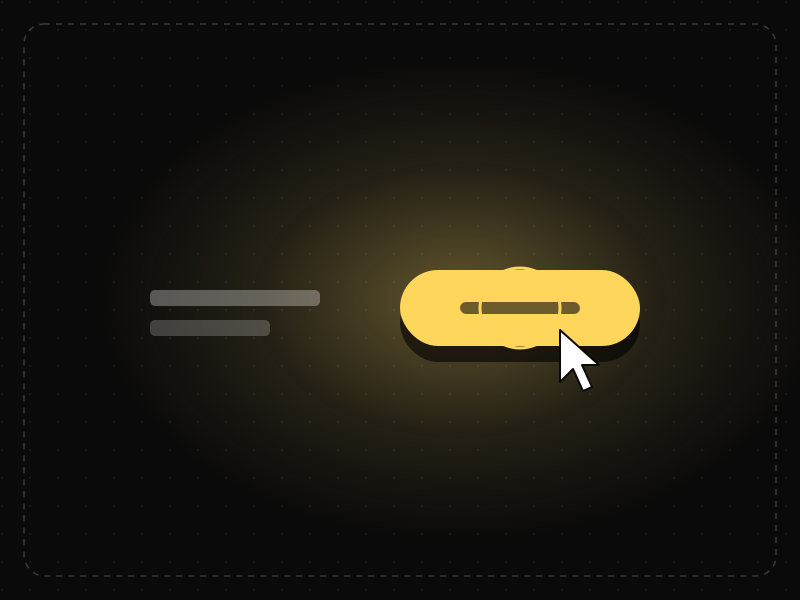
The same screen without and with Affordances & Signifiers. Watch both sides play out, then compare the outcome.
With no visual cue that it can be pressed, people hunt around and may never try it.
Shape, fill and an icon signal “press me”, so the action is found and used at once.
What to watch: the wandering pointer — no signifier, no confidence.
Make interactive things look interactive: button shapes, link styling, handles, hover and focus states.
Flatten controls into plain text, or make static elements look clickable.
Key takeaways
- Make interactive elements look interactive.
- Use consistent signifiers for buttons, links and inputs.
- Do not make non-interactive elements look clickable.
Quick facts
- Also known as
- Affordance, Signifiers
- Described by
- James Gibson; applied to design by Don Norman
- Year
- 1977
- Category
- Interaction & speed
- Related laws
- Jakob's Law, Mental Model, Law of Similarity
Affordances & Signifiers explained
Affordances are the relationships between an object and a person that determine what actions are possible: a chair affords sitting, a button affords pressing.
In digital interfaces, affordances are not physical, so users rely on signifiers such as shape, colour, shadows, underlines, icons and labels to understand what they can do.
When signifiers are missing or misleading, users either miss available actions or try actions that are not possible.
Where it comes from
Psychologist James Gibson developed the concept of affordances in the 1960s and 1970s to describe the action possibilities an environment offers. Don Norman applied it to design in The Design of Everyday Things (1988) and later added the concept of signifiers to clarify how designers communicate those possibilities.
How it shows up in apps
Buttons need to look tappable, links need to look clickable and swipeable content needs visual hints. Flat designs that remove all depth and contrast can hide affordances, leaving users unsure what to tap.
Affordances & Signifiers examples
A sign-up page uses plain text for its 'Continue' action. Many users do not realise it is clickable. Turning it into a filled button with clear contrast and padding increases clicks immediately.
Buttons with depth
Buttons with distinct colour, padding and sometimes a subtle shadow signal that they can be pressed.
Underlined links
Underlined, coloured text is a widely recognised signifier of a link.
Drag handles
Small grip icons on list items show that items can be reordered by dragging.
How to apply Affordances & Signifiers
- Design interactive elements with clear visual cues.
- Use consistent styles for each type of interaction.
- Provide hover, focus and pressed states.
- Label icons and use familiar symbols.
- Avoid styling static content like interactive controls.
Want Affordances & Signifiers checked in your own product? Our mobile app ux audit evaluates it alongside the other principles that shape how users decide, onboard and stay.
Common mistakes
- Flat buttons that look like plain text.
- Hidden gestures with no visual hint.
- Decorative elements that look clickable but are not.
How to measure it
First-click tests and heatmaps show whether users find interactive elements. Watch for rage clicks on non-interactive elements and missed clicks on actual controls.
Frequently asked questions
What is Affordances & Signifiers?
An affordance is what an object lets you do; a signifier is the cue that shows you how. Clear signifiers tell users what is interactive and how to use it.
Where does Affordances & Signifiers come from?
Psychologist James Gibson developed the concept of affordances in the 1960s and 1970s to describe the action possibilities an environment offers. Don Norman applied it to design in The Design of Everyday Things (1988) and later added the concept of signifiers to clarify how designers communicate those possibilities.
How does Affordances & Signifiers apply to app design?
Buttons need to look tappable, links need to look clickable and swipeable content needs visual hints. Flat designs that remove all depth and contrast can hide affordances, leaving users unsure what to tap.
What is the difference between an affordance and a signifier?
An affordance is what an object allows you to do. A signifier is the cue that communicates that possibility.
Why do flat designs sometimes hurt usability?
Removing visual cues like depth and contrast can make it unclear which elements are interactive.
How do you measure Affordances & Signifiers in a product?
First-click tests and heatmaps show whether users find interactive elements. Watch for rage clicks on non-interactive elements and missed clicks on actual controls.
Sources
- Gibson, J. J. (1977). The theory of affordances. In Perceiving, Acting, and Knowing. Lawrence Erlbaum. Find on Google Scholar ↗
- Norman, D. A. (2013). The Design of Everyday Things (Revised edition). Basic Books. Find on Google Scholar ↗
Related laws
 Interaction & speed
Jakob's Law
Users spend most of their time in other products, so they expect yours to work the same way as the apps and sites they already know.
 Memory & attention
Mental Model
A mental model is a person's internal picture of how a system works; interfaces feel intuitive when they match it and confusing when they don't.
 Perception
Law of Similarity
Elements that look alike — in color, shape, size or style — are perceived as related or as having the same function.
Affordances & Signifiers in practice
- Design historyiOS design history: from leather and linen to flat design to Liquid GlassiOS design history in three eras: skeuomorphism (2007), flat iOS 7 (2013) and Liquid Glass (2025). Who decided each change, why, and what the research says.
- Everyday design scienceWhy the human body is shaped the way it is: the design logic behind every partWhy is every body part shaped the way it is? Domes protect, tubes carry, folds add surface, levers move. The design logic of 164 parts, and which can be moved.
- Career guidesHow to get an interaction designer job in 2027: feedback, states, motion, response times, affordances and prototypes that feel rightHow to get an interaction designer job in 2027: feedback, states, motion, response times, affordances, prototyping, accessibility and pay in India.
- Everyday design scienceWhy is the keyboard QWERTY? What the patents, telegraphs and typing data actually showKeyboards are QWERTY because of an 1870s typewriter, not a plan to slow typists. What patents, telegraph history and 136 million keystrokes reveal about it.
- ComparisonsWebflow vs WordPress vs Framer: which website builder should a startup use?Webflow vs WordPress vs Framer for startup websites: design control, CMS, SEO, speed, plugins, cost and who should choose each, with a clear verdict.
- Everyday design scienceWho invented infinite scroll? Aza Raskin built it in 2006, and has spent years warning about itAza Raskin invented infinite scroll in 2006 to save clicks, and now regrets it. How it works on the brain, what research shows and how regulators are acting.
Certifications that test it
- Free certification · UX/UI, Design, Research & CreativeUX Design CertificationCertifies that you can take a product problem from user need to a tested, usable flow — research, information architecture, interaction design and usability evaluation.
- Free certification · UX/UI, Design, Research & CreativeUI Design CertificationCertifies that you can design clear, consistent, accessible interfaces — visual hierarchy, typography, colour, layout, components and interaction states.
- Free certification · UX/UI, Design, Research & CreativeAccessibility Certification (WCAG)Certifies that you can design and review digital products for people with disabilities — WCAG 2.2 principles, inclusive design patterns, assistive technology and accessibility testing.
- Free certification · UX/UI, Design, Research & CreativeFigma CertificationCertifies that you can build production-ready work in Figma — auto layout, components and variants, variables and modes, prototyping and developer handoff.
- Free certification · UX/UI, Design, Research & CreativeInteraction Design CertificationCertifies that you can design how interfaces behave — usability principles and mental models, feedback and states, forms and input, and motion and timing.




Get the ideas, not the noise.
Sign up with Google and we’ll send you short UX psychology tips by email — why people tap, stall and leave, and what to do about it. Unsubscribe anytime. Prefer something to keep? Get the free Laws of UX guide as a PDF.