Labor Illusion
Also known as Operational transparency
People value a service more when they can see the work being done for them, even if it means waiting a little longer.
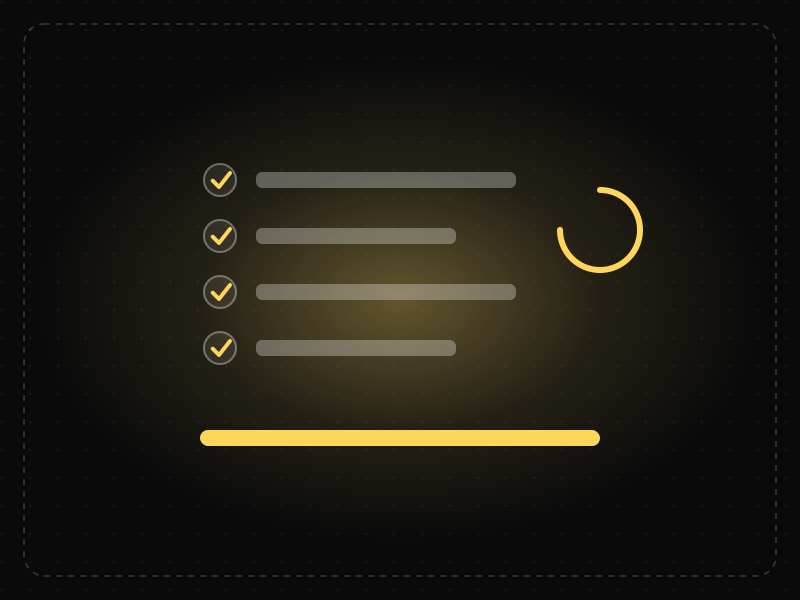
See it in action
The same screen without and with Labor Illusion. Watch both sides play out, then compare the outcome.
A blank wait feels like dead time, and the result feels ordinary.
Same wait, same result — but seeing the effort makes the answer feel more valuable and trustworthy.
What to watch: identical waiting time; only the visible effort changes how the result is valued.
When work genuinely takes time, show what's happening in honest, specific steps.
Add artificial delays to fake effort, or make fast tasks slow to seem impressive.
Key takeaways
- Show what the system is doing during longer waits.
- Visible effort increases perceived value and trust.
- Do not add fake delays; show real work.
Quick facts
- Also known as
- Operational transparency
- Described by
- Ryan Buell & Michael Norton
- Year
- 2011
- Category
- Interaction & speed
- Related laws
- Doherty Threshold, IKEA Effect, Peak-End Rule
Labor Illusion explained
The labor illusion happens because people associate effort with value. When they can see work being done on their behalf, they appreciate the result more and feel the wait is justified.
This effect relates to operational transparency: showing customers the process behind a service increases trust and satisfaction.
The key is honesty. Showing real steps helps users understand and trust the process; inventing delays to seem busy is deceptive and wastes users' time.
Where it comes from
Ryan Buell and Michael Norton of Harvard Business School described the labor illusion in 2011. Their experiments with travel and dating websites found that people preferred services that showed the work being performed, even when results took longer.
How it shows up in apps
Search and comparison sites show which sources they are checking, AI tools show steps as they generate results and finance apps show checks being performed. This transparency makes waits feel worthwhile.
Labor Illusion examples
A flight search shows 'Checking 420 airlines... comparing prices... finding the best routes' while results load. Users perceive the results as more thorough than when an identical wait shows only a spinner.
Travel search
Travel sites list the providers they are checking while results load, making the wait feel productive.
AI generation steps
AI assistants show what they are doing, such as searching or analysing, which helps users trust and understand the result.
Loan applications
Finance apps show verification steps as they run checks, reassuring users that their application is being properly reviewed.
How to apply Labor Illusion
- Show progress and real steps during longer operations.
- Explain what the system is doing in plain language.
- Use the labor illusion for waits that cannot be shortened.
- Keep the explanation honest and specific.
- Still optimise for speed; transparency complements performance, it does not replace it.
Want Labor Illusion checked in your own product? Our mobile app ux audit evaluates it alongside the other principles that shape how users decide, onboard and stay.
Common mistakes
- Adding artificial delays to appear thorough.
- Showing vague or fake progress steps.
- Using process animations for quick operations, which slows users down.
How to measure it
Compare satisfaction, perceived quality and abandonment during waits with and without process transparency. Ensure that total time to completion does not increase.
Frequently asked questions
What is Labor Illusion?
People value a service more when they can see the work being done for them, even if it means waiting a little longer.
Where does Labor Illusion come from?
Ryan Buell and Michael Norton of Harvard Business School described the labor illusion in 2011. Their experiments with travel and dating websites found that people preferred services that showed the work being performed, even when results took longer.
How does Labor Illusion apply to app design?
Search and comparison sites show which sources they are checking, AI tools show steps as they generate results and finance apps show checks being performed. This transparency makes waits feel worthwhile.
Who discovered the labor illusion?
Ryan Buell and Michael Norton described it in a 2011 study published in Management Science.
Should apps add fake loading screens?
No. The labor illusion should be used to explain real work during necessary waits. Fake delays waste users' time and damage trust.
How do you measure Labor Illusion in a product?
Compare satisfaction, perceived quality and abandonment during waits with and without process transparency. Ensure that total time to completion does not increase.
Sources
- Buell, R. W., & Norton, M. I. (2011). The labor illusion: How operational transparency increases perceived value. Management Science, 57(9). Find on Google Scholar ↗
Related laws
 Interaction & speed
Doherty Threshold
Productivity and engagement rise sharply when a system responds in under about 400 milliseconds, so neither the user nor the computer is left waiting on the other.
 Motivation & emotion
IKEA Effect
People place disproportionately high value on things they helped create, even when the result isn't perfect.
 Motivation & emotion
Peak-End Rule
People judge an experience mostly by how they felt at its most intense moment and at its end, not by the average of every moment.
Labor Illusion in practice
- App developmentAI app development cost in 2027: what you'll actually payAn AI app costs ₹12–60 lakh to build in India, ₹5–20 lakh to add AI to an existing app — plus a cost on every request. The full build and per-user running math.
- Making moneyApp monetization strategies that don't annoy users — designed with behavioural scienceMonetize your app without wrecking retention: value-first paywalls, honest trials, rewarded ads, anchoring and decoy pricing done ethically, and what to avoid.
- Architecture & engineeringThe best airports in the world in 2026, and the design science that makes them easy to useThe best airports in the world in 2026, led by Singapore Changi, and the design behind them: wayfinding, short walks, daylight and the psychology of waiting.
- Tech explainedApp permissions explained: what each one lets an app see, and which to allowApp permissions explained for Android and iPhone: what camera, location, contacts, SMS and accessibility access allow, which to refuse and how to check them.
- Career guidesAI trust and transparency design skills employers want in 2027: calibrated trust, explanations, confidence, sources, disclosure, control and correction in AI productsAI trust and transparency design skills for 2027: calibrated trust, explanations, confidence, sources, AI disclosure, user control and correcting AI errors.
- Product managementProduct manager vs product owner: role, accountability and how teams split themProduct manager vs product owner: the job title vs the Scrum accountability, how they overlap, how companies split them, and what it means for you.
Certifications that test it
- Free certification · AI & Generative AIAI UX Design CertificationCertifies that you can design AI-powered products people trust — setting expectations, conversational and agent UX, handling errors and uncertainty, and responsible AI.
- Free certification · UX/UI, Design, Research & CreativeMobile App Design CertificationCertifies that you can design native-feeling iOS and Android apps — platform conventions, navigation and gestures, touch ergonomics and accessibility, and performance, offline and permission flows.
- Free certification · UX/UI, Design, Research & CreativeInteraction Design CertificationCertifies that you can design how interfaces behave — usability principles and mental models, feedback and states, forms and input, and motion and timing.
- Free certification · AI & Generative AIAI Product Manager CertificationCertifies that you can manage AI products — finding the right AI opportunities, data, models and evaluation, AI UX, trust and safety, and shipping, cost and operations.



Get the ideas, not the noise.
Sign up with Google and we’ll send you short UX psychology tips by email — why people tap, stall and leave, and what to do about it. Unsubscribe anytime. Prefer something to keep? Get the free Laws of UX guide as a PDF.