Parkinson's Law
Work expands to fill the time available for its completion — and users' tasks expand to fill the time an interface allows.
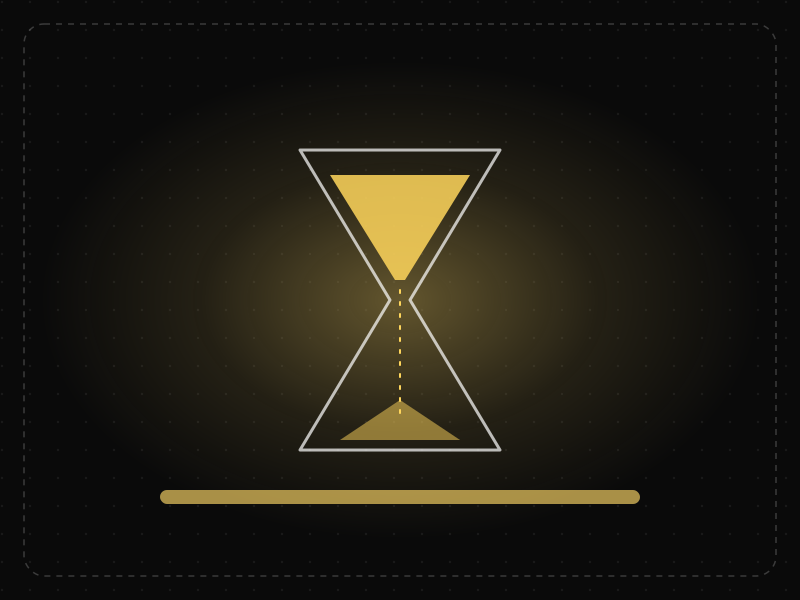
See it in action
The same screen without and with Parkinson's Law. Watch both sides play out, then compare the outcome.
With no shape or limit, the task expands — people over-think, over-write or abandon it.
A clear scope and a time estimate keep the task as small as it really is.
What to watch: the time bar — the same information gathered in a fraction of the time.
Set clear scope, limits and time estimates; use smart defaults to shorten tasks.
Leave tasks open-ended or impose deadlines so tight that quality suffers.
Key takeaways
- Design flows to be completed faster than users expect.
- Use smart defaults and autofill to shorten tasks.
- Clear time expectations ('takes 2 minutes') help users commit and finish.
Quick facts
- Also known as
- —
- Described by
- Cyril Northcote Parkinson
- Year
- 1955
- Category
- Product strategy
- Related laws
- Goal-Gradient Effect, Default Effect, Pareto Principle
Parkinson's Law explained
Parkinson's Law states that work expands to fill the time available for its completion. If a task has a week, it tends to take a week; if it has a day, it is often done in a day.
For users, this applies to tasks inside products: an open-ended form, an unlimited trial or an unstructured setup process invites procrastination and over-thinking. Clear limits and expectations help people finish.
For teams, Parkinson's Law explains why projects without tight scope and deadlines drift, and why time-boxing research and design work keeps it focused.
Where it comes from
Coined by British naval historian C. Northcote Parkinson in a satirical 1955 essay in The Economist about the growth of bureaucracy.
How it shows up in apps
Open-ended setup flows invite users to deliberate, postpone and drop off. Constraining tasks and pre-filling what you can keeps momentum.
Parkinson's Law examples
A profile setup screen that says 'About 60 seconds' and autofills name and photo from sign-in sees more users finish it in one go.
Estimated completion times
Surveys and onboarding flows that say 'takes 2 minutes' set an expectation that helps people finish quickly instead of overthinking each answer.
Autofill and smart defaults
Checkout forms that autofill addresses and payment details let users complete purchases in seconds, leaving no room for the task to expand.
Trial lengths
Shorter free trials with clear milestones often lead to faster product evaluation, because users know they need to explore key features within the time limit.
How to apply Parkinson's Law
- Tell users how long a task will take, and make sure the estimate is honest.
- Reduce the time needed to complete tasks with autofill, defaults and saved information.
- Give multi-step processes clear structure and milestones.
- Time-box research, design sprints and decisions within the team.
- Use gentle reminders and deadlines for tasks users start but do not finish.
Want Parkinson's Law checked in your own product? Our saas ux audit evaluates it alongside the other principles that shape how users decide, onboard and stay.
Common mistakes
- Creating artificial time pressure that rushes users into decisions they regret.
- Underestimating task length, which breaks trust when the task takes longer than promised.
- Leaving setup and configuration open-ended with no sense of what 'done' looks like.
How to measure it
Measure time to complete key tasks and the proportion of started tasks that are finished. Test variants with time estimates, autofill or milestones and compare completion rates and time on task.
Frequently asked questions
What is Parkinson's Law?
Work expands to fill the time available for its completion — and users' tasks expand to fill the time an interface allows.
Where does Parkinson's Law come from?
Coined by British naval historian C. Northcote Parkinson in a satirical 1955 essay in The Economist about the growth of bureaucracy.
How does Parkinson's Law apply to app design?
Open-ended setup flows invite users to deliberate, postpone and drop off. Constraining tasks and pre-filling what you can keeps momentum.
Who came up with Parkinson's Law?
British historian Cyril Northcote Parkinson described it in a humorous essay in The Economist in 1955.
How does Parkinson's Law apply to UX design?
It suggests that limiting and structuring the time users need for a task, and telling them how long it will take, helps them finish rather than procrastinate.
How do you measure Parkinson's Law in a product?
Measure time to complete key tasks and the proportion of started tasks that are finished. Test variants with time estimates, autofill or milestones and compare completion rates and time on task.
Sources
- Parkinson, C. N. (1955). Parkinson's Law. The Economist, 19 November 1955. Find on Google Scholar ↗
Related laws
 Motivation & emotion
Goal-Gradient Effect
People speed up their effort as they get closer to a goal, so visible progress — even artificial head starts — increases completion.
 Decision-making
Default Effect
People tend to stick with the pre-selected option, so defaults strongly shape what most users end up choosing.
 Product strategy
Pareto Principle
For many outcomes, roughly 80% of the effects come from about 20% of the causes — so a few features, users or issues usually matter most.
Parkinson's Law in practice
- App developmentHow long does it take to build an app? Real timelines, not agency promisesA simple app takes 6–10 weeks, most first versions 3–6 months, complex fintech or marketplace apps 6–12 months. Phase-by-phase timelines and what really slips.
- Making moneyApp monetization strategies that don't annoy users — designed with behavioural scienceMonetize your app without wrecking retention: value-first paywalls, honest trials, rewarded ads, anchoring and decoy pricing done ethically, and what to avoid.
- Product management25 best books for product managers — what each teaches and who should read itThe 25 best books for product managers, grouped by skill — discovery, strategy, metrics, design, psychology, interviews and leadership — with what each teaches.
- UI/UX designOnboarding screen examples: 40 patterns that get users to value faster40 app onboarding examples and patterns — welcome, sign-up, personalisation, permissions, empty states and first success — and why each works.
- Making moneyHow to earn money online for students in India — 15 real ways (and scams to avoid)15 real ways students in India can earn money online — internships, freelancing, tutoring, content and building apps — plus the 'task' scams to avoid.
- Career guidesTime management skills for 2027: prioritising by impact, planning your week, protecting focus time, managing interruptions and email, saying no, estimating tasks and avoiding burnoutTime management skills for 2027: prioritising by impact, planning your week, protecting focus time, interruptions, email, saying no and avoiding burnout.





Certifications that test it
- Free certification · UX/UI, Design, Research & CreativeProduct Design CertificationCertifies end-to-end product design: framing problems against business goals, designing and shipping solutions with engineering, and measuring their impact.
- Free certification · Product, Project Management & Business AnalysisProduct Manager CertificationCertifies that you can run product well — discovery, strategy and prioritization, metrics, delivery with design and engineering, and launch.
- Free certification · Product, Project Management & Business AnalysisDesign Leadership CertificationCertifies that you can lead design — build and grow teams, set design strategy, run design operations, measure design's impact and influence the business.
- Free certification · Product, Project Management & Business AnalysisAgile Product Owner CertificationCertifies that you can do the product owner job in agile teams — Scrum roles and events, backlog ordering and refinement, user stories and acceptance criteria, and value-focused releases.
- Free certification · Product, Project Management & Business AnalysisProduct Strategy CertificationCertifies that you can set product strategy — customer and market insight, positioning and differentiation, strategic choices and bets, and outcome roadmaps and OKRs.
- Free skill test · 15 minProduct Manager Interview TestA 15-minute practice test of product manager interview questions: product design, prioritisation, estimation and strategy, metrics and execution, plus behavioural and AI product judgement.




Get the ideas, not the noise.
Sign up with Google and we’ll send you short UX psychology tips by email — why people tap, stall and leave, and what to do about it. Unsubscribe anytime. Prefer something to keep? Get the free Laws of UX guide as a PDF.