Law of Continuity
Also known as Law of good continuation
The eye follows smooth lines and curves, so elements arranged along a line or path are perceived as related and in sequence.
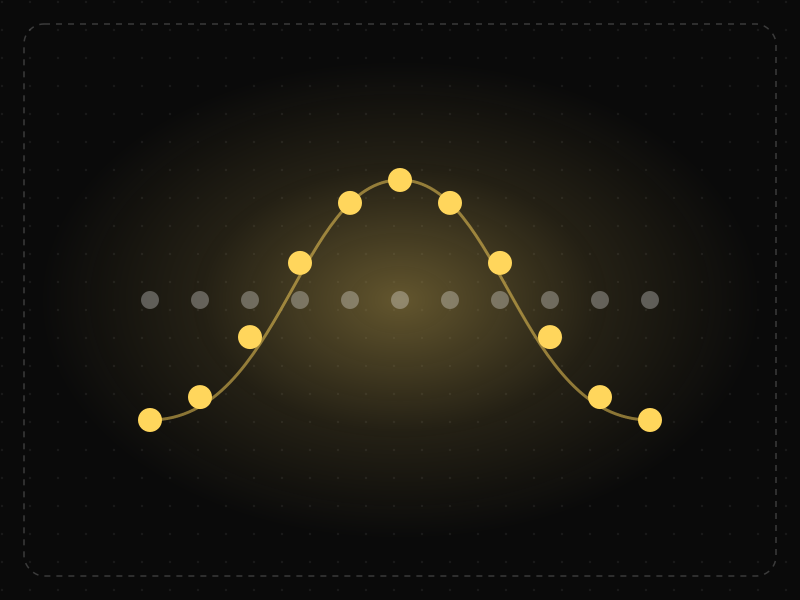
See it in action
The same screen without and with Law of Continuity. Watch both sides play out, then compare the outcome.
Two whole cards fill the row, so people scroll down past the carousel and never see items 3–10.
The row visibly continues past the edge, so the eye follows it and people swipe sideways.
What to watch: the swipe — a card cut off at the edge implies the row keeps going.
Align items along a clear line or curve and let horizontal lists bleed off the edge.
Break a reading line with misaligned items, or end a scrollable row exactly at the edge.
Key takeaways
- Align related items along a clear line so the eye moves through them in order.
- Use alignment and flowing paths to guide users through content and steps.
- Broken alignment interrupts reading and makes items feel unrelated.
Quick facts
- Also known as
- Law of good continuation
- Described by
- Max Wertheimer
- Year
- 1923
- Category
- Perception
- Related laws
- Law of Closure, Law of Uniform Connectedness, Law of Proximity
Law of Continuity explained
The Law of Continuity states that elements arranged on a line or curve are perceived as more related than elements that are not. The eye prefers to follow smooth, continuous paths.
When two lines cross, we see two continuous lines rather than four separate segments meeting at a point. In the same way, we see a row of items as a sequence because they lie along the same line.
Designers use continuity to guide attention and convey order. Strong alignment creates invisible lines that lead the eye from one element to the next.
Where it comes from
Good continuation was described by Max Wertheimer in his 1923 work on Gestalt principles. He showed that people perceive lines as continuing smoothly rather than changing direction abruptly, and group elements that lie along the same path.
How it shows up in apps
Grids, aligned lists, horizontal carousels, timelines and progress steppers all use continuity. When items line up, users read them as a sequence and scan them easily; misaligned items break the flow and slow scanning.
Law of Continuity examples
A product page aligns image, title, price, rating and add-to-cart button along a single left edge. Shoppers' eyes travel straight down the column and reach the button naturally.
Horizontal carousels
Cards aligned in a row are perceived as a related sequence, inviting users to scroll through them.
Timelines and steppers
Lines connecting steps in a process show order and progress, guiding the eye from start to finish.
Left-aligned forms
Forms with labels and fields aligned along one edge are faster to complete than forms with irregular alignment.
How to apply Law of Continuity
- Align elements on a consistent grid.
- Use lines and paths to show sequence in processes and timelines.
- Keep related items on the same horizontal or vertical axis.
- Lead the eye toward the primary action with layout flow.
- Avoid unnecessary breaks in alignment.
Want Law of Continuity checked in your own product? Our mobile app ux audit evaluates it alongside the other principles that shape how users decide, onboard and stay.
Common mistakes
- Centring some elements and left-aligning others in the same section.
- Zigzag layouts that make users search for the next item.
- Visual flows that lead the eye away from the primary action.
How to measure it
Eye-tracking and scroll heatmaps show whether users follow the intended path. Compare form completion times and error rates for aligned versus misaligned layouts.
Frequently asked questions
What is Law of Continuity?
The eye follows smooth lines and curves, so elements arranged along a line or path are perceived as related and in sequence.
Where does Law of Continuity come from?
Good continuation was described by Max Wertheimer in his 1923 work on Gestalt principles. He showed that people perceive lines as continuing smoothly rather than changing direction abruptly, and group elements that lie along the same path.
How does Law of Continuity apply to app design?
Grids, aligned lists, horizontal carousels, timelines and progress steppers all use continuity. When items line up, users read them as a sequence and scan them easily; misaligned items break the flow and slow scanning.
What is good continuation in Gestalt psychology?
It is the tendency to perceive elements arranged along smooth lines or curves as belonging together and continuing in the same direction.
How do designers use the Law of Continuity?
Through alignment, grids, carousels, timelines and visual paths that guide users' eyes from one element to the next.
How do you measure Law of Continuity in a product?
Eye-tracking and scroll heatmaps show whether users follow the intended path. Compare form completion times and error rates for aligned versus misaligned layouts.
Sources
- Wertheimer, M. (1923). Untersuchungen zur Lehre von der Gestalt II. Psychologische Forschung, 4. Find on Google Scholar ↗
Related laws
 Perception
Law of Closure
People mentally complete incomplete shapes and patterns, perceiving a whole even when parts of it are missing.
 Perception
Law of Uniform Connectedness
Elements that are visually connected — by lines, colors or shared frames — are perceived as more related than elements with no connection.
 Perception
Law of Proximity
Objects that are close to each other are perceived as belonging together, so spacing alone can communicate structure.
Law of Continuity in practice
- Career guidesUX psychology skills employers want in 2027: attention, memory, perception, decision-making and how designers apply them without manipulationUX psychology skills employers want in 2027: attention, memory, perception, decision-making, Hick's and Fitts's laws, cognitive load and ethics.
- App marketing & ASOApp retention rate benchmarks by category — and how to read your own numbersApp retention rate benchmarks by category — day 1, day 7 and day 30 ranges compiled from public industry roundups — plus how to measure and improve your own.
- Career guidesProfessional email writing for 2027: subject lines that get opened, answer-first messages, clear asks and deadlines, tone, follow-ups, difficult emails, replying to many people and using AI drafts safelyProfessional email writing for 2027: clear subject lines, answer-first messages, asks and deadlines, tone, follow-ups, difficult emails and safe AI drafting.
- UI/UX designLaws of UX explained: Hick's law, Fitts's law and Jakob's law, with app examplesThe three most-used laws of UX explained with app examples: Hick's law (choices), Fitts's law (target size and distance) and Jakob's law (familiarity).
- Career guidesIndian Sign Language careers in 2027: how ISL works, fingerspelling and numbers, Deaf culture and etiquette, access, law and interpreting, ISLRTC courses and the paths into ISL workIndian Sign Language careers in 2027: how ISL works, fingerspelling, Deaf culture and etiquette, access and law, ISLRTC courses and interpreting paths.
- Career guidesAmerican Sign Language careers in 2027: how ASL works, fingerspelling and numbers, Deaf culture and etiquette, access, law and interpreting, and the paths from ASL learner to working professionalAmerican Sign Language careers in 2027: how ASL works, fingerspelling, Deaf culture and etiquette, access law, interpreting paths and how to start.
Get the ideas, not the noise.
Sign up with Google and we’ll send you short UX psychology tips by email — why people tap, stall and leave, and what to do about it. Unsubscribe anytime. Prefer something to keep? Get the free Laws of UX guide as a PDF.