Figure-Ground
Also known as Figure-ground relationship, Figure-ground principle
People instinctively separate what they see into a foreground object (the figure) and the background (the ground), and focus on the figure.
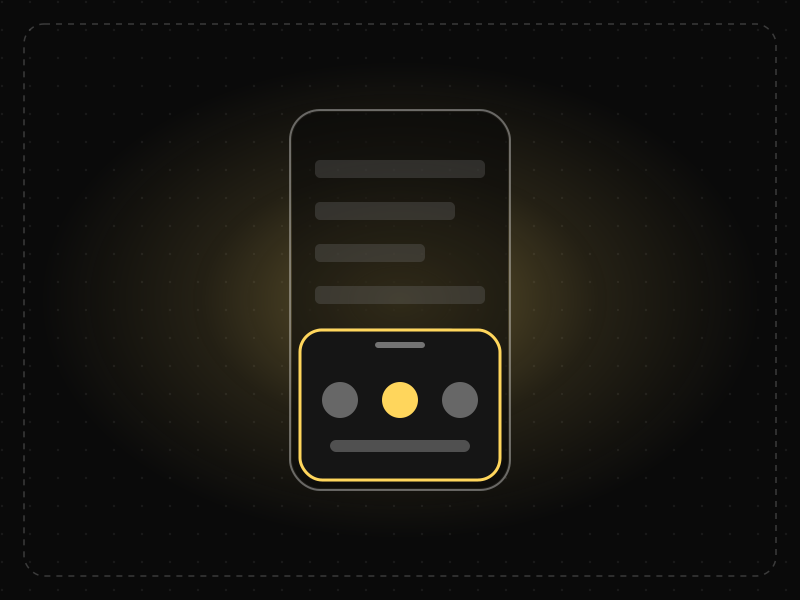
See it in action
The same screen without and with Figure-Ground. Watch both sides play out, then compare the outcome.
The dialog blends into the page behind it; people tap the list instead and wonder why nothing works.
Dimming the page pushes it into the background; the dialog becomes the only figure and gets the tap.
What to watch: how a dark backdrop instantly separates what's in front from what's behind.
Separate layers with contrast, shadow or a dimmed backdrop so the active surface is unmistakable.
Overlay content in the same tone as the page, or let busy backgrounds compete with text.
Key takeaways
- Make the most important element clearly stand out from its background.
- Use overlays, shadows and dimming to bring modals and menus to the foreground.
- Ambiguous figure-ground relationships make interfaces confusing.
Quick facts
- Also known as
- Figure-ground relationship, Figure-ground principle
- Described by
- Edgar Rubin
- Year
- 1915
- Category
- Perception
- Related laws
- Law of Common Region, Von Restorff Effect, Selective Attention
Figure-Ground explained
Figure-ground perception is the brain's way of separating objects from their surroundings. Every scene is organised into a figure, which has shape and appears in front, and a ground, which appears behind and is less defined.
Contrast, size, colour, blur, shadow and position all help the brain decide what is figure and what is ground. When these cues conflict, perception can flip between interpretations, as in the Rubin vase.
In UX design, clear figure-ground relationships make focus obvious. Users immediately understand which layer they are interacting with.
Where it comes from
Danish psychologist Edgar Rubin studied figure-ground perception in 1915, illustrating it with the famous Rubin vase, which can be seen as either a vase or two faces in profile. Gestalt psychologists later incorporated it as a core principle of perception.
How it shows up in apps
Modals, bottom sheets, menus and floating buttons rely on figure-ground: dimming or blurring the background pushes it back and brings the active element forward. Low contrast between content and background makes it hard to see what is interactive or important.
Figure-Ground examples
When a user taps 'Share', a bottom sheet slides up while the rest of the screen dims. The sheet becomes the figure and the dimmed page the ground, so users focus on sharing options.
Modal dialogs
A dimmed backdrop behind a dialog pushes the page into the background and focuses attention on the decision.
Floating action buttons
Elevated buttons with shadows appear above content, signalling that they are always available actions.
Text over images
Hero banners add a dark gradient behind white text so that the text stays the figure against busy photography.
How to apply Figure-Ground
- Use contrast, elevation and dimming to bring active layers forward.
- Ensure text and controls have sufficient contrast against backgrounds.
- Avoid busy backgrounds behind important content.
- Use consistent elevation levels across the product.
- Test designs in grayscale to check figure-ground clarity.
Want Figure-Ground checked in your own product? Our mobile app ux audit evaluates it alongside the other principles that shape how users decide, onboard and stay.
Common mistakes
- Placing text over busy images without an overlay.
- Using subtle shadows that fail to separate layers.
- Inconsistent elevation that confuses which layer is active.
How to measure it
Check contrast ratios against WCAG guidelines, and use first-click tests and five-second tests to see whether users identify the active layer and primary content immediately.
Frequently asked questions
What is Figure-Ground?
People instinctively separate what they see into a foreground object (the figure) and the background (the ground), and focus on the figure.
Where does Figure-Ground come from?
Danish psychologist Edgar Rubin studied figure-ground perception in 1915, illustrating it with the famous Rubin vase, which can be seen as either a vase or two faces in profile. Gestalt psychologists later incorporated it as a core principle of perception.
How does Figure-Ground apply to app design?
Modals, bottom sheets, menus and floating buttons rely on figure-ground: dimming or blurring the background pushes it back and brings the active element forward. Low contrast between content and background makes it hard to see what is interactive or important.
What is the Rubin vase?
An ambiguous image created by Edgar Rubin that can be seen as a vase or as two faces, demonstrating how perception separates figure from ground.
Why do modals dim the background?
Dimming pushes the page into the background, making the modal the figure and focusing attention on it.
How do you measure Figure-Ground in a product?
Check contrast ratios against WCAG guidelines, and use first-click tests and five-second tests to see whether users identify the active layer and primary content immediately.
Sources
- Rubin, E. (1915). Synsoplevede Figurer. Gyldendal. Find on Google Scholar ↗
- Koffka, K. (1935). Principles of Gestalt Psychology. Harcourt, Brace. Find on Google Scholar ↗
Related laws
 Perception
Law of Common Region
Elements that sit inside the same clearly bounded area are perceived as a group, even if they are not otherwise similar.
 Memory & attention
Von Restorff Effect
When several similar items are present, the one that differs from the rest is the one most likely to be noticed and remembered.
 Memory & attention
Selective Attention
People focus on the small part of their environment related to their current goal and filter out the rest — including things designers want them to notice.
Figure-Ground in practice
- Design historyLogo evolution: how 20 famous logos changed, and why almost all of them got simplerLogo evolution of 20 brands from Coca-Cola (1886) to Air India (2023): who designed each, what changed, and the memory science behind simpler logos.
- Career guidesUX psychology skills employers want in 2027: attention, memory, perception, decision-making and how designers apply them without manipulationUX psychology skills employers want in 2027: attention, memory, perception, decision-making, Hick's and Fitts's laws, cognitive load and ethics.
- HistoryThe world's 38 biggest languages, and the design of how they're writtenAll 38 languages with 50 million+ speakers (Ethnologue 2026): speakers, history, scripts, numerals and 'How are you?' in each — with every figure sourced.
- Career guidesOOP interview questions for developers in 2027: the principles, SOLID, patterns and design tasks interviews useOOP interview questions for developers in 2027: the four pillars, SOLID, composition, design patterns and low-level design, with answers.
- UI/UX designLaws of UX explained: Hick's law, Fitts's law and Jakob's law, with app examplesThe three most-used laws of UX explained with app examples: Hick's law (choices), Fitts's law (target size and distance) and Jakob's law (familiarity).
- Career guidesProduct design science in 2027: how designers, PMs and founders use the laws of UX and behavioural science to make product decisions employers trustProduct design science in 2027: how designers, PMs, founders and marketers use the laws of UX and behavioural science to make better product decisions.




Certifications that test it
- Free certification · UX/UI, Design, Research & CreativeUI Design CertificationCertifies that you can design clear, consistent, accessible interfaces — visual hierarchy, typography, colour, layout, components and interaction states.
- Free certification · UX/UI, Design, Research & CreativeAccessibility Certification (WCAG)Certifies that you can design and review digital products for people with disabilities — WCAG 2.2 principles, inclusive design patterns, assistive technology and accessibility testing.


Get the ideas, not the noise.
Sign up with Google and we’ll send you short UX psychology tips by email — why people tap, stall and leave, and what to do about it. Unsubscribe anytime. Prefer something to keep? Get the free Laws of UX guide as a PDF.