 By
Quick answer: Do employers verify certifications?
- Often — especially for required or regulated credentials.
- How — issuer registries, badge links, background checks.
- Your job — share credential ID + link.
- Fakes — verification catches them in minutes.
- SOA — credential ID + QR on every certificate.
Key takeaways
- Many employers verify required certifications, especially in regulated, security and finance roles.
- Verification uses issuer registries, badge links and credential IDs.
- Background-check providers often verify education and credentials as part of hiring.
- Make verification easy: include ID and link on your CV and LinkedIn.
- Unverifiable credentials raise doubts, even when they're real.
How certificate verification works

| Issuer | How to verify |
|---|---|
| PMI (PMP, CAPM) | Online certification registry1 |
| AWS | Credential validation with validation number2 |
| Microsoft | Shareable credential link on Microsoft Learn3 |
| CompTIA, many vendors | Credly digital badges |
| Salesforce | Trailhead credential verification |
| Science of Apps | Credential ID + QR code on the certificate4 |
Do employers check certifications?
Many do, particularly when a credential is required for the role or regulated (healthcare, finance, security clearance work). HR teams often include credential verification in background screening5. Even when they don't check, interviewers test the skill, so unearned credentials rarely survive.
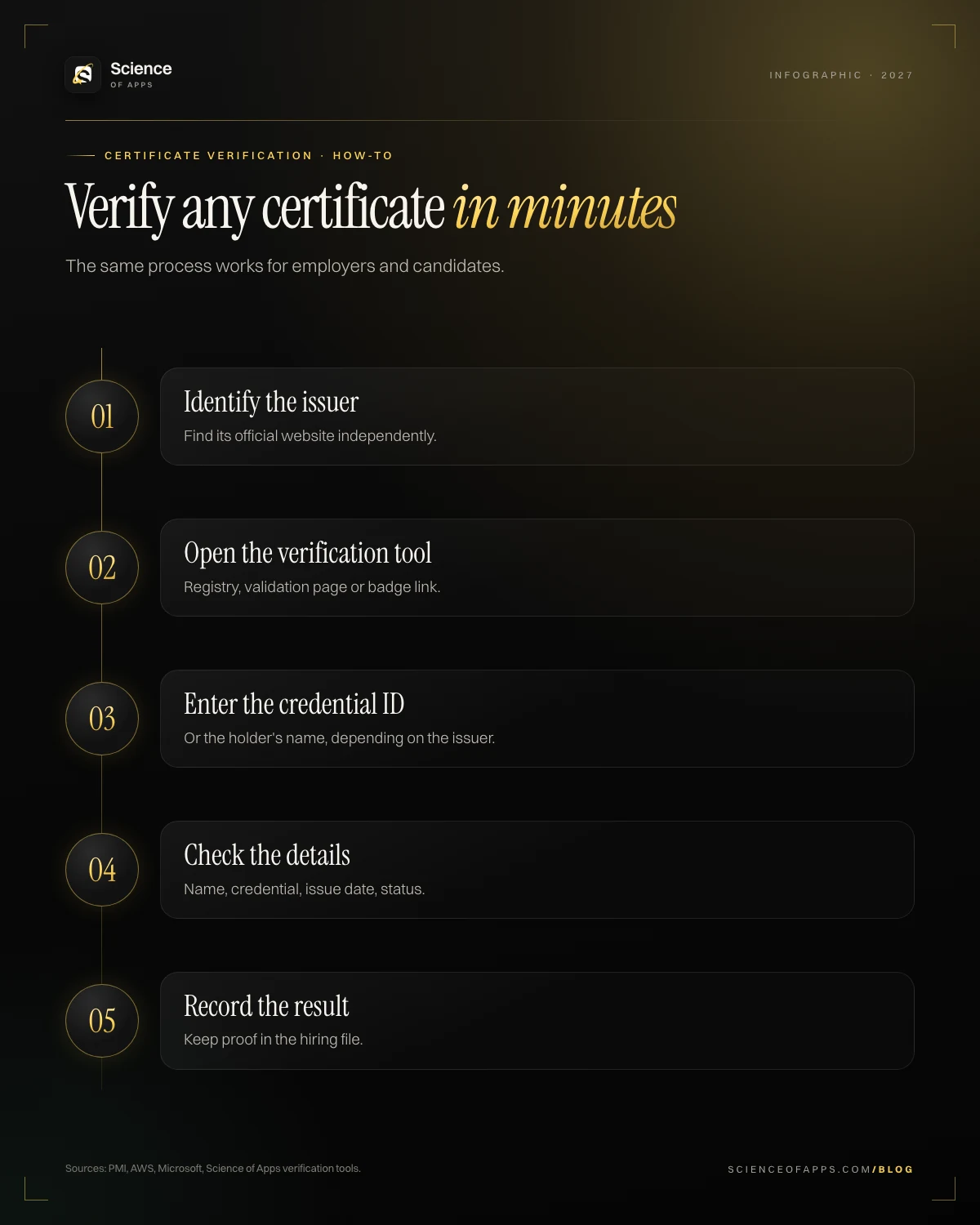
How to verify a certificate online
- Identify the issuer and find its official site independently.
- Use its verification page or registry.
- Enter the credential ID or holder name.
- Confirm name, credential, issue date and status (active/expired).
Make your certifications easy to verify
- Add credential ID and URL in LinkedIn's Licenses & certifications section.
- Put the verification link on your CV.
- Keep certifications current; expired ones show as expired.
Verified certificate vs professional certificate
On platforms like edX, a "verified certificate" confirms your identity and course completion; a "professional certificate" is a multi-course program. Both are different from an exam-based certification.
Background checks and credentials
Many employers use background screening providers who verify education and professional credentials with the issuing body. This is standard in finance, healthcare, government and larger companies. Candidates usually sign a consent form, and the check takes from a day to a couple of weeks.
Prove it free: the tests that match this guide
For HR teams verifying credentials and candidates making theirs easy to check. (Disclosure: Science of Apps publishes these tests.)
- Resume Screening and Skills-Based Hiring CertificationResume screening and skills-based hiring for recruiters.Start free test →
- Interviewing and Candidate Evaluation CertificationEvaluate candidates beyond the certificate.Start free test →
- AI Literacy CertificationEarn a certificate with a credential ID employers can verify.Start free test →
Expired and revoked certifications
Verification also shows status. Many certifications expire (AWS after three years, PMP without 60 PDUs every three years). Listing an expired credential as active is a common, avoidable mistake; list it with its dates or renew it. Revoked credentials, removed for misconduct, also show in issuer registries.
How to list certifications so they're verifiable
Use this format on your CV: Certification name — Issuer — Month Year — Credential ID: XXXX — verification link. On LinkedIn, the Licenses & certifications section has fields for all of these. Recruiters appreciate being able to click through.
Certificate verification in India and elsewhere
Many countries run official verification for academic records, such as India's DigiLocker and National Academic Depository for degree certificates. Professional certifications are verified through each issuer's tools, as above.
Frequently asked questions
How do I verify a certificate online?
Find the issuer's official website, use its verification page or registry, and enter the credential ID or holder's name.
Do employers verify certifications?
Many do, especially for required or regulated credentials, often as part of background checks.
What's the difference between a verified certificate and a professional certificate?
A verified certificate confirms identity and completion of one course; a professional certificate is a multi-course program. Neither is an exam-based certification.
What happens to expired or revoked certifications?
Verification also shows status. Many certifications expire (AWS after three years, PMP without 60 PDUs every three years). Listing an expired credential as active is a common, avoidable mistake; list it with its dates or renew it. Revoked credentials, removed for misconduct, also show in issuer registries.
How should you list certifications so employers can verify them?
Use this format on your CV: *Certification name — Issuer — Month Year — Credential ID: XXXX — verification link*. On LinkedIn, the Licenses & certifications section has fields for all of these. Recruiters appreciate being able to click through.
Sources
- PMI: online certification registry
- AWS: validate an AWS certification
- Microsoft Learn: share and verify credentials
- Science of Apps: free online certifications
- SHRM: background checks and credential verification
- Checked November 11, 2026. Figures that change — fees, salaries, prices — are reviewed every six months; if something is out of date, tell us.
Where to go from here
- Certificate mills & fake certifications — how certificate mills work, red flags of fake certification websites and how to
- Certification accreditation explained — what makes a certification industry-recognized? accreditation bodies (ansi, iso
- Accredited vs non-accredited — what does 'accredited' really mean for a certification? how accreditation works
- CertificationsAre online certificates legit?Are online certificates legit? How to tell real credentials from scams: verification, real assessments, accreditation claims and red flags to check.
- CertificationsSOA verified certificatesEvery SOA certificate can be verified online in seconds. Here's how verification works for learners and employers.
- CertificationsDigital credentials & blockchain certificatesWhat digital credentials and blockchain certificates are, how they prevent fraud and why employers are adopting them.
- CertificationsSkills vs degree vs experienceSkills vs degree vs experience: what employers really value in 2027, why fewer than 1 in 700 hires changed after degree cuts, and where certifications fit.
- CertificationsCertificate mills & fake certificationsHow certificate mills work, red flags of fake certification websites and how to verify any credential before you enrol.
- Career guidesAI research and fact-checking skills employers want in 2027: primary sources, citation checks, lateral reading and documented verificationAI research and fact-checking skills employers want in 2027: primary sources, citation checks, lateral reading, media verification and evidence logs.
Get the ideas, not the noise.
Sign up with Google and we’ll send you short UX psychology tips by email — why people tap, stall and leave, and what to do about it. Unsubscribe anytime. Prefer something to keep? Get the free Laws of UX guide as a PDF.
Prove the skill before you pay for the exam.
1,200+ free, test-based certifications graded on our server. Pass and get a founder-signed certificate with a credential ID employers can verify.