 By
Quick answer: How do I add my company to Crunchbase?
- Cost: free; any registered, socially authenticated user can create a profile.
- Before you start: search Crunchbase so you don't create a duplicate.
- Steps: Resources → Create Profile → choose the type → fill in details → Save All Edits.
- Complete it: logo, founded date, links, short and long description, HQ, 3–5 industries, founders, funding, team.
- Take control: use Manage My Company to verify you work there and control parts of the Overview.
Key takeaways
- Listing your startup on Crunchbase is free and takes minutes; you don't need Crunchbase Pro.
- You must register and connect a social account (Google or LinkedIn) before you can add profiles.
- Crunchbase says complete profiles appear more in search and improve your Crunchbase Rank.
- Content must be accurate, objective and not promotional; Crunchbase isn't a marketing page.
- Insights, predictions, CB Rank and CB Trend aren't editable; report inaccuracies to Crunchbase support.
Investors, journalists and job candidates look your startup up on Crunchbase before they reply to you. If you're not there, or your profile is a half-empty stub someone else created, that's the first impression. Getting listed is free and takes about fifteen minutes if you prepare. This guide follows Crunchbase's own help-centre instructions, read on 17 November 2026, and adds what makes a profile complete and trustworthy. Jump to the steps, the complete-profile checklist or taking control of your profile.
Before you start

- A free Crunchbase account — register with email, or Google or LinkedIn
- Social authentication done — required before you can add profiles
- A search for your company — so you don't create a duplicate
- Your square logo — and a short and a long description, written plainly
- The facts — founded date, headquarters, founders' names, funding rounds (if any), team size
- 3–5 industries — Crunchbase recommends this many
How to get your startup listed on Crunchbase, step by step

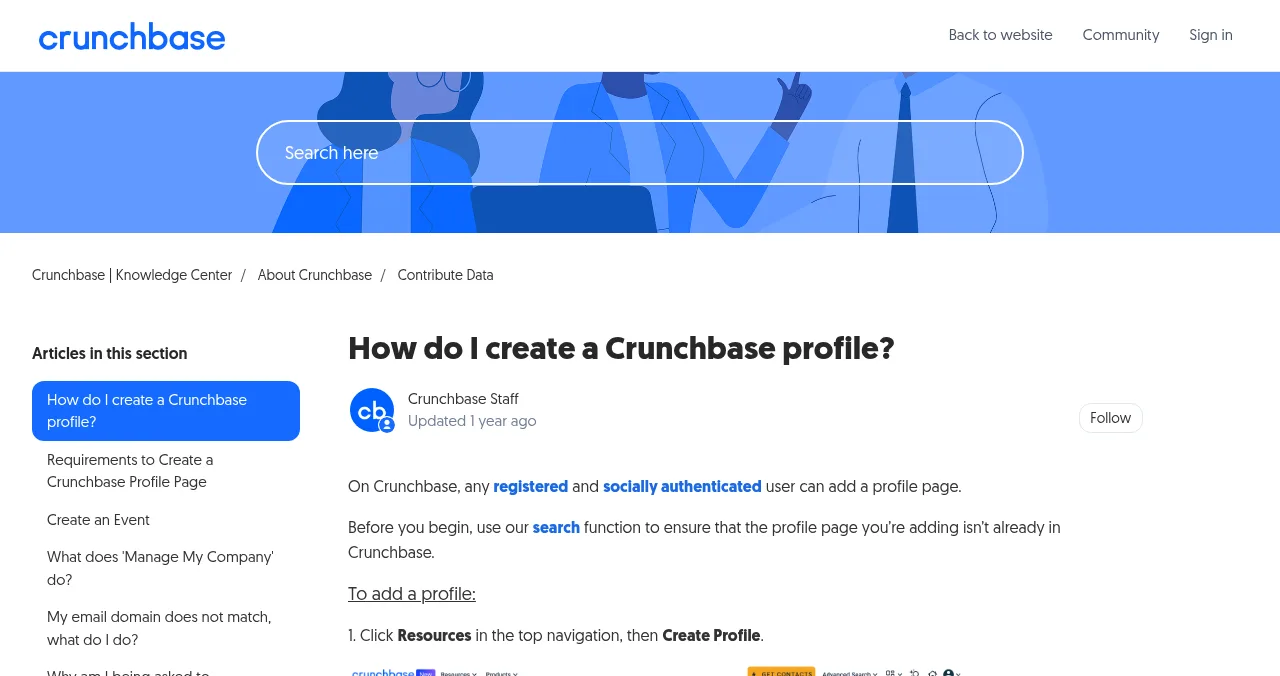
- Register. Click Log In at the top right of Crunchbase, then the Register tab. Use email, name and password, or sign up with Google or LinkedIn.
- Complete social authentication. Click the Account icon (top right) → Account Settings → scroll to Social Authentication → Connect a social network. Crunchbase says "any registered and socially authenticated user can add a profile page".
- Search for your company. If a profile already exists, edit it rather than creating a new one.
- Create the profile. Click Resources in the top navigation, then Create Profile, and select the type (an organisation for your startup).
- Fill in the details. Add everything in the checklist below, then click Save All Edits in the upper right corner.
- Add the people. Create or link founder profiles, so your team shows up on the company page and vice versa.
- Verify you work there. Use Manage My Company to verify your employment, which lets verified employees control parts of the Overview section.
The complete-profile checklist
Crunchbase says to "complete your company profile to maximize your appearance in search results and improve your Crunchbase Rank". Its key editable fields:
| Field | What to write |
|---|---|
| Logo | Square, clear at small sizes |
| Founded date | Month and year, matching your registration |
| Website and social links | Your own domain, LinkedIn, X, GitHub if relevant |
| Short description | One line: what you do, for whom |
| Long description | 3–5 factual sentences; no marketing language |
| Headquarters | City and country |
| Industries | 3–5 that match how people search |
| Diversity Spotlight | Optional; available for US, UK and Europe only |
| Founders | Linked person profiles |
| Funding rounds | Date, type, amount and investors, only if public |
| Employees, board, advisors | Linked person profiles |
Table: Crunchbase's key editable company profile fields (Crunchbase Knowledge Center, checked 17 Nov 2026)
You can't edit Insights, Predictions, CB Rank or CB Trend. If they look wrong, Crunchbase asks you to email support.
Taking control of your profile
If someone else created your company's profile, or you want to stop competitors' edits from sticking, use Manage My Company. It lets you verify that you work at the organisation, and verified employees can exclusively control some of the content in the Overview section. Crunchbase's help centre also covers what to do if your email domain doesn't match the company's website.
Crunchbase's content rules
Anyone can edit Crunchbase, so it moderates. Its guidelines say content must be:
- Accurate and objective, never inflammatory.
- Informative, providing unique information about a company, product or person.
- Not marketing: content "cannot be used as a marketing tool to sell a product or service".
- About the tech ecosystem: startups, investors and the people around them.
Crunchbase prefers correcting problematic profiles to removing them, but removes profiles that are entirely fictitious.
Get found by your product, too
Crunchbase is where people check your company. Customers, though, search for the problem they have. A free Science of Apps Launchpad profile covers that side: a permanent page about your product, written to rank on Google and to be quoted by AI assistants. You can reuse the logo and descriptions you just wrote.

Mistakes that make Crunchbase profiles look weak

- Creating a duplicate — search first, then edit the existing profile
- Marketing copy in the description — Crunchbase removes promotional content; keep it factual
- Leaving founders unlinked — investors look for the people
- Inventing or rounding funding — add only rounds that are public and accurate
- Never verifying — without Manage My Company, anyone's edits can change your Overview
- Different descriptions everywhere — use the same one-line description on Crunchbase, LinkedIn and your launch profiles
Consistency matters beyond Crunchbase: search engines and AI assistants trust facts that several independent profiles agree on (see our organic visibility guide).
Ready to be found?
How we know
Every step and rule comes from Crunchbase's Knowledge Center articles on creating a profile, profile requirements, Manage My Company and content guidelines, read on 17 November 2026. Menu names can change; if a step looks different, search Crunchbase's help centre for "create a profile". Science of Apps runs the Launchpad mentioned above and has no relationship with Crunchbase.
Key terms, defined
- Crunchbase profile: a public page about a company, investor or person on Crunchbase.
- Social authentication: connecting Google or LinkedIn to your Crunchbase account; required to add profiles.
- Manage My Company: Crunchbase's way to verify you work at an organisation and control parts of its Overview.
- CB Rank: Crunchbase's own ranking of a profile's prominence; not editable.
- Duplicate profile: a second profile for the same company; edit the existing one instead.
Frequently asked questions
How do I add my company to Crunchbase?
Register for a free Crunchbase account, connect Google or LinkedIn in Account Settings (social authentication), and search to make sure your company isn't already listed. Then click Resources in the top navigation, choose Create Profile, select the profile type, fill in the details and click Save All Edits in the upper right corner.
Is it free to list a startup on Crunchbase?
Yes. Creating or editing profiles is included in the free Crunchbase account. You only pay for Crunchbase Pro or Business if you want full search, insights and exports for research.
Why can't I create a Crunchbase profile?
Usually because your account hasn't completed social authentication. Crunchbase requires a registered, socially authenticated user: go to Account Settings, scroll to Social Authentication and connect a social account. Errors can also come from a duplicate profile that already exists.
What should a complete Crunchbase company profile include?
Crunchbase lists these key editable items: company logo, founded date, website and social links, short and long descriptions, headquarters, 3–5 industries, Diversity Spotlight (US, UK and Europe only), founders, funding rounds, and employees, board members and advisors.
How do I control my company's Crunchbase profile?
Use Manage My Company to verify that you work at the organisation. Verified employees can exclusively control some of the content in the Overview section. If your email domain doesn't match the company website, Crunchbase's help centre has guidance for that case.
Why was my Crunchbase profile removed?
Crunchbase asks for accurate, objective, non-promotional content that adds unique information about a company, product or person. It generally corrects problematic profiles rather than deleting them, but it removes profiles it finds entirely fictitious, and profiles outside the tech and startup ecosystem may be removed.
How long does a Crunchbase profile take to appear?
Crunchbase doesn't publish a fixed review time for new profiles, and edits pass through its moderation processes. Make the profile complete and accurate from the start, and check back after a few days.
Sources
- Crunchbase Knowledge Center — How do I create a Crunchbase profile? (checked 17 Nov 2026)
- Crunchbase Knowledge Center — Requirements to create a Crunchbase profile page (checked 17 Nov 2026)
- Crunchbase Knowledge Center — What does 'Manage My Company' do?
- Crunchbase Knowledge Center — What are the guidelines for adding content to Crunchbase?
- Crunchbase Knowledge Center — Free account vs paid subscriptions (checked 17 Nov 2026)
- Science of Apps — Launchpad: launch your product free
- Checked November 17, 2026. Figures that change — fees, salaries, prices — are reviewed every six months; if something is out of date, tell us.
Where to go from here
- Is Crunchbase free? — what the free account includes
- Crunchbase alternatives — other places to be found
- Organic visibility for startups — how profiles help you get found
- Science of Apps - LaunchpadHow to list your product on G2, Capterra and GetApp for free: one G2 seller account now manages all of them, what the free plan includes and when paid plans are worth itHow to list on G2 and Capterra free: one G2 seller account covers G2, Capterra, Software Advice and GetApp. What's free and what Starter adds.
- Science of Apps - LaunchpadHow to get your app listed on AlternativeTo: suggesting a new application, choosing the right licence, and appearing as an alternative to the apps you compete withHow to get listed on AlternativeTo: sign up, verify your email, suggest your app, pick the right licence and appear as an alternative to competitors.
- Science of Apps - LaunchpadHow to list your startup in India in 2027: DPIIT recognition, startup databases, media and launch platformsHow to list your startup in India in 2027: free DPIIT recognition via NSWS, Tracxn and Crunchbase profiles, YourStory, Google Business and launch platforms.
- Science of Apps - LaunchpadWhat is Crunchbase? What the private-company database covers, who uses it, what's free, what Pro and Business cost, and how startups use itWhat is Crunchbase? The private-company database explained: who uses it, what a free account gets, Pro and Business prices, and how startups use it.
- Science of Apps - LaunchpadCrunchbase vs the Science of Apps Launchpad: a free company profile investors look up, or a free product listing customers find, with your product tested. What each does, what it costs and which to set up firstCrunchbase is where investors look you up; the Launchpad is where customers find your product. What each costs, what it does, and why most startups need both.
- Science of Apps - LaunchpadCB Insights vs Crunchbase compared for founders, investors and corporate teams: what each covers, how pricing works (self-serve vs request a quote) and which one a startup needsCB Insights vs Crunchbase: enterprise intelligence priced on request vs self-serve company data with a free account. Which fits founders, investors and teams.
Get the ideas, not the noise.
Sign up with Google and we’ll send you short UX psychology tips by email — why people tap, stall and leave, and what to do about it. Unsubscribe anytime. Prefer something to keep? Get the free Laws of UX guide as a PDF.
Launch day ends. Your listing shouldn't.
Crunchbase profiles your company and funding. A free Launchpad listing profiles your product, ranks for the problem it solves, and comes with your product tested end to end and a detailed report.