Choice Overload
Also known as Paradox of Choice
When people face too many options, deciding becomes harder and less satisfying — and they are more likely to choose nothing at all.
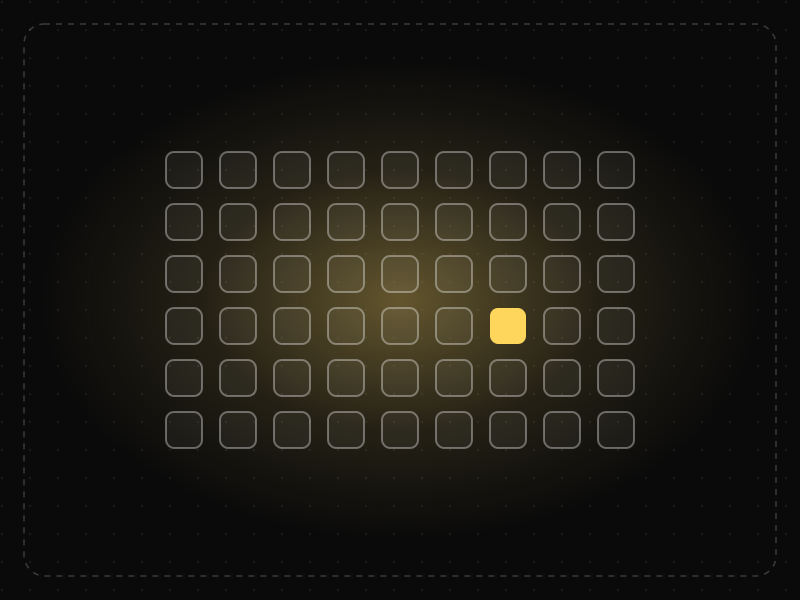
See it in action
The same screen without and with Choice Overload. Watch both sides play out, then compare the outcome.
In the classic jam study, 24 options drew more browsers — but only 3% bought, versus 30% when there were six.
Three distinct plans with a clear recommendation: people compare quickly and commit.
What to watch: the highlight wandering across 24 tiles versus a single confident pick.
Curate a short list, make the differences obvious and recommend a sensible default.
Offer dozens of near-identical variants and hope people find their perfect match.
Key takeaways
- More options increase interest but can lower the chance of a decision.
- Curate: highlight a recommended option and hide the long tail behind search or filters.
- The effect is strongest when options are hard to compare and the person has no clear preference.
Quick facts
- Also known as
- Paradox of Choice
- Described by
- Sheena Iyengar & Mark Lepper
- Year
- 2000
- Category
- Decision-making
- Often confused with
- Hick's Law (Choice Overload vs Hick's Law)
- Related laws
- Hick's Law, Default Effect, Cognitive Load
Choice Overload explained
Choice overload happens when the number or complexity of options makes deciding feel hard enough that people delay, choose poorly, feel less satisfied with what they picked, or walk away without choosing at all.
More options are not always worse. The effect appears when options are hard to compare, when people do not already know what they want, when the decision feels important, or when there is time pressure. Clear structure, good defaults and recommendations can make large catalogues feel easy.
In digital products, choice overload often hides in pricing pages, settings, plan builders, template galleries and onboarding questions, where every extra option feels harmless to the team but adds up for the user.
Where it comes from
Popularised by Sheena Iyengar and Mark Lepper's 2000 'jam study': a tasting table with 24 jams attracted more shoppers, but a table with 6 jams led to far more purchases. Barry Schwartz brought the idea to a wide audience in The Paradox of Choice (2004). A 2010 meta-analysis by Scheibehenne and colleagues found the effect varies a lot by context, so it should be tested rather than assumed.
How it shows up in apps
Pricing pages with many near-identical tiers, onboarding that asks users to pick from dozens of interests, and settings screens full of toggles all create decision friction exactly where you need momentum. In activation flows, every unnecessary choice is a chance to stall.
Choice Overload examples
A subscription app shows four similar plans with eight feature rows each. Reducing it to two plans with one clearly marked 'Most popular' default makes the decision easier and the path to checkout shorter.
Pricing page with too many plans
A SaaS tool offering six plans with overlapping features sees visitors bounce between columns and leave. Reducing to three clearly differentiated tiers with one marked as most popular makes the choice feel safe and raises plan selection.
Streaming home screen
Streaming apps reduce the paralysis of an enormous catalogue by leading with a single featured title, personalised rows and autoplay previews, so viewers evaluate a handful of options instead of thousands.
Template gallery in a design tool
Showing 400 templates on the first screen of a new project slows people down. Asking one question first (what are you making?) and showing eight relevant templates gets users to a blank-page-free start faster.
How to apply Choice Overload
- Limit visible options on decision-heavy screens to a small, curated set and let people expand to see more.
- Make options easy to compare with consistent attributes, side-by-side layouts and plain-language differences.
- Offer a recommended or default option for people who do not have a strong preference.
- Use filters, categories and progressive questions to narrow large catalogues before showing results.
- Remove options that few people choose; usage data usually shows a long tail that adds noise without adding value.
Want Choice Overload checked in your own product? Our mobile app ux audit evaluates it alongside the other principles that shape how users decide, onboard and stay.
Common mistakes
- Assuming more choice always means more value for users, especially in onboarding and pricing.
- Cutting options so far that people cannot find what they need; the goal is easier comparison, not the fewest possible items.
- Presenting options that differ in many dimensions at once, which makes comparison hard even when the list is short.
How to measure it
Track decision time, drop-off and selection rate on screens with many options, and compare variants with fewer or better-structured choices. Post-decision satisfaction or regret (for example plan downgrades and refund requests) shows whether people are happy with what they chose, not just whether they chose.
Frequently asked questions
What is Choice Overload?
When people face too many options, deciding becomes harder and less satisfying — and they are more likely to choose nothing at all.
Where does Choice Overload come from?
Popularised by Sheena Iyengar and Mark Lepper's 2000 'jam study': a tasting table with 24 jams attracted more shoppers, but a table with 6 jams led to far more purchases. Barry Schwartz brought the idea to a wide audience in The Paradox of Choice (2004). A 2010 meta-analysis by Scheibehenne and colleagues found the effect varies a lot by context, so it should be tested rather than assumed.
How does Choice Overload apply to app design?
Pricing pages with many near-identical tiers, onboarding that asks users to pick from dozens of interests, and settings screens full of toggles all create decision friction exactly where you need momentum. In activation flows, every unnecessary choice is a chance to stall.
Is choice overload the same as Hick's Law?
They are related but different. Hick's Law describes how decision time grows with the number of options. Choice overload is broader: too many options can also cause avoidance, lower satisfaction and regret, not just slower decisions.
Did the famous jam study prove that more choice is always bad?
No. Iyengar and Lepper's 2000 study found far fewer purchases from a 24-jar display than a 6-jar one, but later meta-analyses show the effect depends on context, such as how easy options are to compare and how clear preferences are.
How do you measure Choice Overload in a product?
Track decision time, drop-off and selection rate on screens with many options, and compare variants with fewer or better-structured choices. Post-decision satisfaction or regret (for example plan downgrades and refund requests) shows whether people are happy with what they chose, not just whether they chose.
Sources
- Iyengar, S. S. & Lepper, M. R. (2000). When choice is demotivating: Can one desire too much of a good thing? Journal of Personality and Social Psychology, 79(6). Find on Google Scholar ↗
- Schwartz, B. (2004). The Paradox of Choice: Why More Is Less. Ecco. Find on Google Scholar ↗
- Scheibehenne, B., Greifeneder, R. & Todd, P. M. (2010). Can there ever be too many options? A meta-analytic review of choice overload. Journal of Consumer Research, 37(3). Find on Google Scholar ↗
Related laws
 Decision-making
Hick's Law
The time it takes to make a decision increases with the number and complexity of the choices available.
 Decision-making
Default Effect
People tend to stick with the pre-selected option, so defaults strongly shape what most users end up choosing.
 Memory & attention
Cognitive Load
Cognitive load is the amount of mental effort needed to understand and use an interface; when it exceeds what people can handle, they slow down, make mistakes or give up.
Choice Overload in practice
- Career guidesDecision-making skills at work in 2027: framing decisions, setting criteria, weighing options, deciding at the right speed, involving the right people, avoiding bias, committing and learning from decisionsDecision-making skills at work in 2027: framing, criteria, weighing options, right speed, involving people, avoiding bias, committing and learning.
- Career guidesBusiness decision-making under uncertainty for 2027: framing decisions, reversible vs irreversible choices, expected value, scenarios and sensitivity, premortems, decision trees, deciding with 70% of the information and learning from outcomesBusiness decision-making under uncertainty in 2027: framing, reversible choices, expected value, scenarios, premortems, decision trees and learning.
- Career guidesStrategic decision-making skills employers want in 2027: framing choices, options and criteria, scenarios, reversibility, expected value, pre-mortems and group biasesStrategic decision-making skills for 2027: framing choices, options, criteria, scenarios, reversibility, expected value, pre-mortems and avoiding group bias.
- Architecture & engineeringUNESCO World Heritage Sites in India: all 45, with a map, dates and what makes each one specialIndia has 45 UNESCO World Heritage Sites as of 2026, after Sarnath: 37 cultural, 7 natural, 1 mixed. All of them on one map, with dates and design notes.
- Career guidesMeeting facilitation for 2027: deciding if a meeting is needed, agendas with outcomes, timekeeping, involving everyone, handling dominant voices, reaching decisions, hybrid meetings and follow-upMeeting facilitation for 2027: whether to meet, outcome agendas, timekeeping, involving everyone, dominant voices, decisions, hybrid meetings and follow-up.
- Career guidesProduct design science in 2027: how designers, PMs and founders use the laws of UX and behavioural science to make product decisions employers trustProduct design science in 2027: how designers, PMs, founders and marketers use the laws of UX and behavioural science to make better product decisions.
Certifications that test it
- Free certification · UX/UI, Design, Research & CreativeBehavioral Design CertificationCertifies that you can apply behavioral psychology and behavioral economics to product design ethically — motivation, decision architecture, habits and the laws of UX.
- Free certification · Digital Marketing, SEO, AEO & GrowthConversion Rate Optimization (CRO) CertificationCertifies that you can find and fix conversion leaks with evidence — funnel analysis, research, hypothesis design, A/B testing and landing-page and checkout UX.
- Free certification · UX/UI, Design, Research & CreativeInformation Architecture CertificationCertifies that you can structure content people can find — organisation schemes and labelling, navigation systems, card sorting and tree testing, and search.

Get the ideas, not the noise.
Sign up with Google and we’ll send you short UX psychology tips by email — why people tap, stall and leave, and what to do about it. Unsubscribe anytime. Prefer something to keep? Get the free Laws of UX guide as a PDF.