Chunking
Chunking is grouping individual pieces of information into larger, meaningful units so they are easier to scan, understand and remember.
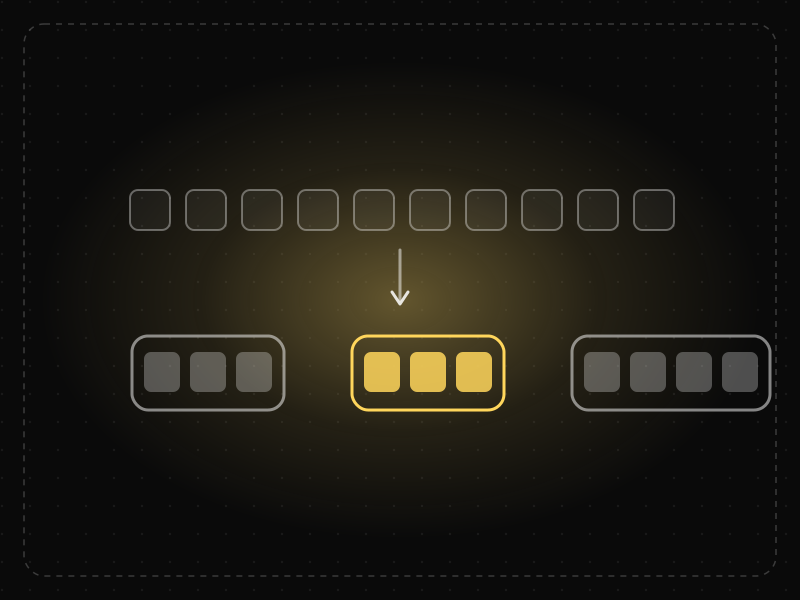
See it in action
The same screen without and with Chunking. Watch both sides play out, then compare the outcome.
Nine unbroken digits overflow short-term memory; people lose their place halfway.
Three chunks of three are easy to hold and re-type in one go.
What to watch: the code disappears before typing — the grouped version survives in memory.
Group long strings and content into meaningful chunks: 3–4 digit groups, short sections, cards.
Show long codes, IDs or walls of text as one undivided block.
Key takeaways
- Group related content into clearly separated units instead of long unbroken lists.
- Format long strings — phone numbers, card numbers, codes — into short groups.
- Chunked content is scanned faster and remembered better than undifferentiated text.
Quick facts
- Also known as
- —
- Described by
- George A. Miller
- Year
- 1956
- Category
- Memory & attention
- Related laws
- Miller's Law, Working Memory, Law of Proximity
Chunking explained
Chunking is the process of grouping individual pieces of information into larger, meaningful units. Because working memory can only juggle a few items at once, chunks let people hold and process more information without feeling overwhelmed.
A phone number shown as 4155552671 is ten separate digits; shown as 415-555-2671 it becomes three chunks that are easier to read, remember and check. The same principle applies to long forms, dense pages, settings and pricing tables.
Good chunking relies on meaningful grouping. Items should belong together because they relate to the same goal or concept, and each group should be visually separated with spacing, headings or containers.
Where it comes from
The term comes from George A. Miller's 1956 paper 'The Magical Number Seven, Plus or Minus Two', which showed that short-term memory capacity is better measured in meaningful chunks than in raw items. Later studies of chess experts (Chase & Simon, 1973) showed experts remember positions by recognising familiar chunks of pieces.
How it shows up in apps
Long forms, dense settings pages and multi-step onboarding all benefit from chunking. Splitting a long form into short themed steps, grouping settings by task, and formatting verification codes into blocks reduce the effort of each screen.
Chunking examples
A one-time passcode shown as '482 913' instead of '482913', and entered into two groups of three boxes, is typed faster and with fewer errors.
Card number and code inputs
Payment forms that automatically space a card number into groups of four, and verification screens that split a six-digit code into two groups of three, reduce entry errors and make checking easier.
Multi-step checkout
Splitting a long checkout into Shipping, Payment and Review sections gives users three manageable tasks instead of one intimidating wall of 18 fields.
Scannable feature pages
A product page that groups benefits under short headings with two-line descriptions is read far more than a single long paragraph, because people scan chunks rather than reading every word.
How to apply Chunking
- Group related content and controls together and separate groups with whitespace, dividers or cards.
- Format long strings such as phone numbers, card numbers and codes into short, familiar groups.
- Break long forms and flows into logical steps or sections with clear headings.
- Use short paragraphs, descriptive subheadings and bullet lists so pages can be scanned.
- Keep each chunk focused on one idea or task so users always know what the group is for.
Want Chunking checked in your own product? Our saas ux audit evaluates it alongside the other principles that shape how users decide, onboard and stay.
Common mistakes
- Grouping items arbitrarily (for example by database structure) instead of by how users think about them.
- Splitting a short flow into too many steps, which adds clicks and makes progress feel slower.
- Relying on chunking to justify showing too much information; chunked clutter is still clutter.
How to measure it
Compare task completion time and error rates between chunked and unchunked versions of forms or data entry fields. For content pages, scroll depth and heatmaps show whether people engage with each section, and comprehension questions in usability tests reveal whether the grouping makes sense to them.
Frequently asked questions
What is Chunking?
Chunking is grouping individual pieces of information into larger, meaningful units so they are easier to scan, understand and remember.
Where does Chunking come from?
The term comes from George A. Miller's 1956 paper 'The Magical Number Seven, Plus or Minus Two', which showed that short-term memory capacity is better measured in meaningful chunks than in raw items. Later studies of chess experts (Chase & Simon, 1973) showed experts remember positions by recognising familiar chunks of pieces.
How does Chunking apply to app design?
Long forms, dense settings pages and multi-step onboarding all benefit from chunking. Splitting a long form into short themed steps, grouping settings by task, and formatting verification codes into blocks reduce the effort of each screen.
How many items should be in a chunk?
There is no fixed number, but small groups of roughly three to five items work well because they fit comfortably within working memory. Meaningful grouping matters more than the exact count.
Is chunking only about memory?
No. In interface design it is equally about scanning and comprehension: chunked layouts help people find what they need and understand structure at a glance.
How do you measure Chunking in a product?
Compare task completion time and error rates between chunked and unchunked versions of forms or data entry fields. For content pages, scroll depth and heatmaps show whether people engage with each section, and comprehension questions in usability tests reveal whether the grouping makes sense to them.
Sources
- Miller, G. A. (1956). The magical number seven, plus or minus two: Some limits on our capacity for processing information. Psychological Review, 63(2). Find on Google Scholar ↗
- Chase, W. G. & Simon, H. A. (1973). Perception in chess. Cognitive Psychology, 4(1). Find on Google Scholar ↗
Related laws
 Memory & attention
Miller's Law
People can hold only a limited number of items in short-term memory — famously about seven, plus or minus two — so information should be organized into small chunks.
 Memory & attention
Working Memory
Working memory is the limited mental workspace that temporarily holds and manipulates information while we complete a task.
 Perception
Law of Proximity
Objects that are close to each other are perceived as belonging together, so spacing alone can communicate structure.
Chunking in practice
- Career guidesUX psychology skills employers want in 2027: attention, memory, perception, decision-making and how designers apply them without manipulationUX psychology skills employers want in 2027: attention, memory, perception, decision-making, Hick's and Fitts's laws, cognitive load and ethics.
- Career guidesAttention to detail for 2027 jobs: how employers test it, checking data and documents, proofreading, catching errors before they ship, checklists, working under interruptions and proving accuracy on your CVAttention to detail for 2027 jobs: how employers test it, checking data and documents, proofreading, checklists, interruptions and proving accuracy.
- Making moneyApp monetization strategies that don't annoy users — designed with behavioural scienceMonetize your app without wrecking retention: value-first paywalls, honest trials, rewarded ads, anchoring and decoy pricing done ethically, and what to avoid.
- App marketing & ASOProduct Hunt launch guide: how to prepare, launch day hour by hour, and what to expectA Product Hunt launch guide: preparation, assets, launch timing (12:01 am PT), the no-upvote-asking rule, launch-day plan, and how to turn attention into users.
- Career guidesHow to get an AI agent developer job in 2027: workflows vs agents, tools and MCP, memory, guardrails and production operationsHow to get an AI agent developer job in 2027: workflows vs agents, tool and MCP design, memory, guardrails, oversight, pay and a portfolio plan.
- Design historyLogo evolution: how 20 famous logos changed, and why almost all of them got simplerLogo evolution of 20 brands from Coca-Cola (1886) to Air India (2023): who designed each, what changed, and the memory science behind simpler logos.




Certifications that test it
- Free certification · UX/UI, Design, Research & CreativeUX Design CertificationCertifies that you can take a product problem from user need to a tested, usable flow — research, information architecture, interaction design and usability evaluation.
- Free certification · UX/UI, Design, Research & CreativeInteraction Design CertificationCertifies that you can design how interfaces behave — usability principles and mental models, feedback and states, forms and input, and motion and timing.
- Free certification · UX/UI, Design, Research & CreativeInformation Architecture CertificationCertifies that you can structure content people can find — organisation schemes and labelling, navigation systems, card sorting and tree testing, and search.
- Free certification · Product, Project Management & Business AnalysisAgile Product Owner CertificationCertifies that you can do the product owner job in agile teams — Scrum roles and events, backlog ordering and refinement, user stories and acceptance criteria, and value-focused releases.
- Free certification · AI & Generative AIPrompt Engineering CertificationCertifies that you can get reliable results from large language models — prompt fundamentals, structure and reasoning, prompting for real product work, and evaluation, safety and reliability.





Get the ideas, not the noise.
Sign up with Google and we’ll send you short UX psychology tips by email — why people tap, stall and leave, and what to do about it. Unsubscribe anytime. Prefer something to keep? Get the free Laws of UX guide as a PDF.