Change Blindness
People often fail to notice changes in what they are looking at, especially when the change happens during a page load, transition or interruption.
See it in action
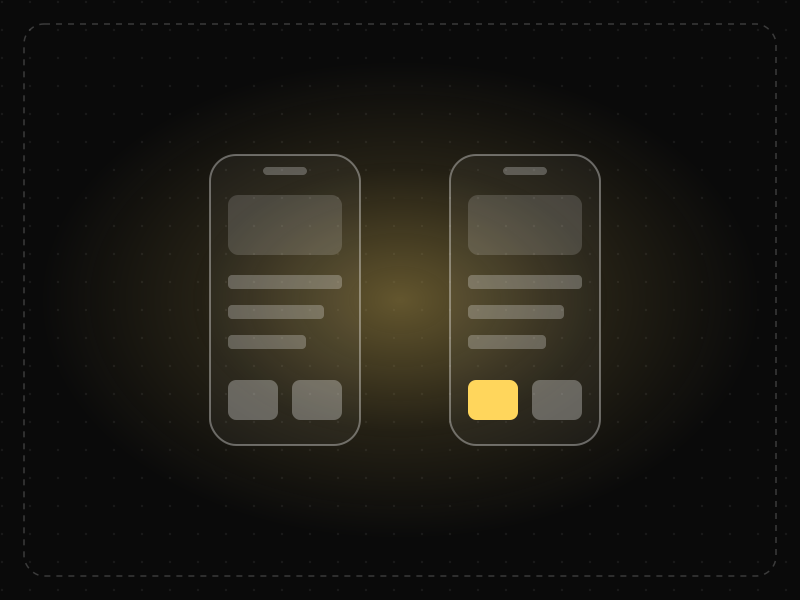
The same screen without and with Change Blindness. Watch both sides play out, then compare the outcome.
The count changes at the corner while attention is on the button — people tap again and order two.
Motion to the cart, a pulse on the count and a confirmed button make the change impossible to miss.
What to watch: the cart count in the corner — one change goes unnoticed, the other draws the eye.
Animate, highlight or confirm changes near where the person is looking.
Update totals, statuses or content silently in a part of the screen nobody is watching.
Key takeaways
- Draw attention to important changes with motion, highlighting or messages.
- Keep updates close to where the user is looking.
- Avoid silent changes to prices, totals or settings.
Quick facts
- Also known as
- —
- Described by
- Ronald Rensink, Daniel Simons & Daniel Levin
- Year
- 1997
- Category
- Memory & attention
- Related laws
- Selective Attention, Doherty Threshold, Law of Common Fate
Change Blindness explained
Change blindness happens because people do not store a complete picture of what they see. They focus on a few elements and assume the rest stays the same.
When a change happens during an interruption (a blink, a page reload, a screen transition) the visual signal that would normally attract attention is lost, so the change goes unnoticed.
For interface design, this means updates must be made visible deliberately. Users cannot be expected to spot differences on their own.
Where it comes from
Researchers including Ronald Rensink, Daniel Simons and Daniel Levin demonstrated change blindness in the late 1990s. In one famous 1998 study, many people giving directions failed to notice that the stranger they were talking to had been replaced by a different person.
How it shows up in apps
When content updates after a filter change, a form validation or a background refresh, users may not notice what changed. Cart totals that update silently, errors that appear far away and toast messages in corners are often missed.
Change Blindness examples
A user applies a discount code and the total updates silently at the top of the page while they are looking at the code field. They think it failed. Showing 'Discount applied: -$10' next to the field, with a brief highlight on the total, fixes it.
Price updates
Checkout pages that briefly highlight the order total when shipping options change help shoppers notice the new price.
Inline validation
Showing validation messages next to the field that triggered them ensures users notice errors instead of searching for them.
Live feeds
Social feeds show a 'New posts' button rather than inserting content silently, so users notice updates without losing their place.
How to apply Change Blindness
- Show changes near the user's current focus.
- Use brief highlights or animations to signal what changed.
- Confirm important updates with clear messages.
- Avoid full page reloads for small changes.
- Never change important values silently.
Want Change Blindness checked in your own product? Our saas ux audit evaluates it alongside the other principles that shape how users decide, onboard and stay.
Common mistakes
- Updating totals or prices without visual feedback.
- Displaying errors far from the field that caused them.
- Relying on small toast notifications in corners for important updates.
How to measure it
In usability tests, ask users what changed after an action. Track repeated submissions, duplicate actions and support contacts that suggest users did not notice updates.
Frequently asked questions
What is Change Blindness?
People often fail to notice changes in what they are looking at, especially when the change happens during a page load, transition or interruption.
Where does Change Blindness come from?
Researchers including Ronald Rensink, Daniel Simons and Daniel Levin demonstrated change blindness in the late 1990s. In one famous 1998 study, many people giving directions failed to notice that the stranger they were talking to had been replaced by a different person.
How does Change Blindness apply to app design?
When content updates after a filter change, a form validation or a background refresh, users may not notice what changed. Cart totals that update silently, errors that appear far away and toast messages in corners are often missed.
What is the difference between change blindness and inattentional blindness?
Change blindness is failing to notice a change in something you are looking at. Inattentional blindness is failing to notice something unexpected because your attention is focused elsewhere.
How can designers prevent change blindness?
By placing updates near the user's focus and using highlights, motion or messages to make changes obvious.
How do you measure Change Blindness in a product?
In usability tests, ask users what changed after an action. Track repeated submissions, duplicate actions and support contacts that suggest users did not notice updates.
Sources
- Simons, D. J., & Levin, D. T. (1998). Failure to detect changes to people during a real-world interaction. Psychonomic Bulletin & Review, 5(4). Find on Google Scholar ↗
- Rensink, R. A., O'Regan, J. K., & Clark, J. J. (1997). To see or not to see: The need for attention to perceive changes in scenes. Psychological Science, 8(5). Find on Google Scholar ↗
Related laws
 Memory & attention
Selective Attention
People focus on the small part of their environment related to their current goal and filter out the rest — including things designers want them to notice.
 Interaction & speed
Doherty Threshold
Productivity and engagement rise sharply when a system responds in under about 400 milliseconds, so neither the user nor the computer is left waiting on the other.
 Perception
Law of Common Fate
Elements that move or change together in the same direction are perceived as a group, even if they look different or are far apart.
Change Blindness in practice
- Career guidesUX psychology skills employers want in 2027: attention, memory, perception, decision-making and how designers apply them without manipulationUX psychology skills employers want in 2027: attention, memory, perception, decision-making, Hick's and Fitts's laws, cognitive load and ethics.
- Career guidesAttention to detail for 2027 jobs: how employers test it, checking data and documents, proofreading, catching errors before they ship, checklists, working under interruptions and proving accuracy on your CVAttention to detail for 2027 jobs: how employers test it, checking data and documents, proofreading, checklists, interruptions and proving accuracy.
- App marketing & ASOHow to reduce app uninstalls: the eight reasons users delete apps, and the fixesWhy users uninstall apps — storage, no value, notifications, ads, crashes, battery, permissions, friction — and practical fixes, especially for India.
- Career guidesSQL for data analyst jobs in 2027: what employers test, the questions they ask and how to prove you're readySQL for data analyst jobs in 2027: which roles need it, how employers test it, real interview questions with answers, the traps that fail candidates and a plan.
- UI/UX designThe best fonts for apps in 2027 — system fonts, open-source picks and Indian-script pairingsThe best fonts for mobile apps: why system fonts often win, strong open-source picks like Inter, Indian-script fonts like Noto, Mukta and Hind.
- App developmentThe mobile app development process: 7 stages explained simplyThe 7 stages of mobile app development — discovery, design, planning, development, testing, launch and growth — what happens in each and how long.
Certifications that test it

Get the ideas, not the noise.
Sign up with Google and we’ll send you short UX psychology tips by email — why people tap, stall and leave, and what to do about it. Unsubscribe anytime. Prefer something to keep? Get the free Laws of UX guide as a PDF.