Recognition over Recall
Also known as Recognition rather than recall
Recognising something is much easier than recalling it from memory, so interfaces should show options and information instead of making users remember them.
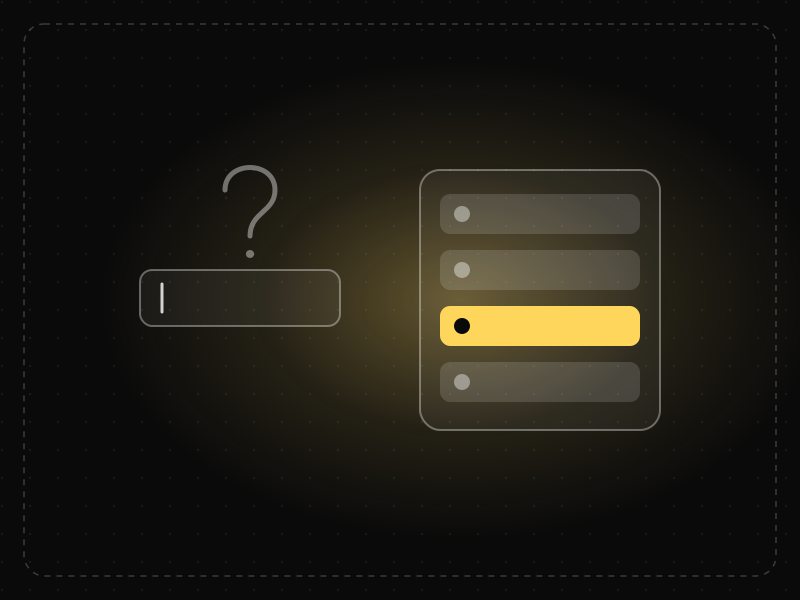
See it in action
The same screen without and with Recognition over Recall. Watch both sides play out, then compare the outcome.
An empty field makes people dig names and spellings out of memory.
Seeing recent and suggested options, people simply recognise the right one and tap.
What to watch: typing from memory versus recognising a chip on screen.
Show recent items, suggestions, previews and visible options instead of empty inputs.
Hide commands behind memorised shortcuts or make people re-enter what the app already knows.
Key takeaways
- Show options, history and suggestions rather than asking users to remember.
- Keep relevant information visible across steps.
- Use familiar icons and labels that users can recognise instantly.
Quick facts
- Also known as
- Recognition rather than recall
- Described by
- Jakob Nielsen (usability heuristic)
- Year
- 1994
- Category
- Memory & attention
- Related laws
- Working Memory, Cognitive Load, Miller's Law
Recognition over Recall explained
Recall requires retrieving information from memory with few cues, as when you are asked to name a password without hints. Recognition only requires noticing that something is familiar, as when you pick your password hint from a list.
Because recognition provides cues, it is faster, more accurate and less tiring. Interfaces that rely on recognition lower cognitive load and help new and infrequent users succeed.
This is why graphical interfaces with visible menus became more popular than command lines for most people, and why search boxes with suggestions outperform empty ones.
Where it comes from
Psychologists have long shown that recognition (identifying something you have seen) is easier than recall (retrieving it from memory without cues). Jakob Nielsen made 'recognition rather than recall' one of his 10 usability heuristics in 1994.
How it shows up in apps
Menus, autocomplete, recently used items, saved addresses and visible labels all support recognition. Command lines, blank search fields and hidden gestures rely on recall and are harder for most users.
Recognition over Recall examples
A food delivery app shows a user's recent orders on the home screen. Instead of remembering the restaurant and dish they enjoyed last week, they recognise it and reorder with one tap.
Autocomplete
Search fields that suggest queries and products as users type let them recognise what they want instead of recalling exact names.
Recently used items
Productivity apps show recent files and projects first, so users recognise and open them without navigating folders.
Visible labels on icons
Navigation bars with text labels under icons help users recognise destinations instead of remembering what each icon means.
How to apply Recognition over Recall
- Show options in menus and lists rather than requiring typed commands.
- Offer autocomplete, suggestions and recent history.
- Label icons, especially for less common actions.
- Keep important information visible across steps.
- Use familiar conventions that users already recognise.
Want Recognition over Recall checked in your own product? Our saas ux audit evaluates it alongside the other principles that shape how users decide, onboard and stay.
Common mistakes
- Hiding functionality behind gestures or shortcuts with no visible cues.
- Unlabelled icons for uncommon actions.
- Empty search boxes with no suggestions or examples.
How to measure it
Compare task success and time on task for recognition-based and recall-based designs. Track usage of autocomplete and recent items, and search abandonment rates.
Frequently asked questions
What is Recognition over Recall?
Recognising something is much easier than recalling it from memory, so interfaces should show options and information instead of making users remember them.
Where does Recognition over Recall come from?
Psychologists have long shown that recognition (identifying something you have seen) is easier than recall (retrieving it from memory without cues). Jakob Nielsen made 'recognition rather than recall' one of his 10 usability heuristics in 1994.
How does Recognition over Recall apply to app design?
Menus, autocomplete, recently used items, saved addresses and visible labels all support recognition. Command lines, blank search fields and hidden gestures rely on recall and are harder for most users.
Is recognition over recall one of Nielsen's heuristics?
Yes. It is the sixth of Jakob Nielsen's 10 usability heuristics, published in 1994.
Why is recognition easier than recall?
Recognition provides cues that help retrieve memories, while recall requires retrieving information without cues, which takes more mental effort.
How do you measure Recognition over Recall in a product?
Compare task success and time on task for recognition-based and recall-based designs. Track usage of autocomplete and recent items, and search abandonment rates.
Sources
- Nielsen, J. (1994). Enhancing the explanatory power of usability heuristics. Proceedings of CHI '94. Find on Google Scholar ↗
- Nielsen, J. (2020). Memory Recognition and Recall in User Interfaces. Nielsen Norman Group. Find on Google Scholar ↗
Related laws
 Memory & attention
Working Memory
Working memory is the limited mental workspace that temporarily holds and manipulates information while we complete a task.
 Memory & attention
Cognitive Load
Cognitive load is the amount of mental effort needed to understand and use an interface; when it exceeds what people can handle, they slow down, make mistakes or give up.
 Memory & attention
Miller's Law
People can hold only a limited number of items in short-term memory — famously about seven, plus or minus two — so information should be organized into small chunks.
Recognition over Recall in practice
- Design historyLogo evolution: how 20 famous logos changed, and why almost all of them got simplerLogo evolution of 20 brands from Coca-Cola (1886) to Air India (2023): who designed each, what changed, and the memory science behind simpler logos.
- Everyday design scienceWhy is the save icon still a floppy disk? The icons that outlived their objectsThe save icon is a floppy disk because that is where files were saved when toolbars were designed. Why it survived, plus 10 icons that outlived their objects.
- Career guidesUX psychology skills employers want in 2027: attention, memory, perception, decision-making and how designers apply them without manipulationUX psychology skills employers want in 2027: attention, memory, perception, decision-making, Hick's and Fitts's laws, cognitive load and ethics.
- Making moneyApp earnings per download: what an app with 1 lakh downloads really earnsWhat 1 lakh downloads really earns: worked examples for ad-supported, subscription and game apps in India, and why active users matter more than installs.
- Making moneyAdMob earnings per 1,000 users: what Indian apps really make from adsAdMob earnings per 1,000 users: eCPM vs revenue per user, illustrative Indian ranges by ad format, a worked formula, and how to earn more.
- Making moneyApp monetization strategies that don't annoy users — designed with behavioural scienceMonetize your app without wrecking retention: value-first paywalls, honest trials, rewarded ads, anchoring and decoy pricing done ethically, and what to avoid.


Certifications that test it
- Free certification · UX/UI, Design, Research & CreativeUX Design CertificationCertifies that you can take a product problem from user need to a tested, usable flow — research, information architecture, interaction design and usability evaluation.
- Free certification · UX/UI, Design, Research & CreativeUX Writing & Content Design CertificationCertifies that you can write interface copy that helps people act — microcopy, errors, onboarding, voice and tone, content structure and testing words.
- Free certification · UX/UI, Design, Research & CreativeDesign Systems CertificationCertifies that you can build, document, govern and scale a design system — tokens, components, documentation, adoption and design–engineering collaboration.
- Free certification · AI & Generative AIAI UX Design CertificationCertifies that you can design AI-powered products people trust — setting expectations, conversational and agent UX, handling errors and uncertainty, and responsible AI.
- Free certification · UX/UI, Design, Research & CreativeMobile App Design CertificationCertifies that you can design native-feeling iOS and Android apps — platform conventions, navigation and gestures, touch ergonomics and accessibility, and performance, offline and permission flows.
- Free certification · UX/UI, Design, Research & CreativeInteraction Design CertificationCertifies that you can design how interfaces behave — usability principles and mental models, feedback and states, forms and input, and motion and timing.






Get the ideas, not the noise.
Sign up with Google and we’ll send you short UX psychology tips by email — why people tap, stall and leave, and what to do about it. Unsubscribe anytime. Prefer something to keep? Get the free Laws of UX guide as a PDF.